TL;DR: While native macOS apps like Teams and Outlook benefit from Platform SSO and hardware-bound tokens, PowerShell modules like Azure PowerShell and Microsoft Graph PowerShell still fall back to standard Authorization Code flow. This leaves token artifacts with sensitive privileges cached in your Keychain. Since the PowerShell Core process (
pwsh) attempts by default to use the refresh token to seamlessly issue or renew access tokens, it is often authorized to read these entries. However, because the Keychain authorizes access by thepwsh, any script the user runs under the process - not just the session that originally signed in - can also silently read (dump) these tokens without triggering an authentication prompt. In this post, we’ll look at the mechanics of this exposure, provide a tool to review your own cache, and walk through mitigations like process-scoped sessions and other measures to minimize risk or blast radius of replay attacks.
Introduction
Microsoft uses macOS’s native Keychain as the storage container for tokens issued by Microsoft Entra ID - but the protection level differs sharply depending on which client and authentication flow is involved, and it’s far less uniform than it first appears. I’ve previously looked at token caching behavior for Microsoft Edge and Office apps on macOS and flagged some potential attack paths in an earlier post in May 2022. Since then, Microsoft has invested heavily in Entra integration and security on macOS, most notably Platform Single Sign-On (Platform SSO).
This time, I wanted to look specifically at what happens when you run Connect-AzAccount or Connect-MgGraph on an Entra-joined macOS device. Where do the resulting tokens actually end up - and how does that compare to what an app like Teams or Outlook does?
The short answer: Keychain storage isn’t one uniform thing. There are several different ways the Keychain is used on a modern, Platform-SSO-enabled Mac. Getting this right matters if you’re threat-modeling token theft on macOS endpoints.
The building blocks: Platform SSO and the broker
On an Entra-joined Mac with Platform SSO configured (via Intune or another MDM), the Microsoft Enterprise SSO plug-in - bundled inside the Company Portal app - acts as the local token broker, conceptually equivalent to Web Account Manager (WAM) on Windows. It owns two extensions, as documented on Microsoft Learn:
- PSSO Extension - handles device/user registration and issues the device-bound Primary Refresh Token (PRT), backed by keys in the Secure Enclave (Device Signing Key / Device Encryption Key).
- SSO App Extension - handles token requests from other apps on the device using that PRT.
Crucially, apps don’t talk to Company Portal directly. They call Apple’s public ASAuthorizationSingleSignOnProvider API (part of the AuthenticationServices framework). macOS’s Extensible SSO subsystem looks at the device’s Extensible Single Sign-on MDM payload, figures out which SSO extension is registered for the identity provider in question, and routes the request there. In the Microsoft Entra case, that’s Microsoft’s SSO App Extension inside Company Portal. Apple’s framework is the dispatcher; Microsoft’s code does the actual work.
Broker-integrated apps (Teams, Outlook, Edge native)
These are MSAL apps built to be “broker-aware.” The flow looks like this:
- The app calls
ASAuthorizationSingleSignOnProvider. - Apple’s AuthenticationServices framework routes the request to the SSO App Extension inside Company Portal.
- The broker uses the device-bound PRT - stored in the SSO extension’s own protected Keychain item, itself bound to the Secure Enclave’s signing key - to get an app-specific token from Entra ID.
- The broker hands the calling app only the access token (AT).
On a managed/enrolled Mac, the broker does not return the refresh token to the app. It keeps the RT/PRT for itself and handles all future silent refreshes on the app’s behalf. The app’s own MSAL library then caches that AT in its own app-scoped Keychain item - a separate entry from the SSO extension’s PRT store, not a shared one. So even within “the Keychain,” there are at least two protection boundaries: the broker’s own store (which only the SSO extension can read) and each app’s private MSAL cache (readable only by that app, via Keychain access groups).
Non-broker apps: Az and Microsoft Graph PowerShell
On Windows, Azure PowerShell and Microsoft Graph PowerShell authenticate via WAM - the same OS-level broker Windows apps use - and benefit from a hardware-bound PRT the same way Teams or Outlook does. Broker-based authentication was introduced for these tools and, in recent module versions, is becoming the default on Windows.
In the tested module versions, these tools do not successfully use a broker path on macOS. Azure PowerShell attempts the native macOS broker path, but the attempt fails because it must run on the main thread. Authentication therefore proceeds through the OAuth 2.0 authorization code flow in the system browser, or through device code flow. During my tests, the tools did not obtain tokens through the SSO extension.
Side Note: Azure PowerShell’s current dependencies (Microsoft.Identity.Client/Microsoft.Identity.Client.Broker 4.84.0, Azure.Identity.Broker 1.6.0) include MSAL.NET’s native macOS broker support, added via PR #5274 (June 2025). By default (EnableLoginByWam is true with no OS-specific gating), Connect-AzAccount now attempts this native broker path first. However, due to a threading limitation - the macOS broker requires execution on the main thread, while Azure PowerShell issues the interactive call from a background task - the attempt fails fast with an error rather than completing. So while the tool now tries the broker first, the “plain OAuth”/device-code behavior described below is still what actually governs in practice today. To the best of my knowledge, this is based on package versions observed in the repo and an investigation of the error message (“mac broker enabled must be executed on the main thread on macOS”) - so, no claims to full technical correctness.
Putting it all together
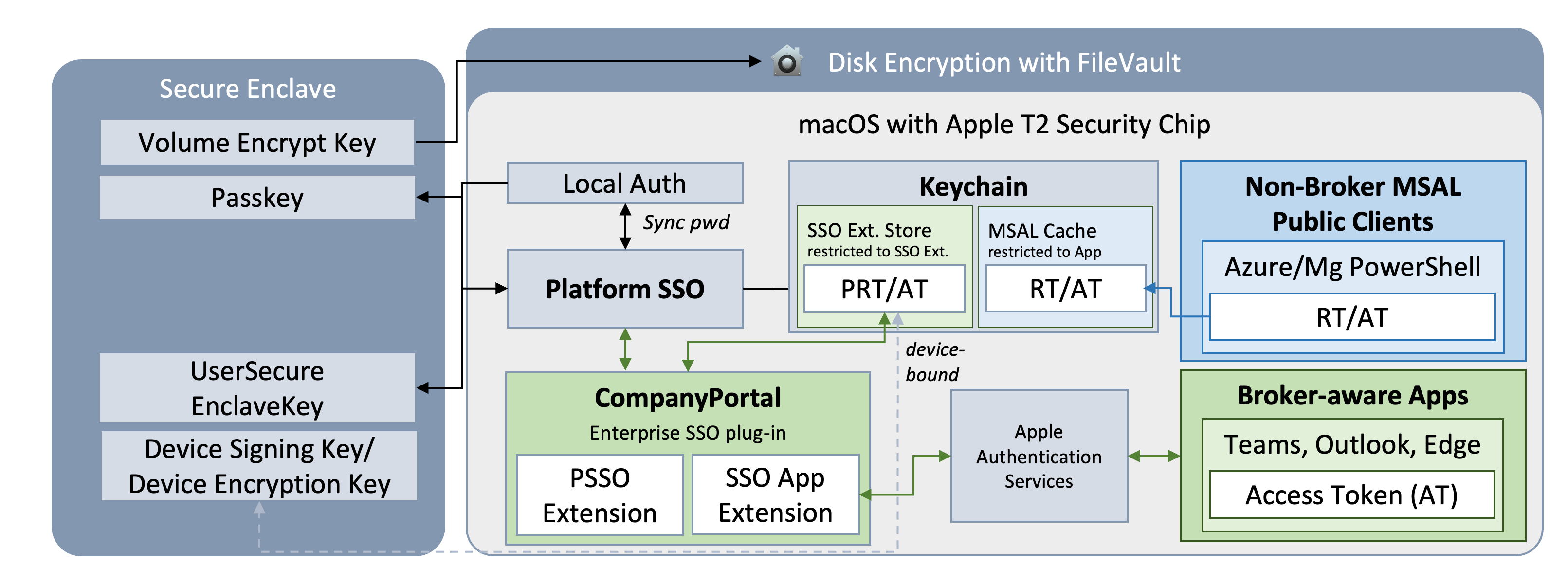
The moving parts: apps that are broker-aware go through Apple’s AuthenticationServices layer to reach the SSO App Extension and the PRT, and only ever receive an access token back. Az PowerShell and Microsoft Graph PowerShell skip the broker entirely, authenticate directly against Entra ID, and manage their own token cache - with real differences in how well-protected that cache is.
Why this matters
In my opinion, if you’re building a threat model for token theft on macOS endpoints, “tokens are in the Keychain, so they’re protected” isn’t a sufficient statement. You need to know:
- Which Keychain item you’re talking about - the broker’s protected PRT store, an individual app’s MSAL cache, or a Keychain item created independently by a non-broker tool.
- Whether the tool is broker-aware at all. On macOS, unlike Windows, most of the common Azure command-line tooling isn’t, and falls back to browser-based auth.
- How the tool’s cache is protected and which processes can access it. Az PowerShell and Microsoft Graph PowerShell use Keychain-backed caches by default.
Technical background and implementation
Let’s take a closer look at exactly which Keychain items the PowerShell modules create, when they’re created and removed, and who’s actually authorized to read them.
Test setup: an Entra-joined Mac running macOS Tahoe with Platform SSO configured via Intune, the
Az.Accounts(Version 5.1.0) andMicrosoft.Graph.Authentication(Version 2.38.0) modules installed, and interactive sign-ins performed withConnect-AzAccountandConnect-MgGraph.
Authentication context: current user vs. process
By default, Connect-MgGraph uses the CurrentUser context scope and caches at the level of the user profile, as documented by Microsoft:
Once you’re signed in, you remain signed in until you invoke
Disconnect-MgGraph. Microsoft Graph PowerShell automatically refreshes the access token for you, and sign-in persists across PowerShell sessions because Microsoft Graph PowerShell securely caches the token when using the defaultCurrentUsercontext scope. If you use the-ContextScope Processparameter withConnect-MgGraph, sign-in only persists for the current PowerShell session.
The same behavior exists for Azure PowerShell: the default scope is CurrentUser, and it can be changed to Process using the -Scope parameter. In addition, Azure’s module allows changing the default behavior by disabling context autosave with Disable-AzContextAutosave. The Get-AzContextAutosaveSetting cmdlet shows additional details about context caching in Azure PowerShell.
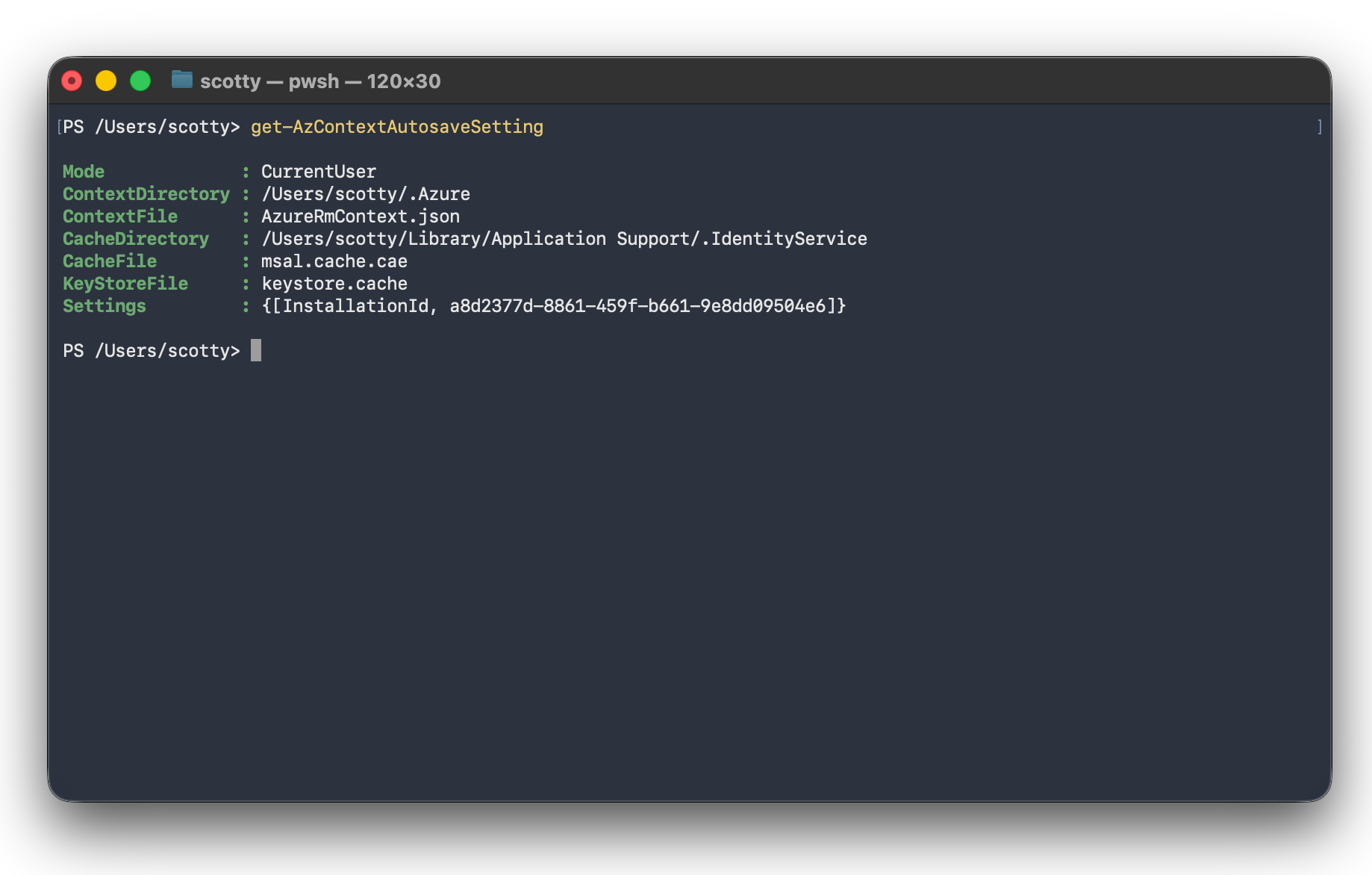
In my tests, the on-disk msal.cache.cae file was empty even though the token cache was set at the CurrentUser scope - the actual cached content lives in the Keychain item, not in that file. The keystore.cache file was previously used to store service-principal credentials used in Azure PowerShell; this caching mechanism appears to have since changed. I also checked AzureRmContext.json; it held only account, tenant, and subscription metadata, and its TokenCache property was empty. So it seems the actual token cache lives exclusively in the Keychain, as described above.
macOS Keychain entries
Let’s have a closer look at how the tokens are “securely stored,” as Microsoft describes it. Similar to other Microsoft apps on macOS, the Keychain is used to cache tokens. This is no surprise: both PowerShell modules use an MSAL-based authentication flow that initializes a persistent cache. A default Keychain entry with the service name Microsoft.Developer.IdentityService is created. The macOS Keychain handles the encryption of this blob using the user’s login password or system key, which offers clear benefits from a security perspective.
Both modules maintain separate entries, distinguished by account name, which separates Azure PowerShell from Microsoft Graph PowerShell. Each module keeps both a CAE and a non-CAE variant (the split reflects whether the cached token supports Continuous Access Evaluation):
- Azure PowerShell:
msal.cache.caeandmsal.cache.nocae - Microsoft Graph PowerShell:
mg.msal.cache.caeandmg.msal.cache.nocae
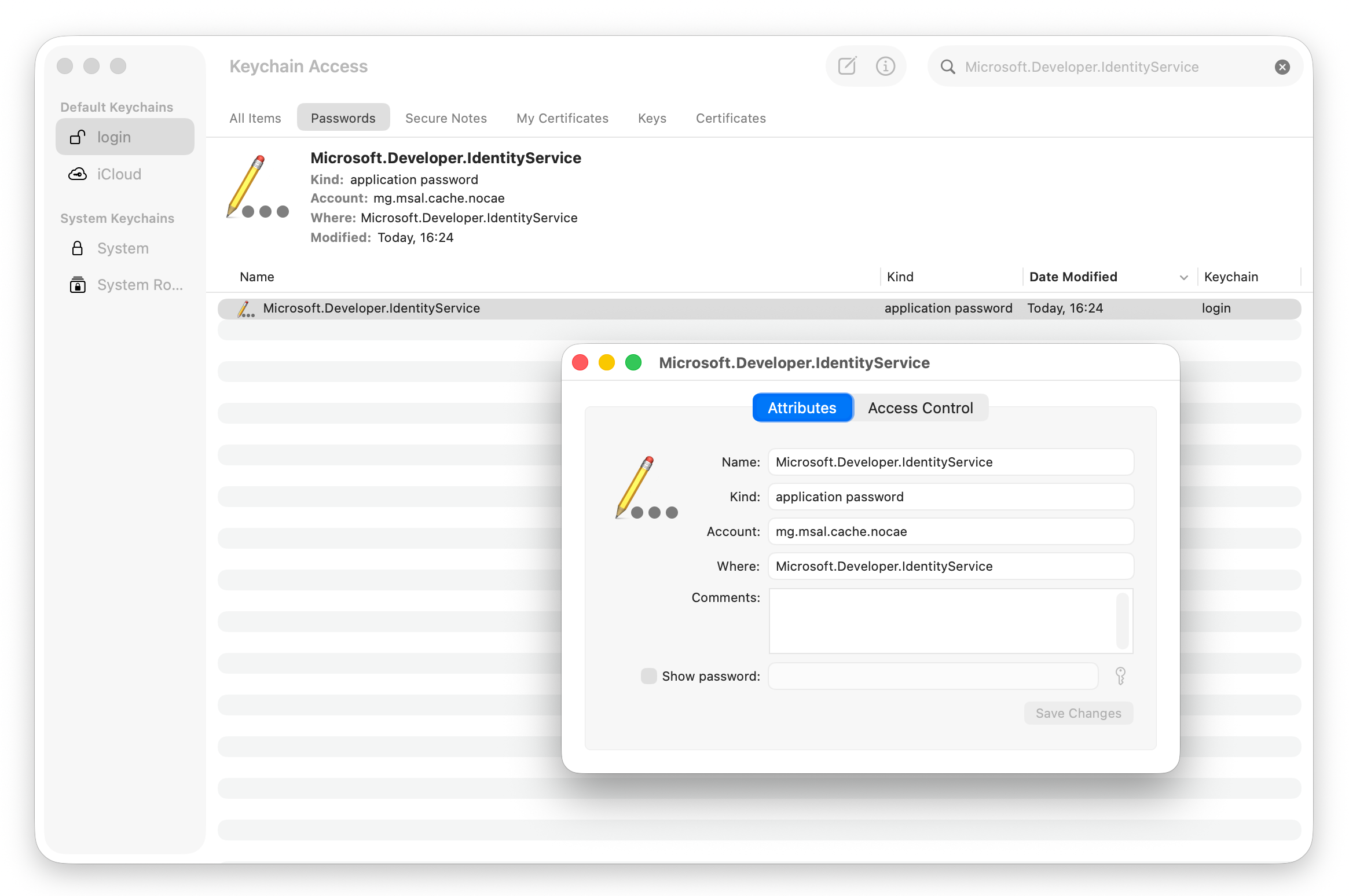
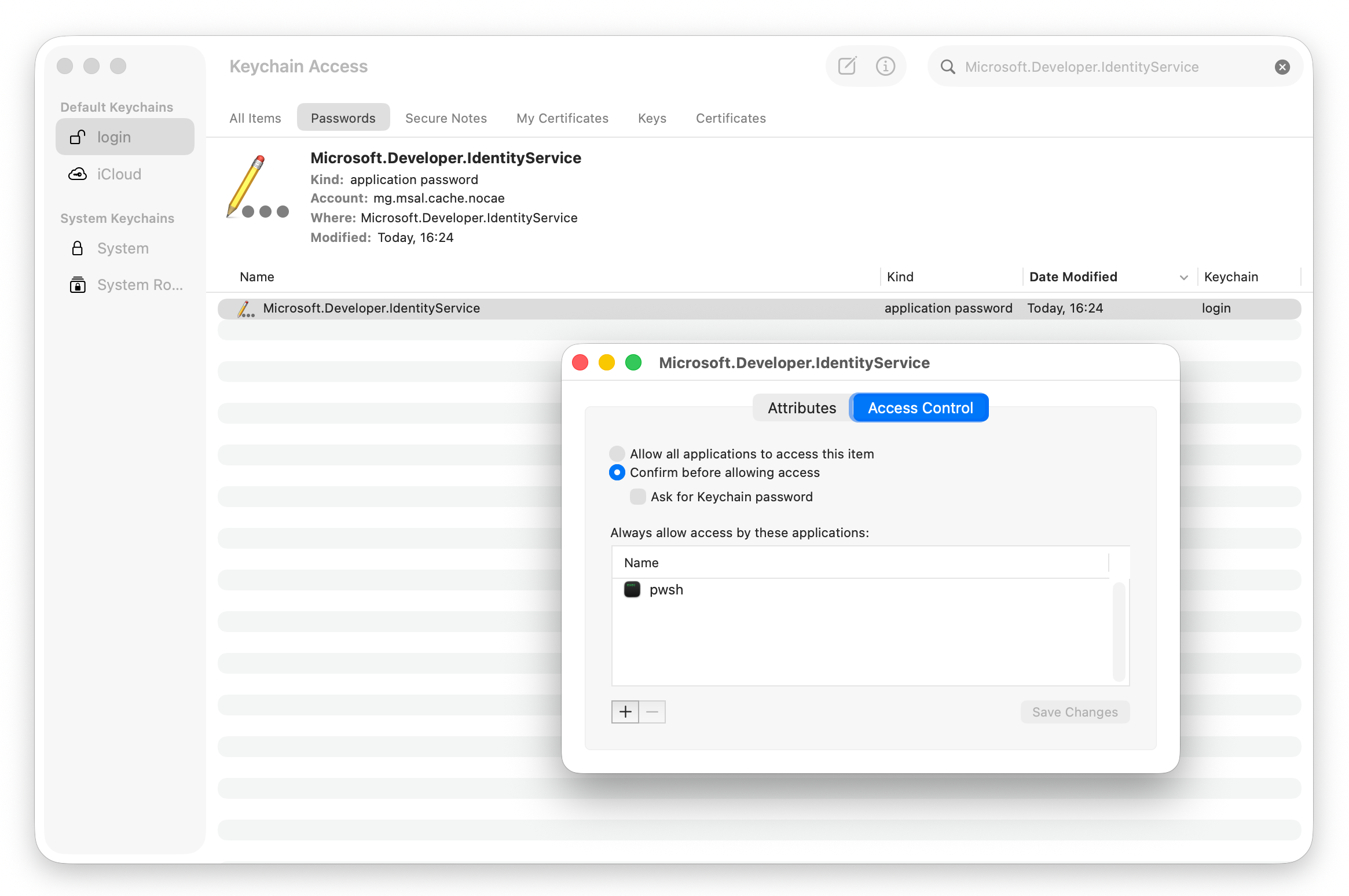
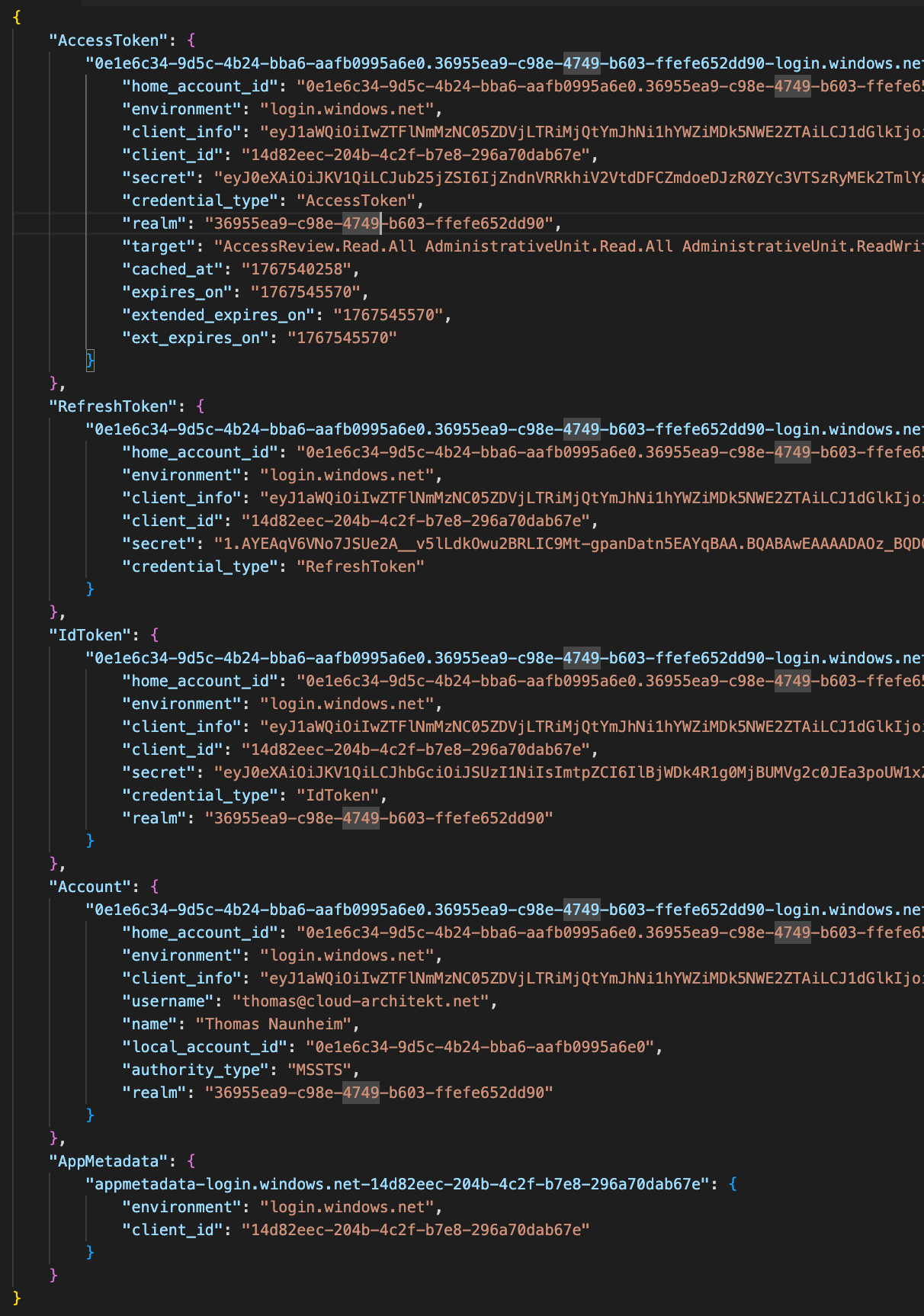
The password field stores a JSON payload containing metadata, claims, and token artifacts (including Access, Refresh, and ID tokens). Within this payload, the secret property contains the token values in plaintext.
These values are stored inside the OS platform keychain, which is encrypted and access-controlled by the operating system. This storage model is consistent with other industry token-caching implementations that rely on the underlying platform OS security rather than performing additional item-level encryption on the cached artifacts. However, this approach presents a clear risk: an attacker who gains access to the keychain, or who can impersonate a process with authorized access to these entries, could potentially replay or misuse the plaintext tokens.
⚠️ Note on Multi-Tenant or Multi-Account Authentication
By default, omitting the -TenantId parameter when calling Connect-AzAccount triggers an authentication process against every tenant associated with your account (including B2B guest directories). The resulting token artifacts are also stored in the Keychain item.
This caching behavior is cumulative. If you authenticate via Connect-AzAccount or Connect-MgGraph using different user accounts, the cache will store the artifacts for all used identities side-by-side. Consequently, your local keychain will contain tokens for multiple users and multiple tenants at the same time, which can lead to increased blast radius.
Access to the sensitive content of the Keychain entry is restricted: only the PowerShell Core process (pwsh) is configured as an “always allowed” application. Any other application or user access triggers an authentication prompt first. This access-control list is exactly why the default read path is silent - pwsh has been authorized when using the modules for first authentication with caching, so no prompt is shown.
Side Note: Theoretically, if a user authenticates via Connect-AzAccount or Connect-MgGraph but refuses to grant access when prompted to authorize the pwsh process, no cached tokens should be written to the Keychain. However, this is a rare edge case in practice; most users will eventually grant write access to the Keychain item simply to suppress the repetitive OS keychain prompts, inadvertently allowing the process to create and subsequently access the item.
Deleting cached tokens
It’s worth highlighting that Microsoft has documented that Disable-AzContextAutosave will not delete existing tokens. Using Clear-AzContext will remove the sensitive properties from the JSON in the password field - only the AppMetadata property remains in the Keychain entry.
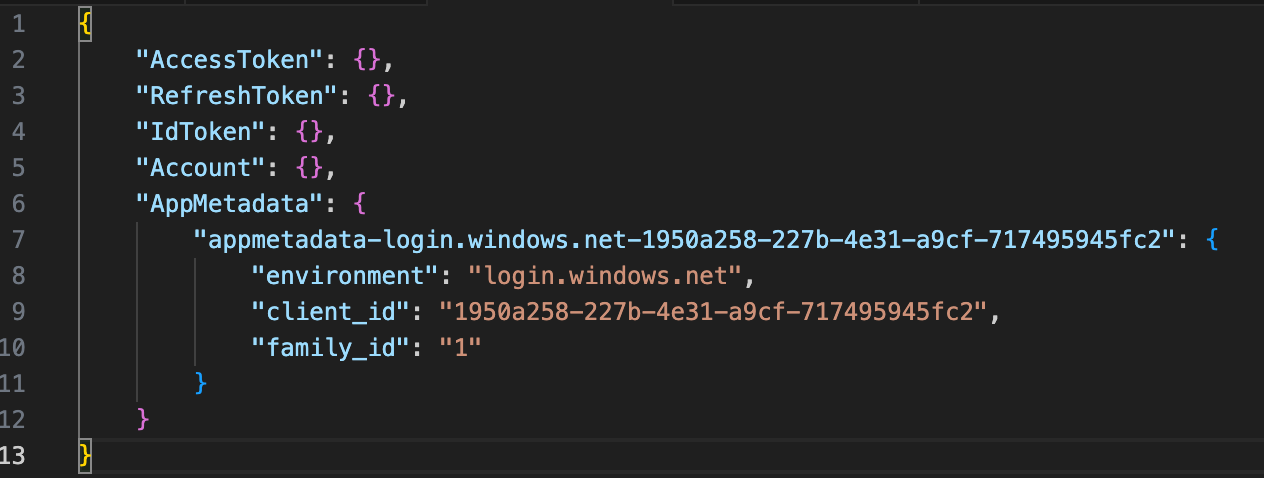
Previously, running Disconnect-MgGraph did not clear the entries from the Keychain item, even though Microsoft’s documentation implied it should. This behavior was prominent since version 2.34.0 of the Microsoft.Graph.Authentication module and was tracked as a bug in a GitHub repository issue.
However, Microsoft has fixed this bug in Version 2.38.1. As an additional defense-in-depth improvement, Disconnect-MgGraph now successfully removes authentication tokens associated with the current user from the module’s token cache. During my testing, I observed that previously cached tokens belonging to other users are not cleared upon disconnection. This confirms that Disconnect-MgGraph operates strictly within the current user’s context, purging only their specific token artifacts.
Side Note: In this version, a new optional parameter (-SignOutFromBroker) has been introduced to clear cached account information associated with the Microsoft Authentication Broker (WAM) on Windows. Because the broker cache is shared at the operating system level, using SignOutFromBroker may also sign you out of other applications relying on the same brokered account, such as Visual Studio or Azure PowerShell. This parameter has no effect in environments where WAM is not used.
Attack scenario
The following key facts from the findings above raised my attention for a potential attack:
- By default, sessions are cached at the user scope.
- The context often remains active after using PowerShell, for one of the following reasons:
Disable-AzContextAutosave, scopingConnect-*to theProcessscope, or callingDisconnect-*wasn’t used.- Clearing the user context (such as via
Disconnect-MgGraph) might not fully resolve caching issues in the following scenarios:- Outdated Modules: The user is running an older version of the module that lacks the recent bug fix.
- Multi-User Artifacts: Stale tokens from other users still exist in the cache, as the updated command only clears the active user’s context.
- Skipped Steps: The user simply forgot to execute the disconnect command
- Refresh token values are stored in plaintext within the JSON payload of
secretfield, while the containing Keychain item is encrypted and access-controlled by macOS. - The
pwshprocess has access to the related Keychain item. - The MSAL library is able to read and write the sensitive password field of the Keychain item.
I set out to learn more about the MSAL and token-cache mechanism in both PowerShell modules. The code is open-source on GitHub, which helped me dive deeper into the implementation. I then wrote a PoC script (with the support of my favorite AI model 😊) that uses MSAL to take “benefit” of the cached tokens in the Keychain.
Proof of Concept: Get-MsalCacheFromKeychain.ps1
To move from theory to something verifiable, I wrote Get-MsalCacheFromKeychain.ps1 - a PowerShell script that reads the MSAL token caches Az PowerShell and the Microsoft Graph PowerShell SDK leave behind in the macOS Keychain, and turns them into a structured, readable report. It demonstrates that any script executed under pwsh - not only the session that originally signed in - can gain access to the Keychain by using MSAL under the conditions described above. The user isn’t prompted for authentication, because the Keychain authorizes the pwsh, and the MSAL library can decrypt and deserialize the cache. The user also doesn’t need to be signed in to the PowerShell modules at the time of execution - the cached tokens remain accessible as long as the relevant cache entry remains present and the token remains valid.
How it works
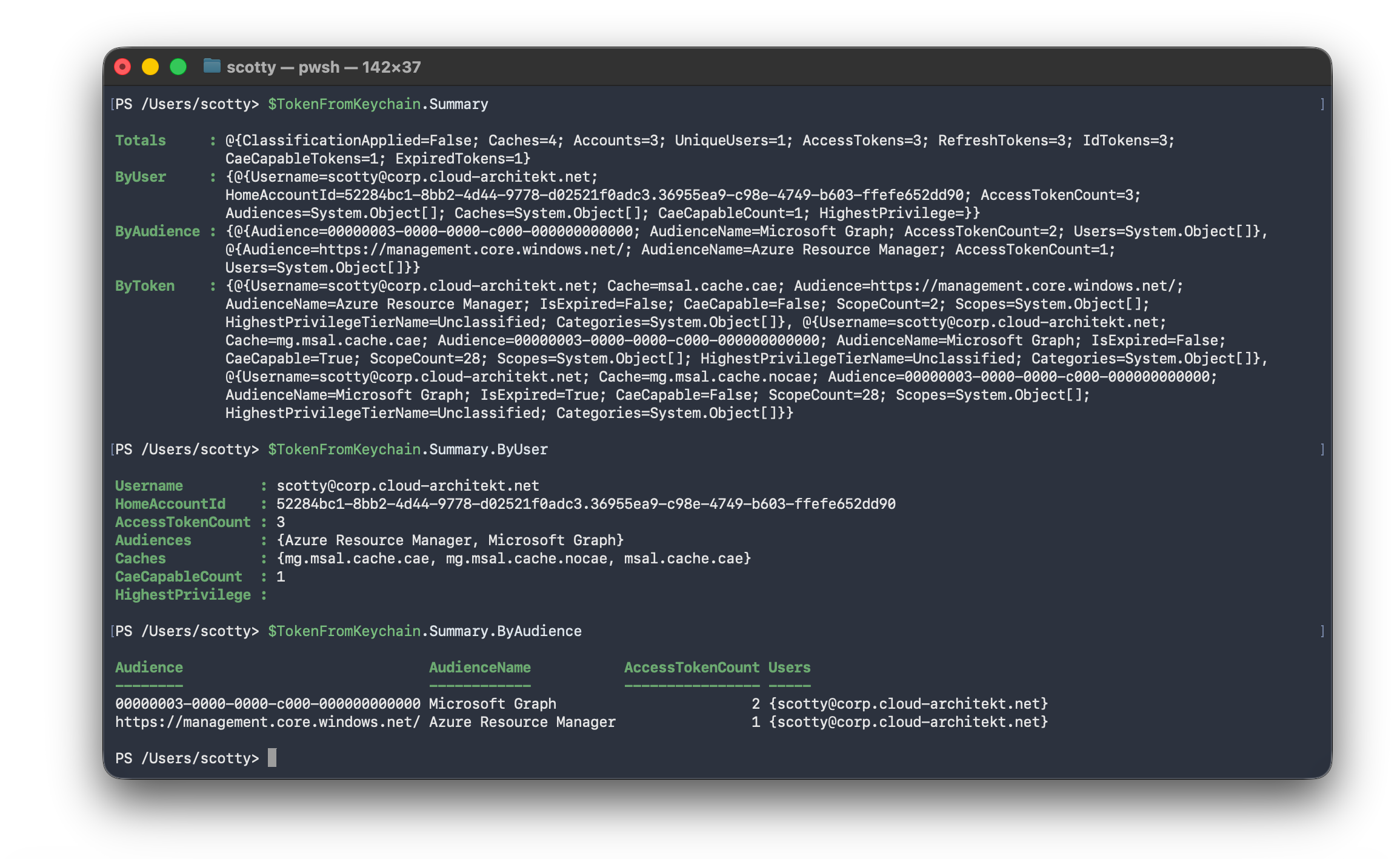
Both modules persist their cache under the Keychain service Microsoft.Developer.IdentityService, split into up to four account entries - msal.cache.cae / msal.cache.nocae for Az PowerShell, and mg.msal.cache.cae / mg.msal.cache.nocae for Microsoft Graph PowerShell (the CAE/non-CAE split reflects whether the cached token supports Continuous Access Evaluation). Rather than reverse-engineering the Keychain blob format myself, the script loads the actual Microsoft.Identity.Client and Microsoft.Identity.Client.Extensions.Msal assemblies that ship inside every Az.Accounts installation, and uses them to open the cache exactly the way Az PowerShell itself would - same decryption path, same deserialization, zero guesswork. It then reshapes the result into per-account, per-token objects: access tokens, refresh tokens, ID tokens, and app metadata, each with expiry converted to local time.
![PowerShell output of `$TokenFromKeychainInclArtifacts.Tokens[0]` after running with -IncludeTokenArtifacts (or -ValidOnly , which implies it), showing a reusable access token revealed in plaintext together with its account, tenant, audience, and scopes](https://www.cloud-architekt.net/assets/images/2026-09-17-macos-cached-token-theft-pathway/image7.png)
Turning tokens into risk context
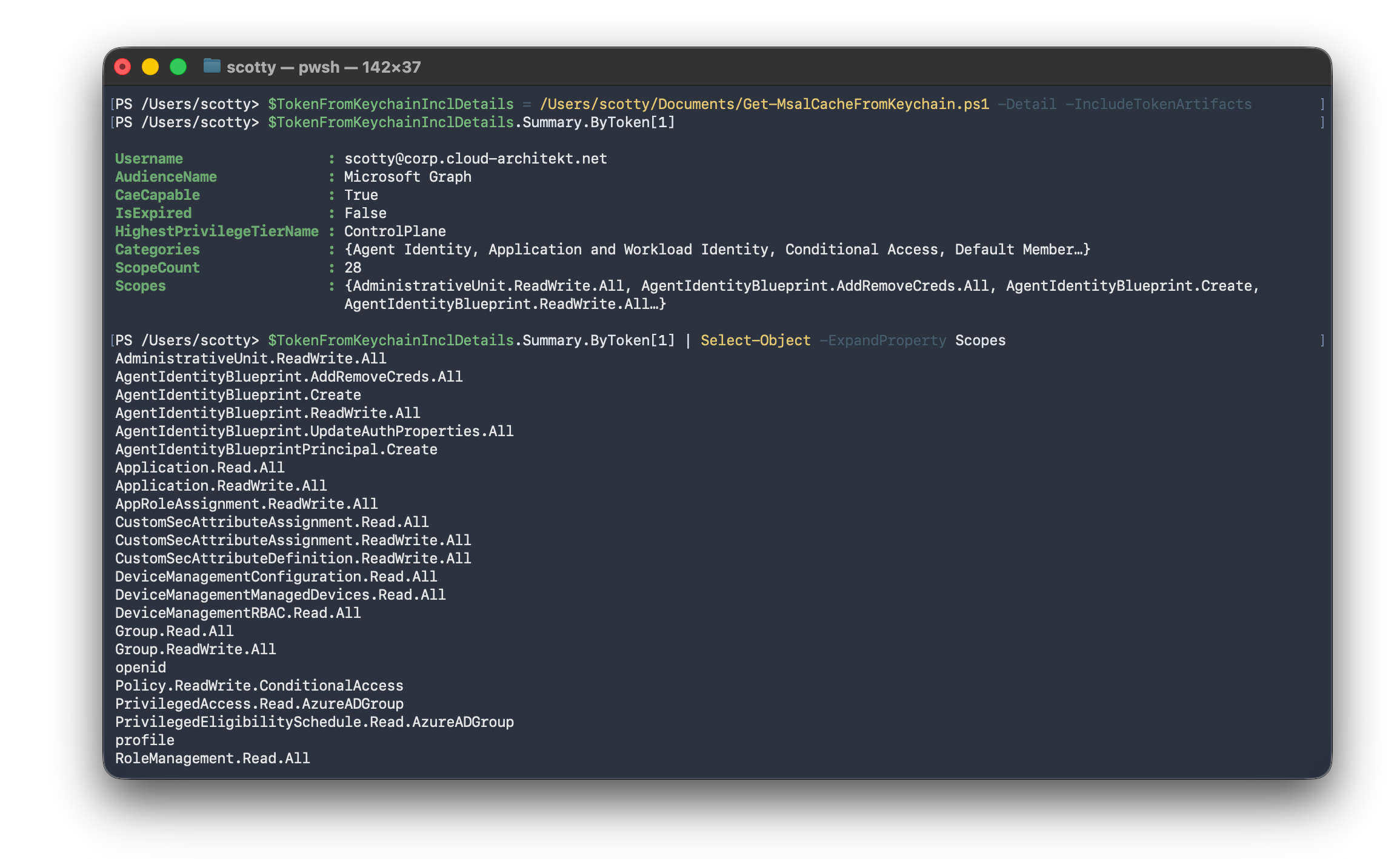
With -Detail, every access token JWT gets decoded and its claims - audience, issuer, CAE capability, delegated scopes (scp), and the signed-in user’s directory roles (wids) - are run against EntraOps’ Enterprise Access Model classification. That turns a raw token dump into an answer to the question that actually matters for an assessment: is this a Tier-0 / control-plane credential, or something with limited, low-privilege scope? -Discover additionally enumerates the Keychain for any MSAL cache accounts beyond the four known ones, and inventories other Microsoft/Azure Keychain secrets nearby - metadata only.
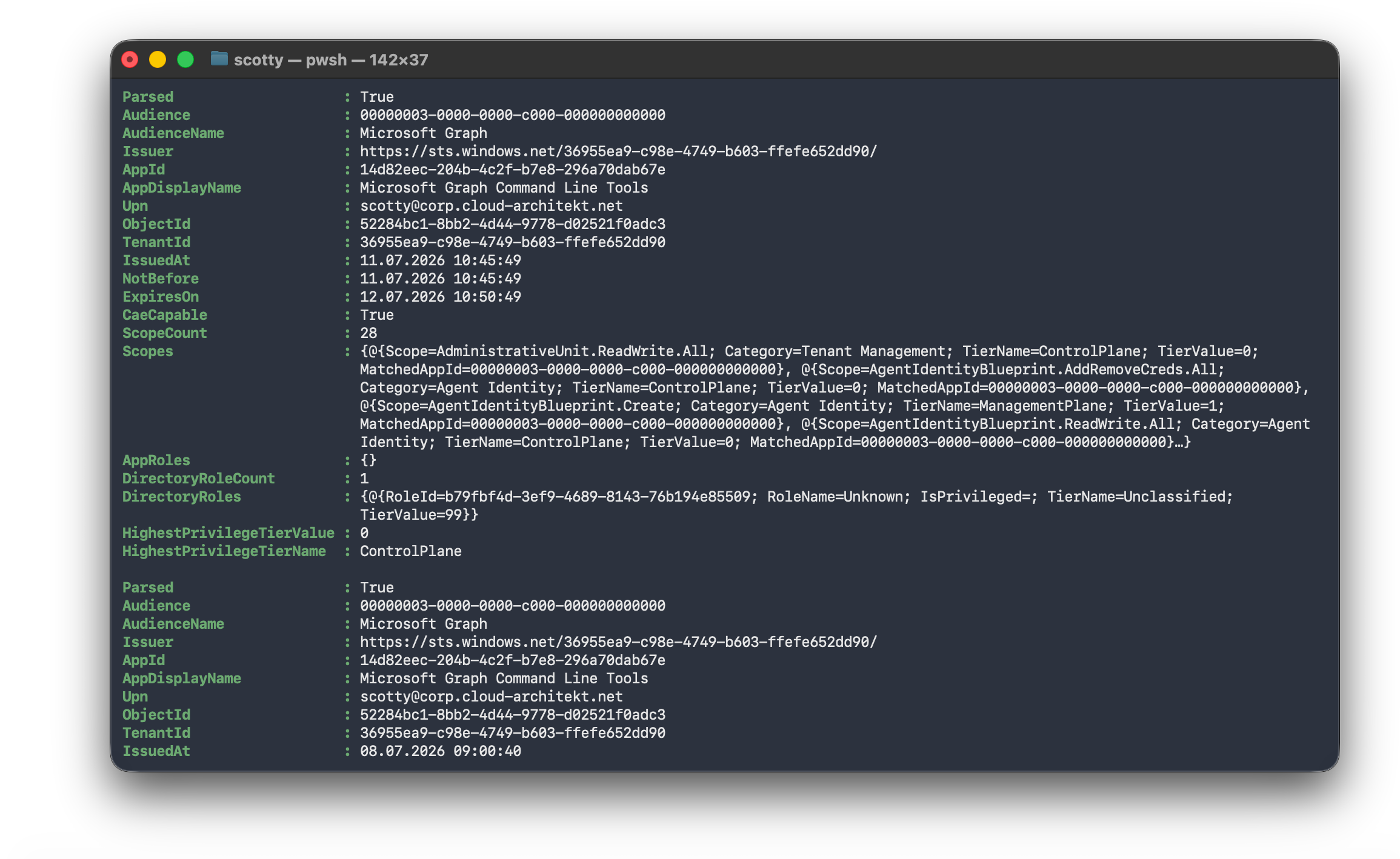
Redacted by default
Every access token, refresh token, and ID token secret comes back as $null unless you explicitly pass -IncludeTokenArtifacts (or -ValidOnly, which implies it). Audience, expiry, CAE capability, and the full privilege classification are computed either way - only the raw secret value itself is withheld by default. That split matters for how you use this: the default mode gives you a safe inventory and exposure report to understand what’s sitting in the Keychain and how privileged it is, while actually extracting a live, reusable token requires a deliberate, explicit opt-in.
What this is (and isn’t)
This is a local, same-user-context PoC - it demonstrates what’s readable once you’re already running as the signed-in user with an unlocked Keychain (which macOS typically grants automatically inside an active login session). It isn’t a remote exploit, and it doesn’t bypass any authentication. What it does show concretely is the point from earlier in this post: unlike the broker’s own PRT store, Az PowerShell’s and Microsoft Graph PowerShell’s Keychain items are ordinary, app-owned MSAL caches - and once you can unlock the Keychain, the access and refresh tokens inside them are just as reusable as if you’d signed in yourself. That’s a useful thing to understand if you’re threat-modeling token theft on macOS endpoints or want to know which tokens are currently cached and what their privilege level is.
This technique would require arbitrary code execution in the context of the signed-in user, as well as the ability to launch pwsh. While it does not directly bypass macOS Keychain protections, Microsoft authentication requirements, or any security controls on its own, it could be leveraged in a scenario where a user executes a malicious script, a module is compromised via a supply chain attack, or an infostealer acts on behalf of the user.
Responsible-use notice: This proof of concept is provided solely for authorized security research, defensive testing, and auditing systems you own or are explicitly permitted to assess. It is provided “as is,” without warranty of any kind. You are responsible for complying with applicable laws, organizational policies, and terms of service.
The script is available here: Get-MsalCacheFromKeychain.ps1
Mitigations
Reducing the risk of Keychain-cached tokens
Don’t persist the token in the first place - use process-scoped, in-memory sessions.
Both PowerShell modules support a non-persistent mode:
- Az PowerShell:
Disable-AzContextAutosave -Scope ProcessbeforeConnect-AzAccountkeeps the context in memory for that PowerShell process only, instead of writing the refresh or access token to the Keychain entry. Alternatively,Connect-AzAccount -Scope Processavoids saving the token artifacts of the user session to the Keychain. - Microsoft Graph PowerShell:
Connect-MgGraph -ContextScope Processdoes the same - sign-in only persists for the current PowerShell session, rather than being cached at the defaultCurrentUserscope.
This is the single most effective mitigation for interactive use: no Keychain item means nothing for a later Keychain-unlock scenario to read.
Sign out when using the user scope - but verify it actually cleared the cache.
Disconnect-AzAccount and Disconnect-MgGraph are supposed to remove the persisted cache, and Microsoft’s docs describe them as always removing authentication tokens and saved contexts in context of the Entra ID user. In practice, this hasn’t always held up. As described earlier, there has been a bug in the past where Disconnect-MgGraph does not clear the persisted MSAL token cache: the Keychain cache on macOS stays intact, so a new PowerShell session can silently reuse cached tokens without prompting for authentication. Practical takeaway: after disconnecting, manually verify (or manually delete) the relevant Keychain items rather than trusting the sign-out command alone - this is exactly the kind of gap the PoC script is useful for auditing.
Mitigate token replay outside of the target device
Everything so far in this post has been about where a refresh token ends up sitting at rest - an app-scoped Keychain item or broker-protected PRT store - and how easily each of those can be read. In this section we will focus on a different aspect: what happens after a refresh token has already been copied out. The two controls below don’t stop someone from extracting the secret; they’re aimed specifically at making a stolen refresh token useless when replayed - either from a different device (Token Protection) or from outside the corporate network (Global Secure Access).
Token Protection (device-bound tokens)
How it works, simply: normally a refresh token is a “bearer” secret - whoever holds the string can use it, on any machine. Token Protection changes that by pairing the refresh token with a private key that’s generated on the device and never leaves it (stored in the TPM on Windows, the Secure Enclave on macOS). Every time the token is redeemed, the client also has to sign the request with that private key. Entra ID checks the signature; if it doesn’t match the key tied to that specific device, the request is rejected - no matter how valid the token string itself looks.
This is what “proof of possession” means, and it’s why it mitigates replay: stealing the refresh token alone is no longer enough, because the token by itself can’t produce a valid signature. An attacker would additionally need the private key, and that key is generated inside secure hardware specifically so it can’t be exported, copied, or extracted - only used by the device it belongs to. So a token copied out of the Keychain and replayed elsewhere would fail the signature check on the very first use, even though the copied secret is byte-for-byte identical to the real one.
Licensing: Token Protection requires Microsoft Entra ID P1 (or higher) licensing for the targeted users.
Pre-requisite: macOS devices must be Microsoft Entra joined or registered. This registration process is what provisions the hardware-bound session key inside the Mac’s Secure Enclave, establishing the cryptographic tie between the token and the physical device.
Where it stands today: on Apple platforms this is a preview feature. It only covers a specific list of native broker-integrated desktop apps (Teams, Outlook, OneDrive, Edge profile sign-in, and similar - not browser apps, Az PowerShell, or Microsoft Graph PowerShell), and only protects Exchange Online, SharePoint Online, and Teams as target resources. So it doesn’t help with the scenario in this post yet.
For the full mechanics, supported apps/resources, and deployment steps:
- Token Protection in Microsoft Entra Conditional Access
- Token Protection Deployment Guide – Apple Platforms (Preview)
Compliant Network via Global Secure Access
A complementary, network-level control: Global Secure Access lets you require a “compliant network” - traffic routed through Microsoft’s secure tunnel - before a Conditional Access policy grants access. A stolen token replayed from outside that tunnel gets blocked, without needing the token itself to be device-bound. Since it doesn’t depend on broker integration or an app allow-list, this is the more relevant stopgap for the PowerShell modules today.
Licensing: the Compliant Network check used here rides on Global Secure Access’s Microsoft traffic profile, which routes Entra ID / M365 traffic (including the token endpoint). This profile - and the Compliant Network condition itself - is included in Microsoft Entra ID P1 (or P2) at no additional cost. The separate Internet Access and Private Access profiles (general internet/SaaS traffic and ZTNA to private resources) are the ones that require the standalone Entra Internet Access / Private Access licenses or the Entra Suite - but neither is needed for this particular mitigation.
If you want to learn more about how Global Secure Access mitigates token replay, with or without Token Protection, I can highly recommend the excellent blog post by Chris Brumm: Token Replay Protection and the Compliant Network Check.
Shrink the blast radius if a cache is read anyway
- Enforce Conditional Access sign-in frequency for privileged roles, so a stolen refresh token has a short usable lifetime before re-authentication is forced. By default the lifetime is a sliding window of up to 90 days; it can be limited to a specific number of hours or days.
- Use Privileged Identity Management (PIM) with an authentication context that requires re-authentication for the activation of sensitive roles, so a token captured at rest carries little privilege unless a role is actively activated. This reduces the window in which a privileged token can be captured. Note that enabling “Require MFA” alone will not stop an attacker from using a replayed token, because the MFA claim can be satisfied by the stolen token - only “Require re-authentication” forces the attacker to possess an authentication method they don’t have.
- Require re-authentication for risky sign-ins and risky users to stop further abuse of replayed refresh tokens. Entra ID Protection also covers anomalous-token and post-authentication signals, which help detect replayed tokens and can limit the blast radius after detection. As with the PIM re-authentication control, make sure a pre-existing MFA claim can’t satisfy your risk-based Conditional Access policies.
Detection of replayed tokens
Detect and revoke rather than assume prevention is perfect
Correlate sign-in log signals - such as ISP/IP address and activity logs - for unusual patterns or behavior. If compromise is suspected, revoke refresh tokens, review and remove suspicious sessions, and monitor ongoing session activity after revocation (for example, by tracking issued access tokens).
I’ve published a set of hunting queries for token activity, which include hunting for activity by revoked tokens and audited activity by session or token across Microsoft 365 and Azure workloads.
More details on token hunting can be found in the recording of my session at HIPConf25.
Detection of Keychain access by EDR
A fair question is whether an EDR such as Microsoft Defender for Endpoint would detect this activity. The answer comes down to how the script reads the Keychain - and the two code paths in Get-MsalCacheFromKeychain.ps1 have very different visibility to an EDR sensor:
- The default cache-read path loads
Microsoft.Identity.Client.Extensions.Msal.dllinside the PowerShell process and calls it in-process to open the Keychain item - the same API path Az PowerShell itself uses. No child process is spawned, and no unusual binary is invoked; from a process-telemetry standpoint this looks like an ordinary PowerShell session that loaded the same assembliesAz.Accountsalready ships. Therefore, I haven’t seen a built-in detection rule that raises a default alert for this access - though that doesn’t rule out building a custom detection for it. - The
-Discoverpath is different - it explicitly shells out to/usr/bin/security dump-keychainto enumerate Keychain metadata. That’s a real, distinct child-process-creation event (parentpwsh, childsecurity, with a recognizable argument), and it’s exactly the kind of “living-off-the-land binary” pattern Microsoft’s own macOS infostealer research repeatedly flags as worth hunting for.
And in testing, the -Discover path was detected out of the box. Microsoft Defender for Endpoint captured the pwsh → pwsh → security process tree and raised an alert titled “Sensitive Content of private keys or keychain were accessed” with the action type UnixCredentialDumping, mapped to MITRE ATT&CK T1555.001 (Credentials from Password Stores: Keychain) among others.
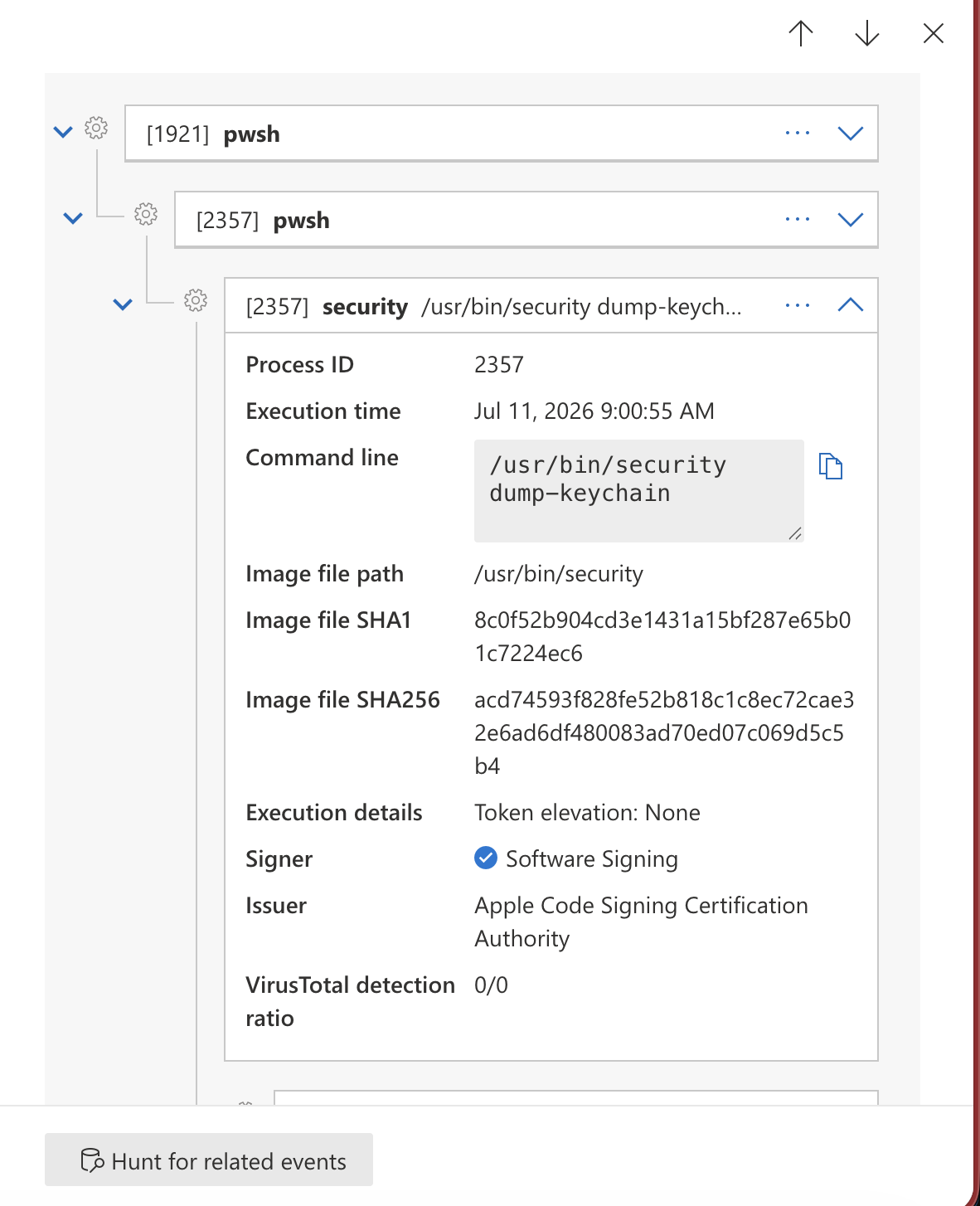
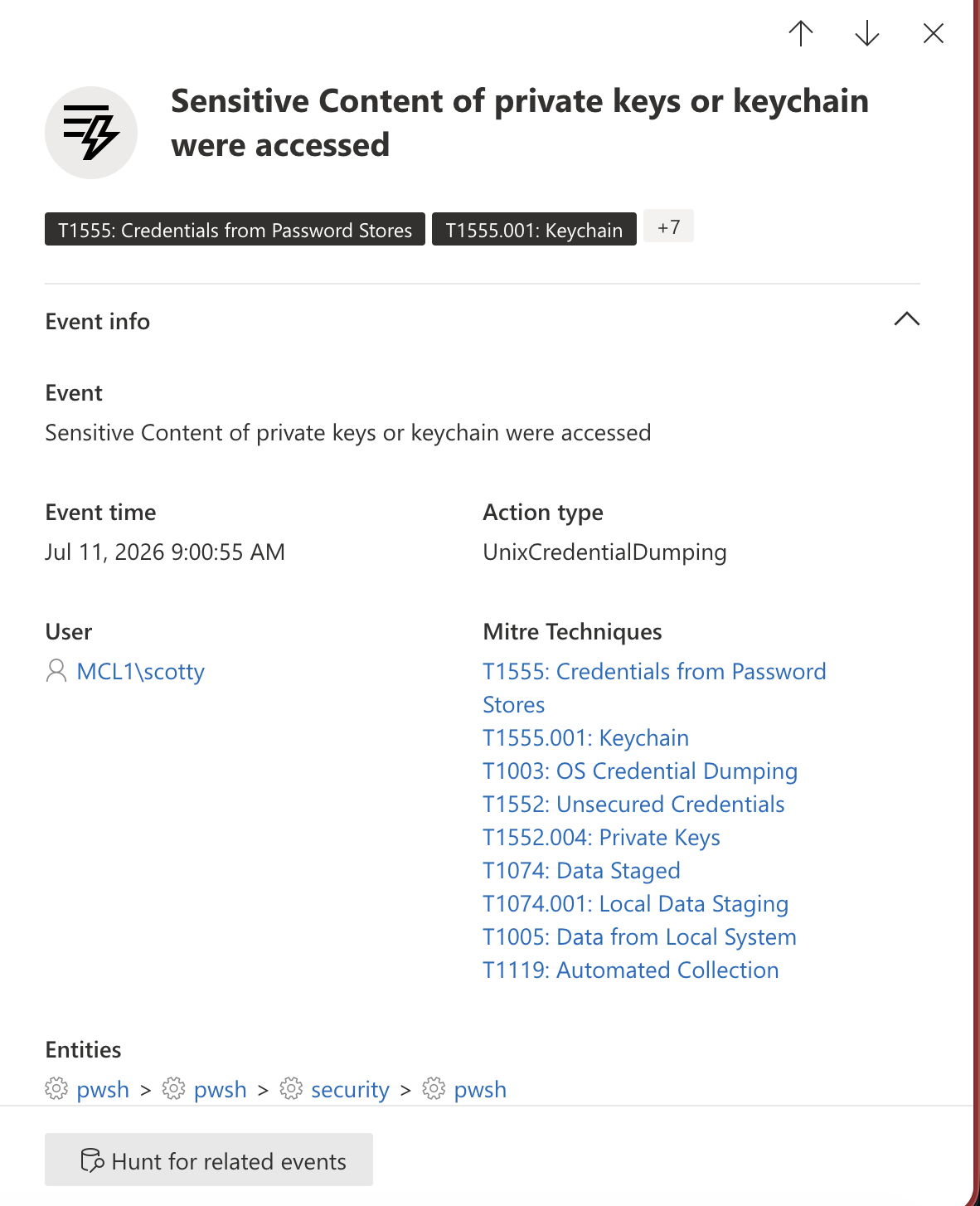
So the picture is split: the default in-process read is quiet (it rides on pwsh’s authorized Keychain ACL and never touches an external binary), while the -Discover path is caught by default as UnixCredentialDumping. In other words, Defender detects the noisy, security-based enumeration path, but not the quieter MSAL-native read that most closely mirrors what a real attacker with code running inside pwsh would actually do.
Practical takeaway for defenders: to catch the discovery/dump activity as an alert, consider a custom detection rule watching for process-creation events matching security with arguments like dump-keychain or find-generic-password - especially with an unusual parent process (pwsh, python3, osascript) rather than an expected system process. This mirrors what Microsoft’s threat research on macOS infostealers recommends monitoring for. Detecting the in-process MSAL read itself is much harder, since it’s indistinguishable from legitimate module behavior at the process level.
Report to MSRC
I submitted this information to the Microsoft Security Response Center (MSRC) on 5 January 2026. After investigation, the case was assessed as low severity, on the basis that the currently logged-in user is only able to access their own tokens and this does not constitute a privilege-escalation scenario. Microsoft’s feedback also noted that additional defense-in-depth measures would be considered, as appropriate, in future releases.
Disclosure timeline
- 05 Jan 2026 - Web-based submission (VULN-170098), including a blog post draft, video, and public disclosure plans as part of a planned conference session.
- 11 Feb 2026 & 27 Feb 2026 - Follow-up requests to MSRC regarding case status.
- 06 Mar 2026 - MSRC confirmed the reported behavior and indicated that investigation was ongoing to determine how to address the issue. MSRC communicated that the case had been assessed as low severity and that the engineering team was working on a deployment. Follow-up request submitted regarding the ETA for a fix and public disclosure.
- 09 Jun 2026 - No response had been received since March; another follow-up request submitted to MSRC regarding case status.
- 17 Jun 2026 - MSRC responded, reiterating the low-severity assessment and explaining why the behavior does not constitute a privilege-escalation scenario. The response referenced that additional defense-in-depth measures may be considered in future releases. Internal communication was initiated to gather team feedback on the provided blog draft.
- 18 Jun 2026 - Request submitted to MSRC for feedback on Token Protection (as a supported mitigation scenario), and to raise concerns regarding token theft in environments where tokens are accessible to a local or logged-in user who is not Microsoft Entra-connected or integrated. Asked for the ETA for the feedback review and for details on plans regarding any upcoming “defense-in-depth” fix.
- 27 Jun 2026 - Shared details regarding the public disclosure and requested feedback on provided content or any comments on the disclosure timeline.
- 16 Jul 2026 - MSRC closed the original case and provided feedback on the
Disconnect-MgGraphchanges and the blog post. - 16 Jul 2026 - Submitted a request to MSRC regarding multi-user artifacts in the token cache, where other users’ tokens remain intact after a different user disconnects.
Finally, I want to thank the Microsoft Security Response Center (MSRC) for their collaboration on this case and feedback. I would also like to give a shout-out to Fabian Bader and Dirk-jan Mollema for their feedback on this blog post.