A new tenant governance feature provides the option to establish a relationship between tenants for delegating cross tenant administration assignments for centralized management. This feature is, for me, a game-changer for multitenant environments. It allows multitenant organizations to take advantage of the same delegation model which is already known for service providers - GDAP. But what are the advantages or disadvantages for those organizations? What are the criteria and considerations to make the decision: B2B or Not 2B? That is the Privileged Question!
What is the Tenant Governance Relationship?
Microsoft recently released a feature for organizations to establish a governance relationship which includes granting delegated Entra ID roles. This cross-tenant access option uses the Granular Delegated Admin Privileges (GDAP) feature which is widely used by Managed or Cloud Service Providers for accessing customer environments.
The process to add a tenant to the governance relationship follows a strict process which is slightly different depending on whether the tenant which should be governed is sharing the billing account or is on a separate billing account.
For separated tenants (without shared billing) the three-step handshake works as described below:
-
Request to govern: A tenant (later named Governed Tenant) sends an invite to another tenant (Governing Tenant) to be under management of the Tenant Governance model.
Side notes: By default, the permissions to send governance invitations to a tenant is disabled and has to be enabled in the Tenant governance settings. Consider using the “Tenant Governance Administrator” role for least privilege to manage relationship configuration.
-
Governance request: The governing tenant reviews the invitation and sends a governance request which includes a policy that defines the relationship between governing and governed tenant.
-
Accept governance request: Finally, the governed tenant receives the request with the policy definition including directory roles that will be assigned by the governance relationship.
Side Note: When a governance relationship is established, Tenant Governance provisions several resources. For delegated administration: the partner-specific configuration for cross-tenant access in the governed tenant is updated, and cross-tenant role assignments are created. For multitenant application management: a service principal with the corresponding permissions is created in the governed tenant. Details of all provisioned resources are visible and trackable in the Microsoft Entra audit logs.
How to set up the Tenant Governance relationship?
In the following section, I would like to give some recommendations and considerations for the configuration of the Tenant Governance relationship based on my experience. Details on how to set up the relationship in general are already well documented by Microsoft.
The step-by-step guide for the process and required steps using the Microsoft Entra portal or Microsoft Graph API is available in Microsoft Learn.
Side note: Tenant Governance relationships require specific licenses. For details on licensing requirements, refer to the Microsoft Learn documentation: Tenant Governance licensing – Governance relationships.
The following guidance covers the advanced scenario of establishing a delegation model as you can see in the visualization below.
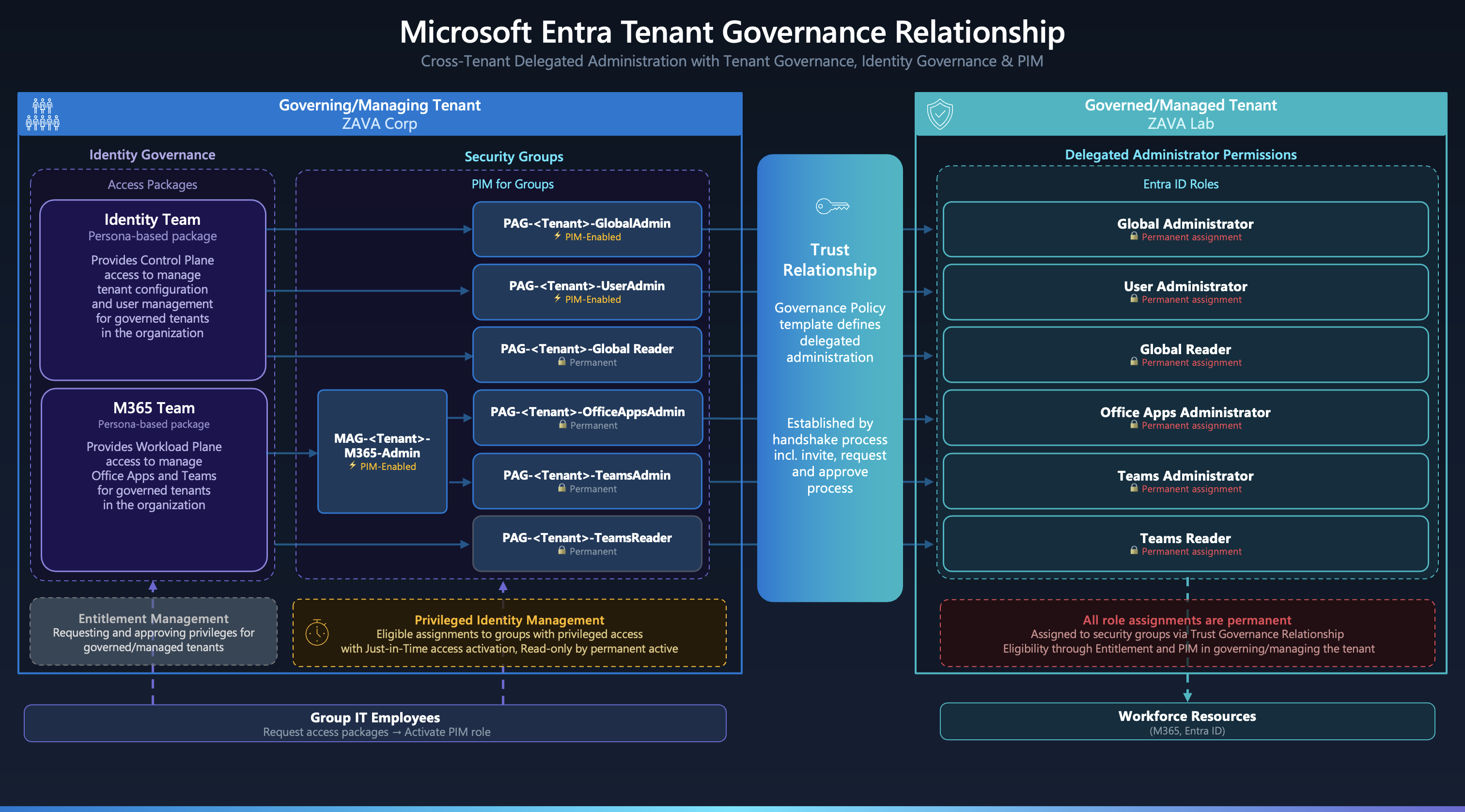 Overview of cross-tenant delegated administration by using Identity Governance and PIM
1. Governing Tenant: Configuration of Governance policy template
A governance policy template defines two key areas of access: which Microsoft Entra built-in roles are assigned to security groups in the governing tenant for cross-tenant delegated administration, and which custom multitenant applications are provisioned as service principals in the governed tenant. Templates can be reused across multiple governance relationships.
Important: Updating a governance policy template afterwards does not automatically update existing relationships - you must repeat the request and approval process to apply changes to an active relationship. More details can be found in the Microsoft Learn documentation on how to update a governance relationship.
Also make sure that you are using PIM for Groups to take advantage of just-in-time access management. Delegated Administration in Tenant Governance cannot be used in combination with PIM for Entra ID roles directly - there is no support for eligibility of delegated role assignments. PIM for Groups is the only supported path for eligible access.
Check out the FAQ section in the Microsoft Learn documentation to learn more about common design questions, for example if multi-tier relationships multiple governing tenants are supported.
2. Governing Tenant: Entitlement Management of role groups
I would strongly recommend implementing an access package for requesting and assigning membership to the role-assignable groups which are used for the delegated role permissions in the Tenant Governance relationship. Access packages can be defined for a persona that requires access to the governed tenant. We have to use PIM for Groups for eligible assignments because PIM for Entra ID roles is not available for tenant governance delegation.
There are two patterns for mapping groups to roles, depending on the activation granularity you need:
- Single-activation - one PIM group activation grants exactly one Entra ID role. This gives fine-grained control and is recommended for sensitive roles.
- Multi-activation - one PIM group activation grants multiple Entra ID roles simultaneously. This is useful for bundling lower-risk roles that are always needed together (e.g., a helpdesk persona).
For single-activation, use a dedicated role-assignable group per Entra ID role. This is particularly important for sensitive assignments like Global Administrator, as the group display name makes the scope immediately visible:
<Prefix> - <TenantName> - <EntraIdRole>
(e.g., pag-Contoso-GlobalAdministrator, where pag = Privileged Access Group)
→ Defined in policy template of <TenantName> to assign permanent <EntraIdRole>
For multi-activation, create a role-assignable group with multiple assignments in the policy template:
<Prefix> - <TenantName> - <CustomGroupedNameOfRoles>
(e.g., mag-Contoso-HelpdeskRoles, where mag = Multi-role Access Group)
→ Assigned in policy template of <TenantName> to <EntraIdRoleA>
→ Assigned in policy template of <TenantName> to <EntraIdRoleB>
The next question is where to assign the eligibility for those groups. There are two options:
Option A - Individual eligible membership via Access Package: Entra ID Governance allows assigning eligible membership to a PIM for Group as part of an access package assignment. This requires Entra ID Governance P2 licenses (included in Entra Suite or Microsoft 365 E7). The eligible assignment is created for each individual user.
<Access Package> → Assign eligible membership → <Prefix> - <TenantName> - <EntraIdRole>
Option B - Persona-based groups with nested eligible membership: Use persona-based groups and assign eligible membership via a nested group. The access package manages permanent membership to the persona group, while eligibility to the role group is assigned outside of Identity Governance:
<Access Package> → Assign permanent membership → <Persona Group>
Outside of Identity Governance, create an eligible assignment of the persona group to the PIM-enabled group:
Members of <Persona Group> → Assign eligible membership → <Prefix> - <TenantName> - <EntraIdRole>
In this case, the access package manages membership to the persona group, but not each individual assignment to the role groups. The trade-off is simpler access package management at the cost of less granular per-user visibility in PIM.
If you are more interested in how to design access packages and take advantage of persona-based groups, check out my blog post about securing privileged user access with Conditional Access and Identity Governance.
3. Securing Delegated Access with Conditional Access
After granting permissions for delegation, you should secure privileged access with Conditional Access policies. This should include enforcement of phishing-resistant authentication, device compliance, and optionally a device extension attribute filter to restrict access to Privileged Admin Workstations (PAWs) only. Those CA policies must be scoped to “Service provider users” and the related tenant.
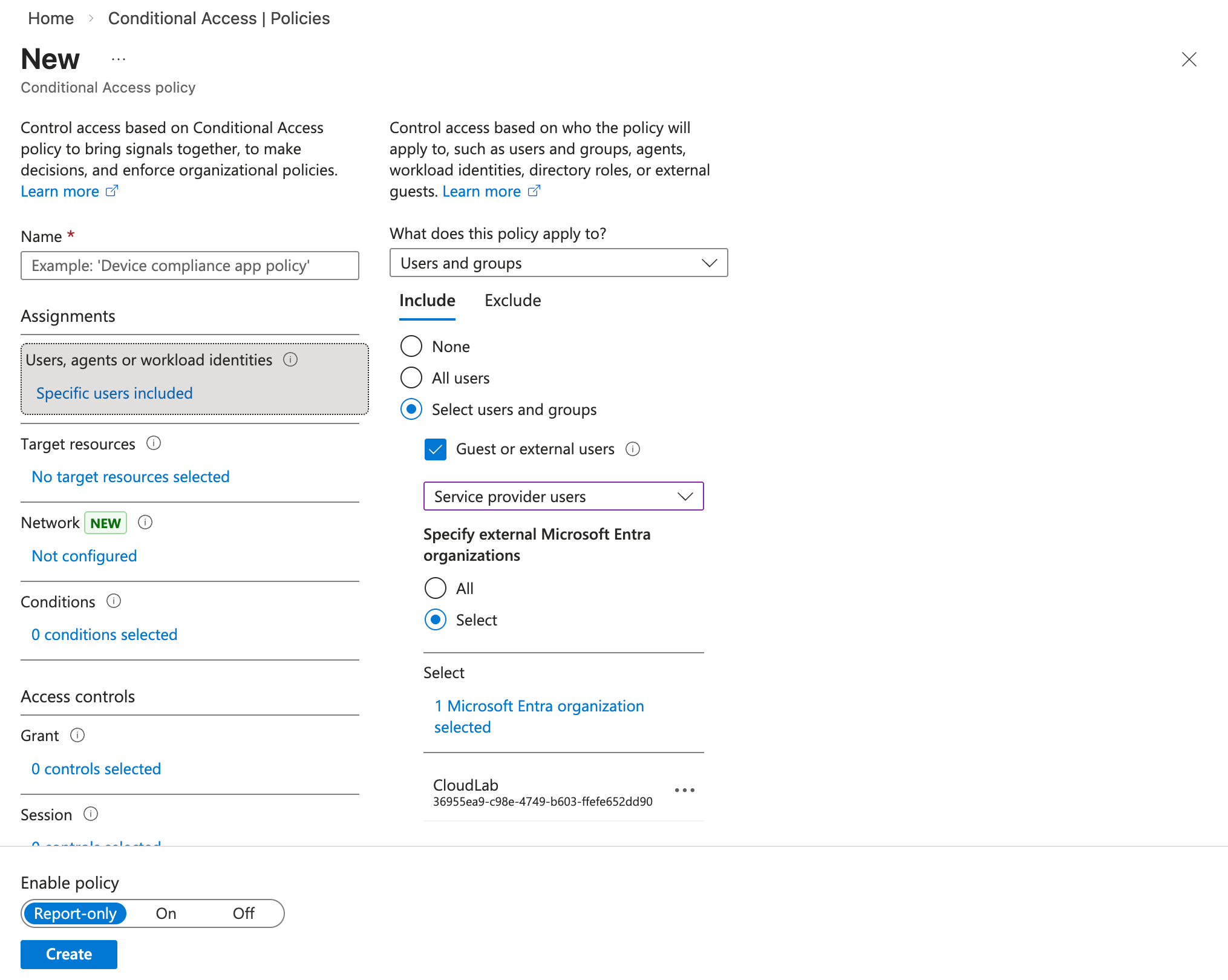
I also recommend configuring a block policy for every organization that should not be authorized to use GDAP/Tenant Governance for delegated administration. If you also want to block B2B access and enforce the use of the governance relationship, a dedicated policy to block Guest/Member users from the governing tenant is an additional option.
What are the benefits and differences over B2B in multitenant environments?
With the setup covered, it is worth comparing Tenant Governance against the traditional B2B approach across the dimensions that matter most for multitenant administration decisions.
| B2B | Cross-tenant delegated administration | |
|---|---|---|
| User Management | ||
| Lifecycle Management of Joiner/Leaver/Mover process | Manual Invitation, by Access Package or Cross Tenant Sync to Governed Tenant | Not required, user object exists in Governing Tenant only and lifecycle will be managed from here |
| Attack surface for account takeover | B2B users can be converted to internal users in the governed tenant | Account takeover and attack paths in Governing Tenant only |
| Entitlement Management | ||
| Assignment of Entra ID Roles | Decentralized, configuration in Entra ID roles of Governed Tenant | Mostly centralized, configuration by Governing Tenant, acceptance and review in Governed Tenant |
| Supported PIM resource types | Full, B2B users can be assigned to all types of resources such as: PIM for Groups, Entra ID roles, Azure resources | Limited, cross-tenant delegated admin roles can only be assigned to Entra ID roles by groups. Using PIM for Groups for those group objects in Governing Tenant is the only option. |
| Access Package Assignment and Management | Decentralized, assignment to resources will be configured in Governed Tenant | Centralized, assignment to Entra ID roles will be configured in Governing Tenant by Role-assignable Groups with eligible or permanent members |
| Security Controls | ||
| Attack Surface by privileged identities in Governed Tenant to modify privileges | Present, privileges to modify existing or new role assignments | Reduced, no privileges to modify directly or indirectly assignments of the governance relationship in Governing Tenant. Risk of canceling relationship or assigning privileges outside of the governance relationship. |
| Risk of account takeover by similar or lower privileges | Present, B2B user can be converted to internal users under specific conditions | Reduced, privileged identities of the governance relationship and their privileges are not exposed in Governed Tenant |
| Blast radius for lateral movement | Low, decentralized assignments in Governed Tenant | Medium-High, centralized role assignments to multiple tenants in Governing Tenant by using group membership |
| Enforcement and Evaluation of Conditional Access Policies | Governed Tenant | Governing and Governed Tenant |
| Support for Cross-Tenant Access Signals | Authentication Strength, Device Compliance and Device Filters | Authentication Strength, Device Compliance and Device Filters |
| Blocking access to selected privileged identities | Yes, disabling B2B user(s) | No |
| Supported Role Assignment Types | ||
| Scoping on AU/Object-Level | Yes | No |
| Custom Roles | Yes | No |
| Eligibility by PIM for Entra Roles | Yes | No - only via PIM for (Role-assignable) Groups |
| Assignment to RBAC systems outside of Entra roles | Yes | No |
| Visibility | ||
| Audit Logs | Assignment to Entra Roles will be audited in Governed Tenant. | Assignment of Groups by governance relationship request will be audited in Governed Tenant. Changes to the membership in Role-Assignable Groups will be audited in Governing Tenant only |
| Sign-in Logs | Visibility in Governing and Governed Tenant | Full Visibility in Governing Tenant, Limited visibility in Governed Tenant because accessing user from governing tenant will be only shown with UserId and displayname <TenantName> technician. |
| PIM Activation History | Decentralized, PIM actions will be made in Governed Tenant, visibility in Governing Tenant | Centralized, PIM actions will be made in Governing Tenant, no visibility in Governed Tenant |
| Assigned Role Assignments | Decentralized, all objects and assignments exist in Governed Tenant. No visibility in Governing Tenant. | Centralized, all objects and assignments exist in Governing Tenant. Only assigned GroupId to Entra roles is visible. No visibility in Governed Tenant which identities are eligible or permanently assigned to the related groups. |
How can I increase the visibility of privileges (by EntraOps)?
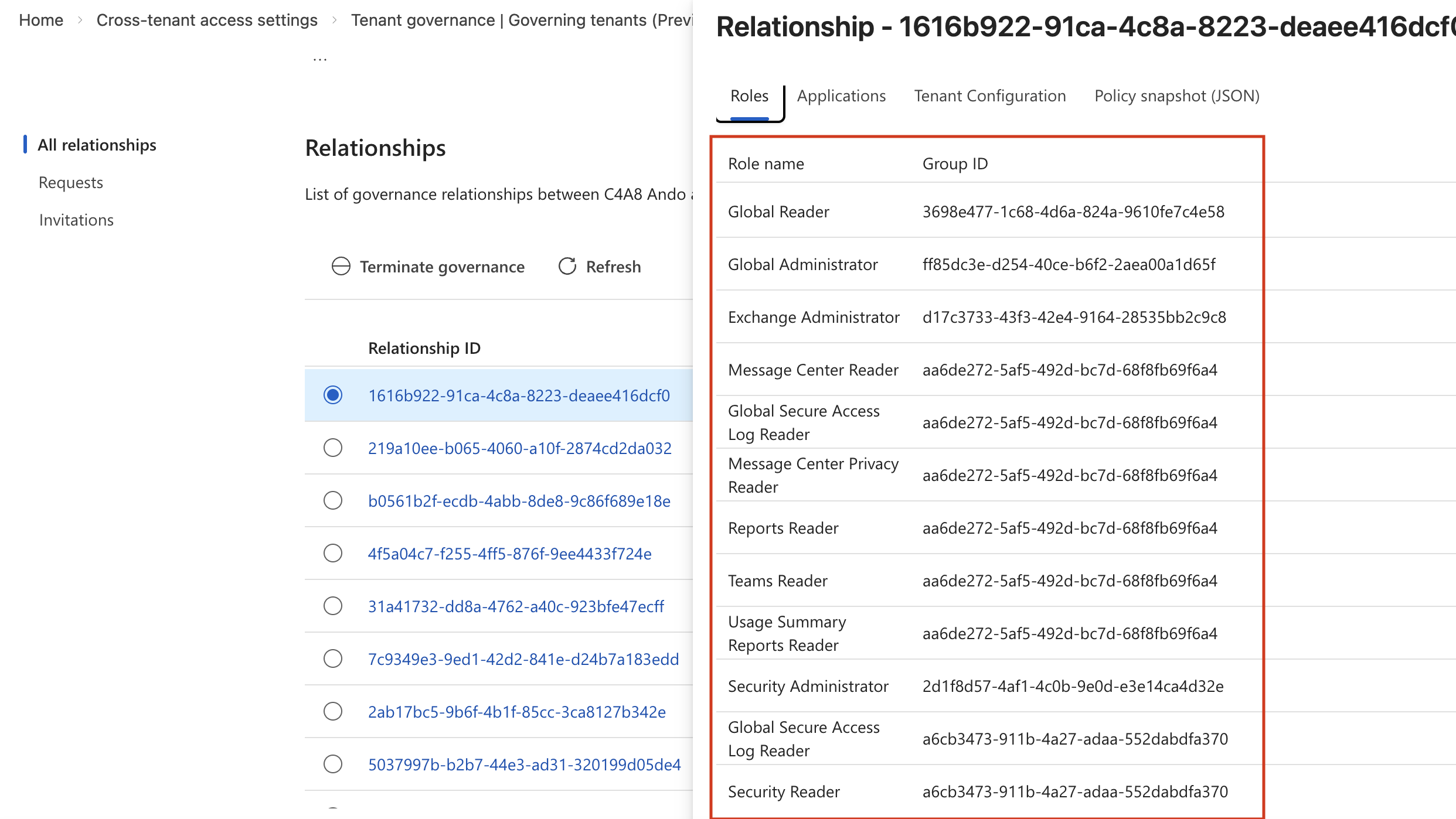
One of the disadvantages of using cross-tenant delegated administration is the limited visibility. By default, the policy template shows only the assigned group IDs. There is no visibility of assigned/nested groups or users for the roles, and Entra ID role assignments in the governed tenant do not show any cross-tenant assignments either.
However, you want to see all privileges in the tenant, whether they are assigned within the tenant or cross-tenant by using Tenant Governance. Therefore, I’ve implemented multitenant and tenant governance support in the latest beta version of EntraOps. All groups with assigned roles in the trust relationship will be resolved between the governed and governing tenant. EntraOps also needs privileges to read that information from the governing tenant, and the tenant name must be included in the EntraOps.config file (ManagedTenantName and ManagedTenantId).
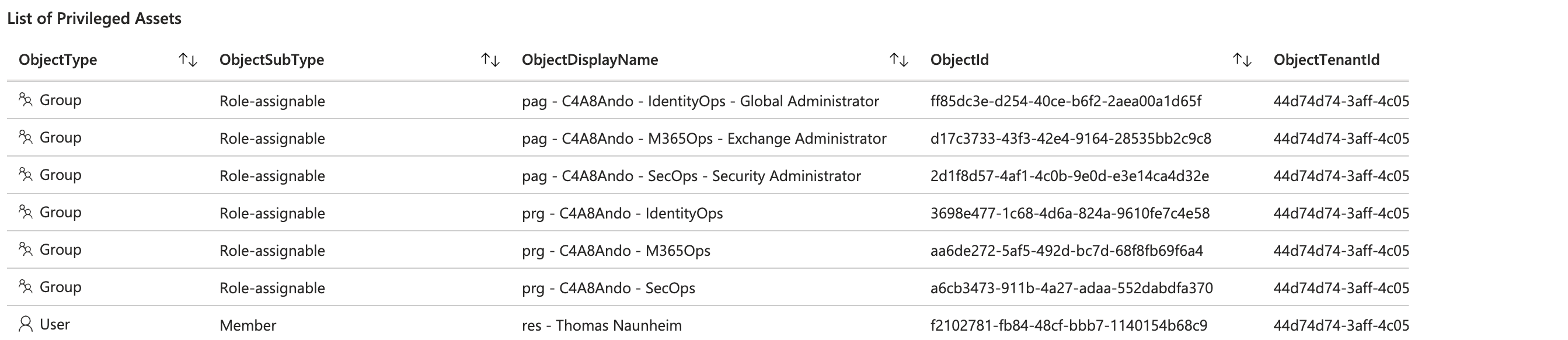 EntraOps Privileged EAM Workshop with list of all assigned privileged objects from governing tenant by cross tenant delegated administration
The classification of the governed tenant will be applied to the privileged objects from the governing tenant. This includes all details of the assigned objects, such as details about the restricted management of the involved users, groups and apps, and details about the transitivity of the role assignment.
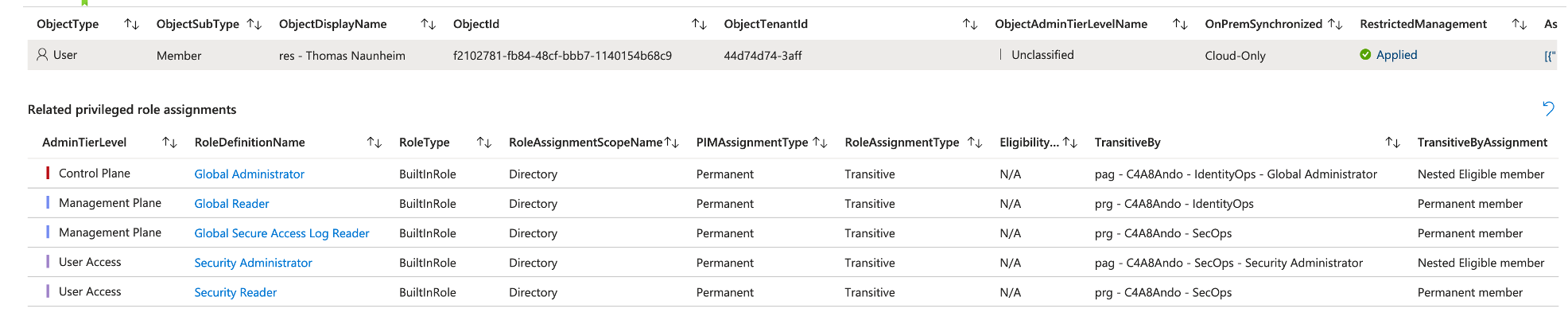 Details of role assignments in Tenant Governance including EntraOps classification and details of (transitive) assignments and PIM eligibility.
The latest beta version of EntraOps with support for Tenant Governance is available on GitHub.
B2B or Tenant Governance - Making the Decision
The comparison table above makes the trade-offs clear, but the core question remains: when should you actually choose one over the other?
Choose Tenant Governance when:
- You operate a centralized identity or governance team responsible for administering multiple tenants and want a single pane of glass for lifecycle and entitlement management.
- You want to minimize the attack surface in governed tenants by keeping privileged identities out of those environments entirely.
- You have adopted the GDAP model as an internal CSP provider and want to migrate to this consistent delegation model as part of Tenant Governance without a dependency on Microsoft Partner status.
Stick with B2B when:
- You need full PIM support - eligibility for Entra ID roles, AU scoping, custom roles, or Azure RBAC assignments in the governed tenant.
- Governance decisions must remain decentralized and under the control of each individual tenant.
- You need per-user blocking granularity (e.g., quickly disabling a specific compromised admin account in the governed tenant without affecting the broader relationship).
The key trade-off is centralized control vs. flexibility. Tenant Governance delivers a cleaner, more scalable delegation model with a reduced attack surface, but it comes with real limitations in role assignment types and visibility. For organizations with a dedicated central IT or security operations team managing many tenants, those benefits outweigh the limitations. For organizations where each tenant needs to retain full governance autonomy, B2B remains the right choice.
The best of both worlds - combining Tenant Governance with Cross-Tenant Synchronization: You do not have to choose exclusively. A hybrid approach combines the strengths of both models: use cross-tenant delegated administration for holistic and centralized management of broad role assignments, while using Cross-Tenant Synchronization to provision B2B users from the governing tenant into the governed tenant for scenarios that require fine-grained, scoped permissions or assignment to roles outside of Entra ID RBAC.
With synchronized B2B users from the governing tenant available in the governed tenant, you can assign them to Entra ID roles with full PIM support - including eligibility, AU-scoped assignments, custom roles, and Azure RBAC - for use cases where Tenant Governance’s limitations would otherwise block you. The lifecycle of those identities remains centrally managed in the governing tenant, and Cross-Tenant Synchronization keeps their attributes and security group memberships in sync automatically.
This means the governing tenant remains the single source of truth for identity lifecycle, while the governed tenant gains the flexibility to apply granular, scoped permissions where needed - without reverting to fully decentralized B2B management.
What’s next?
I have started working on a follow-up article to cover the design and implementation in combination with the Enterprise Access Model and multitenancy in more detail. This will also include aspects to monitor sign-ins and activities from the governing tenant. There are also some more features around EntraOps which will be part of the preview soon. Stay tuned for that deep dive!