Last year, I published many queries around token hunting as part of my speaker engagements at YellowHat and the Hybrid Identity Protection (HIP) Conference. In one of my sessions, the question came up: would it also be possible to use the queries for non-human identities in Microsoft Entra? Therefore, I’ve released an adjusted version of my MicrosoftCloudActivity KQL function which should support application and workload identity activity. This query is available here: MicrosoftCloudWorkloadActivity. More details and potential use cases and queries are described in this article.
Why we need to hunt for Workload Identity activity
Workload identities have become high-value targets for attackers, often posing a greater risk than user accounts. They typically operate with permanent privileges and are frequently deployed with weak security configurations or insufficient monitoring (including missing detection for anomalous behavior).
Crucially, many advanced defense mechanisms available for users — such as Token Protection (Token Binding) or compliant network enforcement via Global Secure Access — are not currently available for non-human identities. This gap makes them particularly susceptible to token theft and replay attacks. With the overall rise in post-authentication compromises, hunting for the usage of stolen tokens by applications and workloads has become an essential defense strategy.
Therefore, I’ve started my study to explore ways for hunting activities of tokens by non-human identities and summarized them in the KQL function ‘MicrosoftCloudWorkloadActivity’.
What is covered by “MicrosoftCloudWorkloadActivity”
In the first step, I’m using the First-Party Apps Reference from the GitHub Project of Merill Fernando to identify sign-ins from Microsoft Service Principals.
The query uses the table CloudAppEvents to get a unified schema for Azure but also Microsoft 365 activities. I’ve used various patterns to extract the Session ID and Unique Token Identifier from the Raw Event Log.
In addition, the GraphAPIAuditEvents table will be used to get insights about Graph API calls by the non-human identities. A KQL logic from my MVP fellow Fabian Bader is included to parse the Request URI and obtain details about the Target Object ID or ObjectType from the call.
All user and non-human identity sign-in logs (except MicrosoftServicePrincipalSignInLogs) will be used to map the activity to the used token of the application and workload activity. This also allows me to get activity with delegated permission by an application identity. I’ve decided to exclude the MicrosoftServicePrincipalSignInLogs from the query because of the limited availability in most organizations and additional execution time. The First-Party App Reference list will be used to flag sign-ins by Microsoft Apps. Details about a CAE-capable token as well as details about the used credentials will also be extracted from the sign-in logs. The lookback for sign-in logs adds 28 hours to the originally defined lookback window to cover CAE-capable tokens.
What are the parameters of the KQL function?
You can get the latest version of the KQL function from my GitHub repository. If you want to try the query, just copy and paste the query to the Advanced Hunting in Microsoft Defender portal. Make sure that Unified XDR is enabled and the previously described tables are ingested to Microsoft Sentinel.
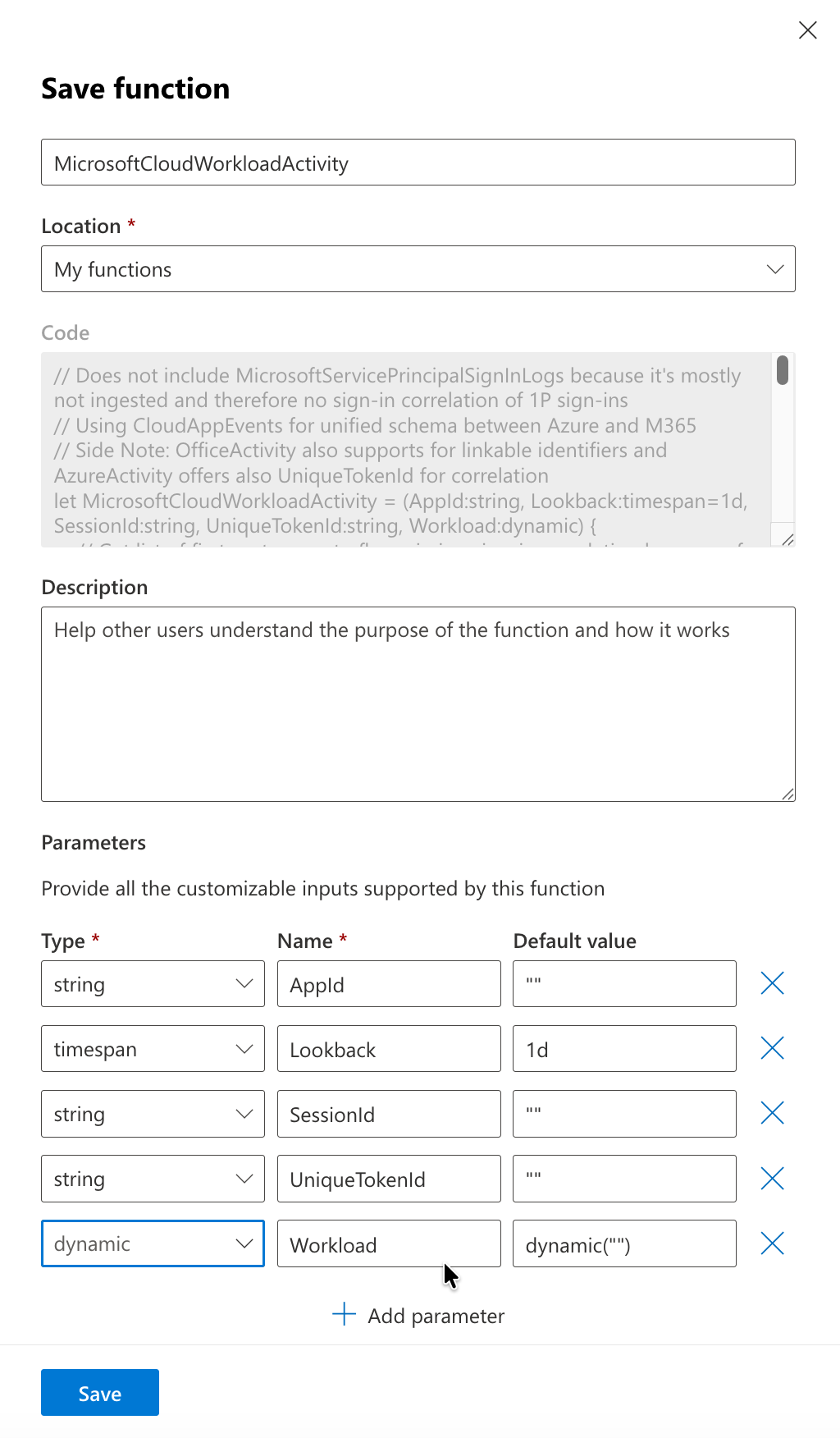
AppId (string) - Filters activities by the Client ID of the Service Principal. Leave empty to retrieve all applications.
Lookback (timespan, default: 1h) - Time window for collecting activity events.
SessionId (string) - Filters activities by session identifier to track activities within a specific authentication session. Leave empty to retrieve all sessions.
UniqueTokenId (string) - Filters activities by unique token identifier (UTI claim) to correlate all operations performed with a specific access token. Leave empty to retrieve all tokens.
Workload (dynamic) - Filters by Microsoft cloud workload (e.g., “Azure”, “Exchange”, “SharePoint”, “Microsoft Graph API”). Leave empty to retrieve activities from all workloads.
Considerations for filtering
The query is designed to look for a close time range or specific usage by a token. Because of the large number of events that will be queried from the sign-in and activity logs, it can easily exceed the maximum time and resources for a hunting query.
Use filters to get results faster and avoid timeouts, for example:
- Always specify
AppIdwhen investigating specific non-human identities. - Use the shortest possible
lookbackperiod. Start with 1h-6h for investigations for the specific identity or token rather than full days - Add
UniqueTokenIdwhen correlating activities from a known sign-in event (e.g., from incident investigation) - Specify
Workload(“Azure”, “Exchange”, “SharePoint”) when you know the scope to reduce M365Events processing
Use and save KQL function for regular usage
Advanced Hunting in the Microsoft Defender Portal allows you to easily save a query as a function.
Firstly, we need to remove the default values at the bottom from the existing KQL query (e.g. change AppId="" to AppId). Afterwards click on “Save” and “Save as function”.
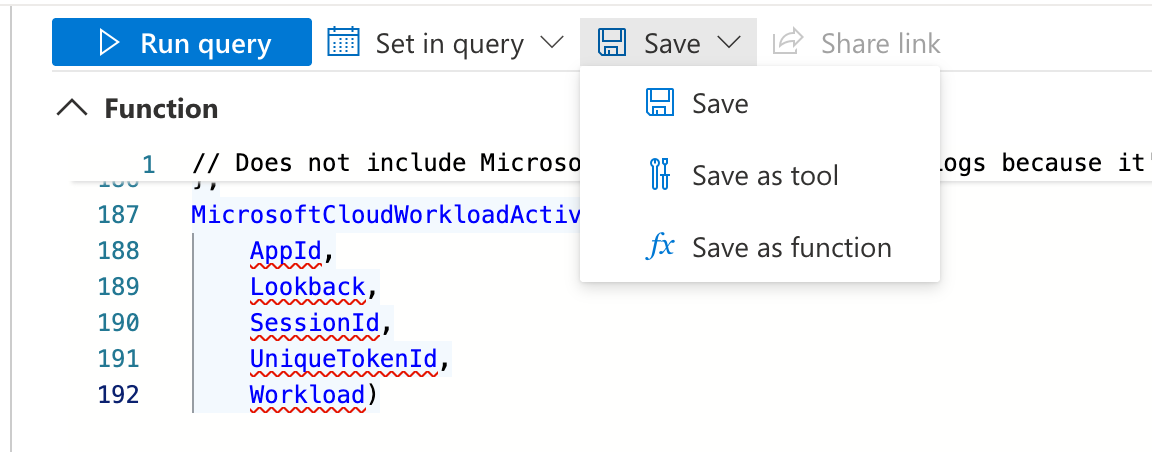
Next, we have to choose a name for the function (in this case, MicrosoftCloudWorkloadActivity) and define default parameters as you can see in the screenshot:
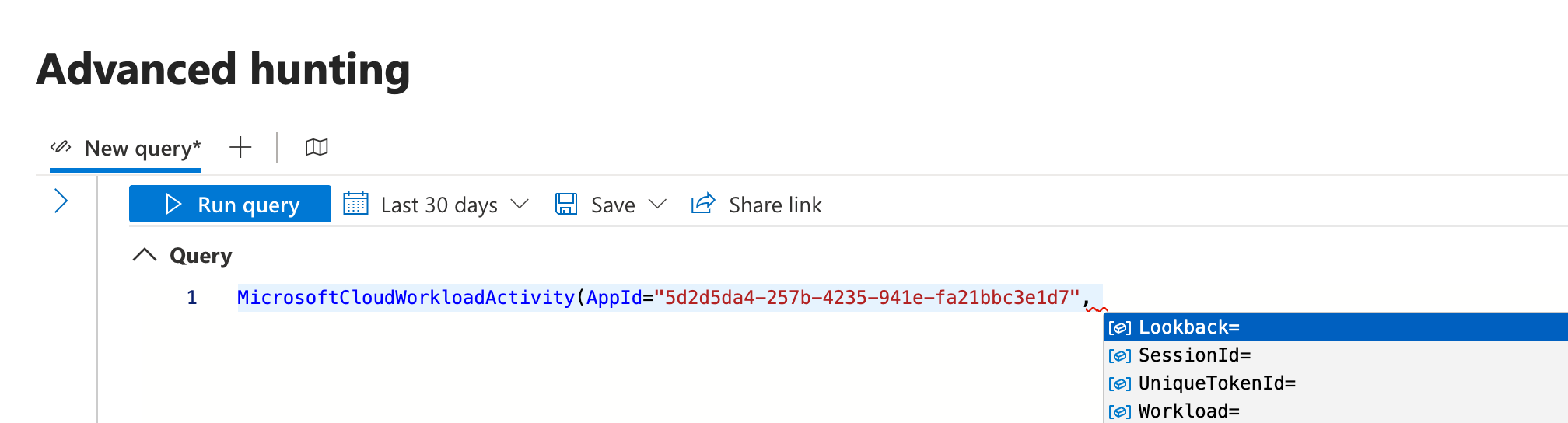
After a few moments, you should be able to use the KQL function from the Advanced Hunting query, like this, including IntelliSense to select the parameter for further filtering:
What are other use cases?
Below you’ll find some use cases intended to inspire you on how to leverage MicrosoftCloudWorkloadActivity. Please note that these examples are very experimental and based on my initial tests—they are not yet production-ready and are provided without warranty.
Hunting of issued and used tokens by AppId
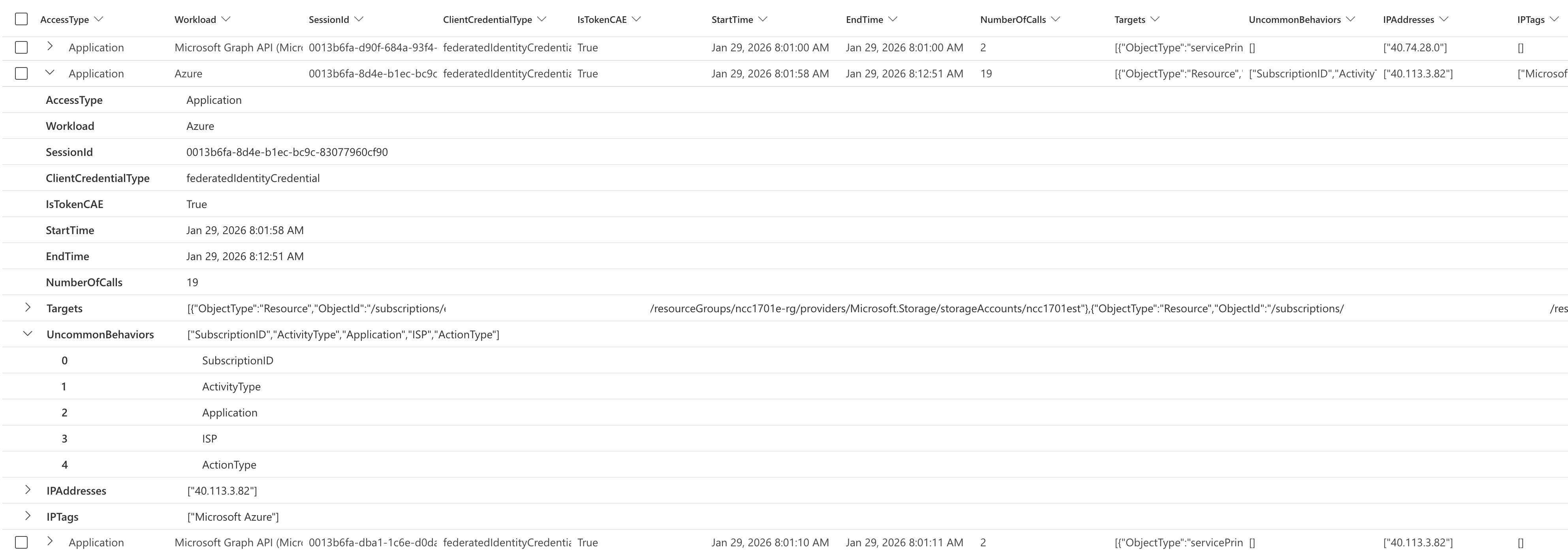
The results group activity by the application and workload identity grouped by SessionId and the used ClientCredentialType and if the token is CAE-capable.
Details include information about which Workload/API has been used, target object and if there has been Uncommon Behavior identified in the CloudAppEvents.
MicrosoftCloudWorkloadActivity(AppId="<YourAppId>", Lookback=4h)
| extend Target = bag_pack_columns(ObjectType, ObjectId)
| summarize StartTime = min(Timestamp), EndTime = max(Timestamp), NumberOfCalls = count(), Targets = make_set(Target), UncommonBehaviors = make_set(UncommonForUser), IPAddresses = make_set_if(IPAddress, isnotempty(IPAddress)), IPTags = make_set(IPTags)
    by AccessType, Workload, SessionId, ClientCredentialType, IsTokenCAE
Ongoing activity from tokens issued before Service Principal disablement, containment, or high-risk detection
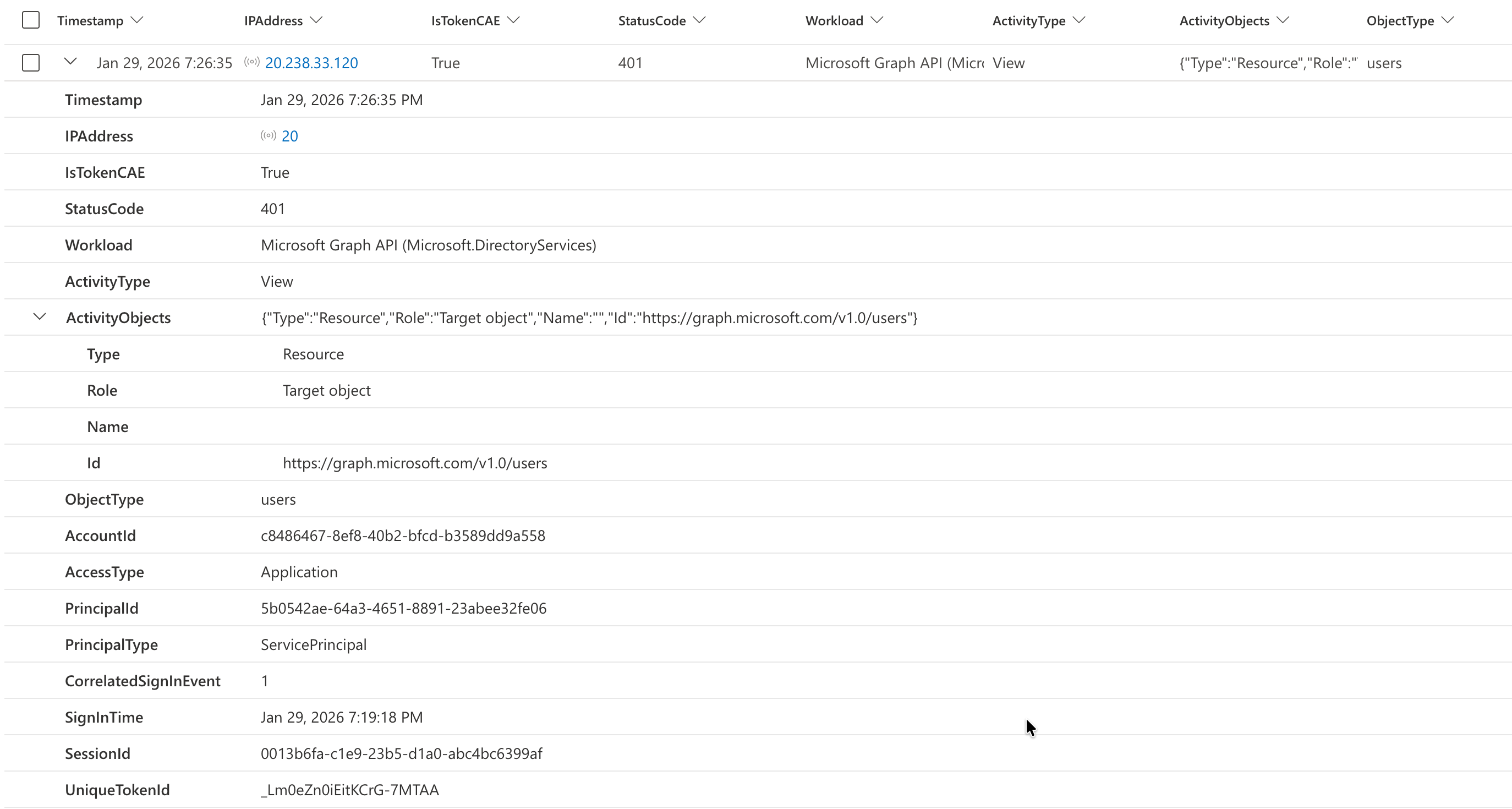
This query identifies post-containment token activity after disabling a compromised service principal. It detects when the service principal’s AccountEnabled property was changed to false in audit logs, then hunts for any subsequent Microsoft Graph API calls made using previously-issued tokens from that identity. This is crucial for incident response because tokens can remain valid for up to one hour after account disablement—allowing threat actors to maintain persistence until token expiration. CAE-capable tokens will immediately fail with a 401 response code upon revocation, as we can see in the following example.
let ImpactedAppId = "YourAppId";
let SpDisableEvent = AuditLogs
| extend TargetResources = parse_json(TargetResources)
| mv-expand TargetResource = TargetResources
| mv-expand ModifiedProperty = TargetResource.modifiedProperties
| where ModifiedProperty.displayName == 'AccountEnabled'
| where ModifiedProperty.newValue == '[false]'
| extend AdditionalDetails = parse_json(AdditionalDetails)
| mv-expand Detail = AdditionalDetails
| where Detail.key == "AppId"
| extend AppId = tostring(Detail.value)
| where AppId == (ImpactedAppId);
let SpDisableTimestamp = toscalar(SpDisableEvent | summarize min(TimeGenerated));
// Optional: Add a 90-second buffer to ensure the disable event has taken effect
let SpDisableTimestampWithBuffer = datetime_add('second', +90, SpDisableTimestamp);
MicrosoftCloudWorkloadActivity(AppId=(ImpactedAppId), Lookback="48h", Workload="Microsoft Graph API")
| where Timestamp > SpDisableTimestampWithBuffer
| extend StatusCode = parse_json(RawEventData)["ResponseStatusCode"]
| project-reorder Timestamp, IPAddress, IsTokenCAE, StatusCode, Workload, ActivityType, ActivityObjects, ObjectType
A similar approach can be applied when Entra ID Protection for Workload ID flags a service principal as high risk. This risk detection triggers a revocation event for CAE-capable tokens and—if configured—Conditional Access policies will block sign-in requests or token renewals. The following query collects all UniqueTokenIdentifiers issued before the high-risk event occurred and hunts for any continued activity using those specific tokens.
let ImpactedAppId = "YourAppId";
let SpHighRiskEvent = AADServicePrincipalRiskEvents
| where AppId == (ImpactedAppId)
| where RiskLevel == @"high"
| project ActivityDateTime, RiskState, RiskEventType;
let SpHighRiskEventTimestamp = toscalar(SpHighRiskEvent | summarize min(ActivityDateTime));
// Optional: Add a 90-second buffer to ensure the high-risk event has taken effect
let SpHighRiskTimestampWithBuffer = datetime_add('second', +90, SpHighRiskEventTimestamp);
let IssuedTokens = union AADServicePrincipalSignInLogs, AADManagedIdentitySignInLogs
    | where CreatedDateTime < SpHighRiskTimestampWithBuffer and CreatedDateTime > datetime_add('hour', -28, SpHighRiskTimestampWithBuffer)
    | where AppId == (ImpactedAppId)
    | summarize by UniqueTokenIdentifier, TimeGenerated;
let IssuedTokensList = toscalar(IssuedTokens | summarize make_set(UniqueTokenIdentifier));
MicrosoftCloudWorkloadActivity(AppId=(ImpactedAppId), Lookback="24h", Workload="Microsoft Graph API")
| where Timestamp > (SpHighRiskTimestampWithBuffer) and UniqueTokenId in (IssuedTokensList)
| extend StatusCode = parse_json(RawEventData)["ResponseStatusCode"]
| project-reorder Timestamp, IPAddress, IsTokenCAE, StatusCode, Workload, ActivityType, ActivityObjects, ObjectType
List of sign-in details and issued tokens by unusual credential type and other properties
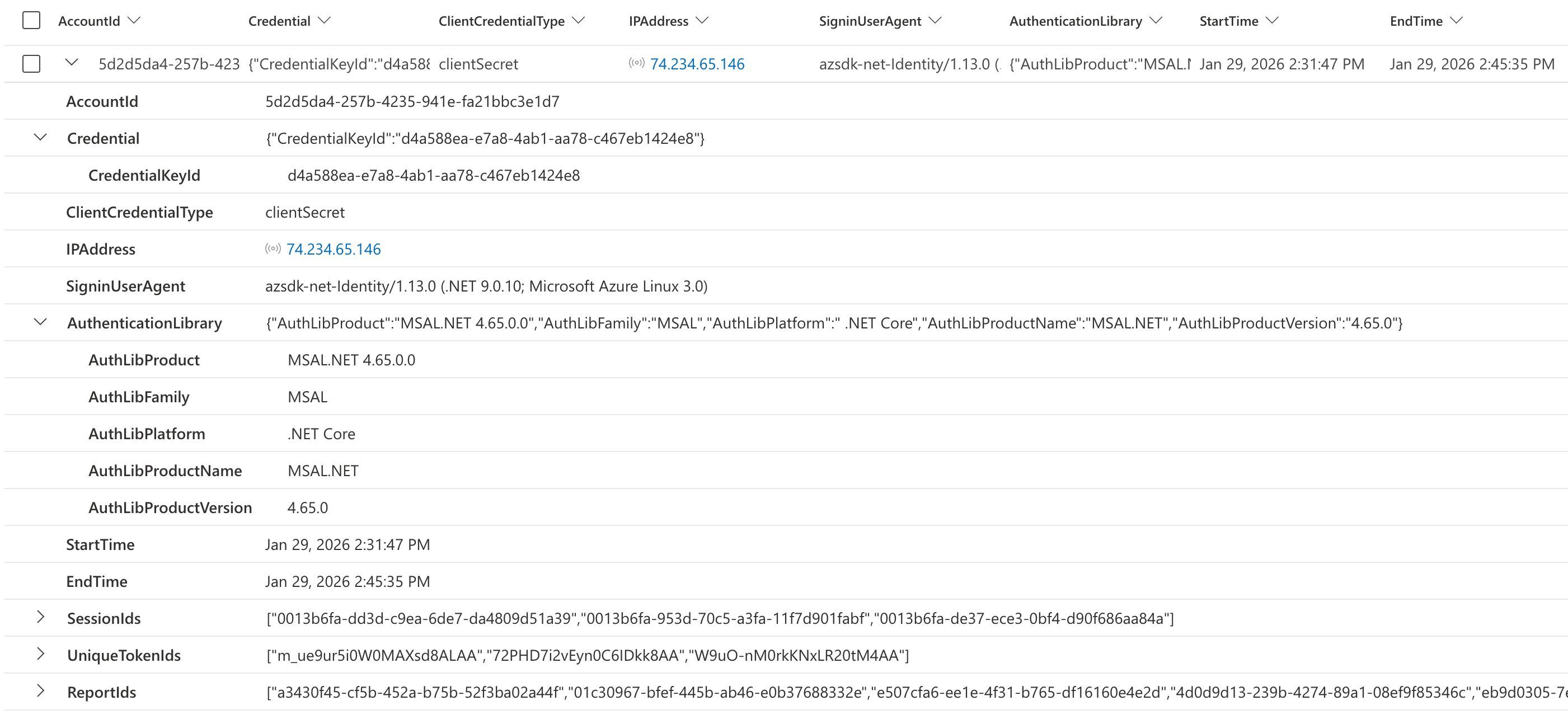
This query identifies secret-based authentication sessions for a service principal. It groups activity by credential type, source IP address, user agent, and authentication library, providing a summary of each unique session, associated session IDs, token IDs, and Microsoft Defender’s report IDs. This helps detect if the same service principal is authenticating from multiple IP addresses, using different credentials, or exhibiting unusual agent and authentication library.
Comparing the UserAgent from activity logs with the SigninUserAgent from sign-in logs can also provide valuable insights. Unfortunately, these details are not available for every type of sign-in or activity event.
MicrosoftCloudWorkloadActivity(AppId="YourAppId")
| where ClientCredentialType == "clientSecret"
| summarize StartTime = min(Timestamp), EndTime = max(Timestamp), SessionIds = make_set(SessionId), UniqueTokenIds = make_set(UniqueTokenId), ReportIds = make_set(ReportId)
    by AccountId, ClientCredentialType, IPAddress, SigninUserAgent, UserAgent, AuthenticationLibrary
Hunting of unusual activity on Graph API
The following query detects anomalous Microsoft Graph API activity for a specific service principal by comparing current usage patterns against a 7-day baseline. It identifies ObjectTypes (like users, groups, applications) where the call volume has increased by 2x or more, or here the service principal is accessing resource types it hasn’t accessed before. Results show the current count, historical average, ratio increase, and whether the pattern is entirely new. This could help analysts quickly spot potential indicators of compromise, abuse or configuration changes.
let AppIdFilter = "YourAppId";
let CurrentPeriod = 1d;              // Period to analyze for anomalies
let BaselinePeriod = 7d;             // Historical baseline period
let AnomalyThreshold = 2.0;          // Alert if current volume is 2x baseline average
let MinBaselineCount = 10;           // Ignore patterns with low baseline activity
// Collect baseline activity (7 days ago, excluding current period)
let Baseline = MicrosoftCloudWorkloadActivity(
    AppId=AppIdFilter,
    Lookback=BaselinePeriod + CurrentPeriod,
    Workload="Microsoft Graph API"
)
| where Timestamp < ago(CurrentPeriod)  // Exclude current period from baseline
| summarize
    BaselineCount = count(),
    BaselineDays = dcount(bin(Timestamp, 1d))
    by Workload, ObjectType
| extend AvgDailyBaseline = todouble(BaselineCount) / BaselineDays;
// Collect current period activity
let Current = MicrosoftCloudWorkloadActivity(
    AppId=AppIdFilter,
    Lookback=CurrentPeriod,
    Workload="Microsoft Graph API"
)
| summarize
    CurrentCount = count(),
    FirstSeen = min(Timestamp),
    LastSeen = max(Timestamp),
    ActivityTypes = take_any(ActivityType, 3)
    by Workload, ObjectType;
// Compare and detect anomalies
Current
| join kind=leftouter (Baseline) on Workload, ObjectType
| extend AvgDailyBaseline = coalesce(AvgDailyBaseline, 0.0)
| extend BaselineCount = coalesce(BaselineCount, 0)
| extend IsNew = BaselineCount == 0
| extend RatioToBaseline = iff(AvgDailyBaseline > 0, CurrentCount / AvgDailyBaseline, 0.0)
| extend PercentIncrease = (RatioToBaseline - 1) * 100
| where IsNew or (RatioToBaseline >= AnomalyThreshold and BaselineCount >= MinBaselineCount)
| project
    Workload,
    ObjectType,
    CurrentCount,
    AvgDailyBaseline = round(AvgDailyBaseline, 1),
    BaselineCount,
    RatioToBaseline = round(RatioToBaseline, 2),
    PercentIncrease = round(PercentIncrease, 0),
    ActivityTypes,
    IsNew,
    FirstSeen,
    LastSeen
| sort by RatioToBaseline desc, CurrentCount desc
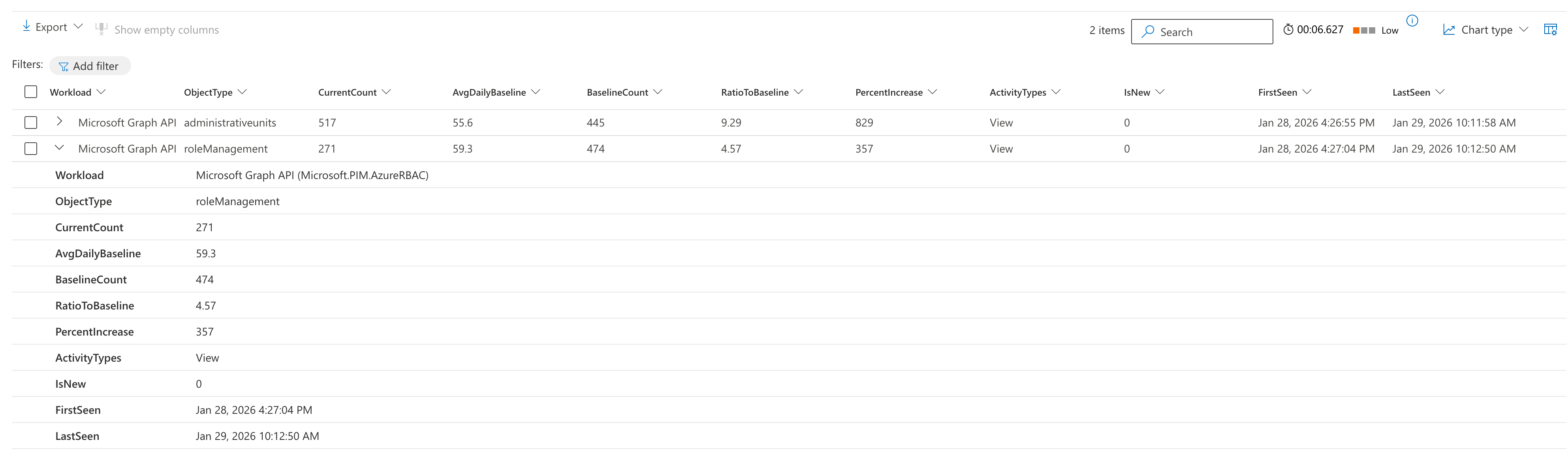
Note: Baseline/anomaly detection can also be valuable for other criteria, such as IP addresses, user agents, response sizes from Microsoft Graph API (which may indicate data exfiltration or large-scale reconnaissance), and the types of credentials or authentication libraries used during sign-in activities.
Visualization of unusual amount of activity
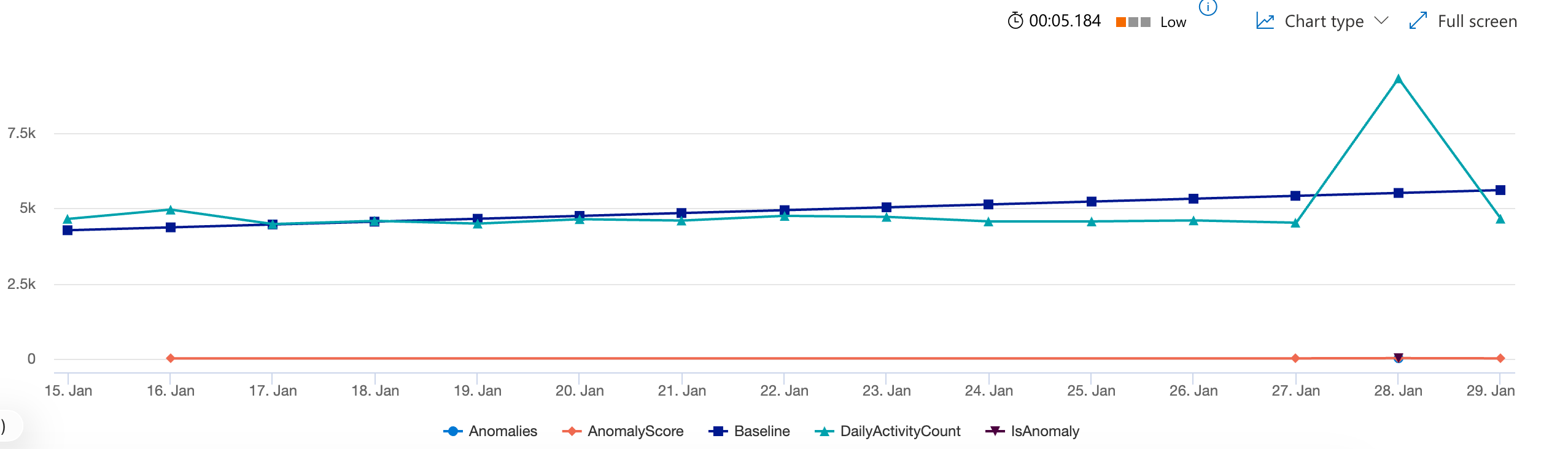
This query uses time-series anomaly detection to identify unusual activity patterns for a service principal’s Microsoft Graph API usage. It creates a 14-day daily activity trend, applies learning (series decomposition with linefit) to establish a baseline, and flags any days where activity deviates significantly (1.5x threshold) from expected behavior. The timechart visualization displays actual vs. baseline activity with anomalies highlighted, helping to spot suspicious spikes or drops without manually defining thresholds.
MicrosoftCloudWorkloadActivity(AppId="<YourAppId>", Lookback=30d, Workload="Microsoft Graph API", SessionId="", UniqueTokenId="")
| make-series DailyActivityCount=count() default=0 on Timestamp in range(ago(14d), now(), 1d)
| extend (Anomalies, AnomalyScore, Baseline) = series_decompose_anomalies(DailyActivityCount, 1.5, -1, 'linefit')
| project Timestamp, DailyActivityCount, Baseline, Anomalies, AnomalyScore
| mv-expand Timestamp to typeof(datetime), DailyActivityCount to typeof(long), Baseline to typeof(double), Anomalies to typeof(long), AnomalyScore to typeof(double)
| extend IsAnomaly = Anomalies != 0
| render timechart with (title="Daily Activity Volume: Baseline vs Actual (Anomalies Highlighted)", ysplit=axes)
What’s next?
This is just the first version of the query, which still has room for improvement in both performance and activity coverage. Nevertheless, I hope this supports your research and hunting efforts. I would be happy to receive your feedback or contributions on the KQL query.
In the future, I plan to add more insights regarding non-human identities (for example, considering Agentic identities and the various associated Agent identities). Stay tuned for updates in the coming months.