This post examines a gap in Microsoft Entra Identity Governance that allowed a catalog owner without separate resource-owner authorization to grant Microsoft Graph API permissions to a service principal if at least one API permission had previously been added to the catalog. Microsoft has since addressed that specific behavior. The case might also illustrate a broader question: after resource onboarding is secured, which escalation paths exist when delegated Identity Governance roles manage already-onboarded sensitive resources?
Summary of my MSRC case
“Unauthorized resource owners can introduce or expand access to API permissions through access packages”
Users with no Entra ID directory role assignment (or resource-owner authorization) and only catalog owner permissions were able to grant Microsoft Graph API permissions to a service principal through the new API-permission resource support in Identity Governance. For other resource types, the operation is normally protected by a check that the caller is authorized as the resource owner to add that resource to the catalog. In my testing, this check was not performed after an authorized actor had added at least one Microsoft Graph API permission to the catalog. A delegated administrator could then add further permissions from that resource provider to access packages in the catalog without a separate resource-ownership check. The first-party service principal “Azure AD Identity Governance - Directory Management” executed the resulting app-role assignment to the target service principal, allowing the non-privileged user to assign those permissions indirectly.
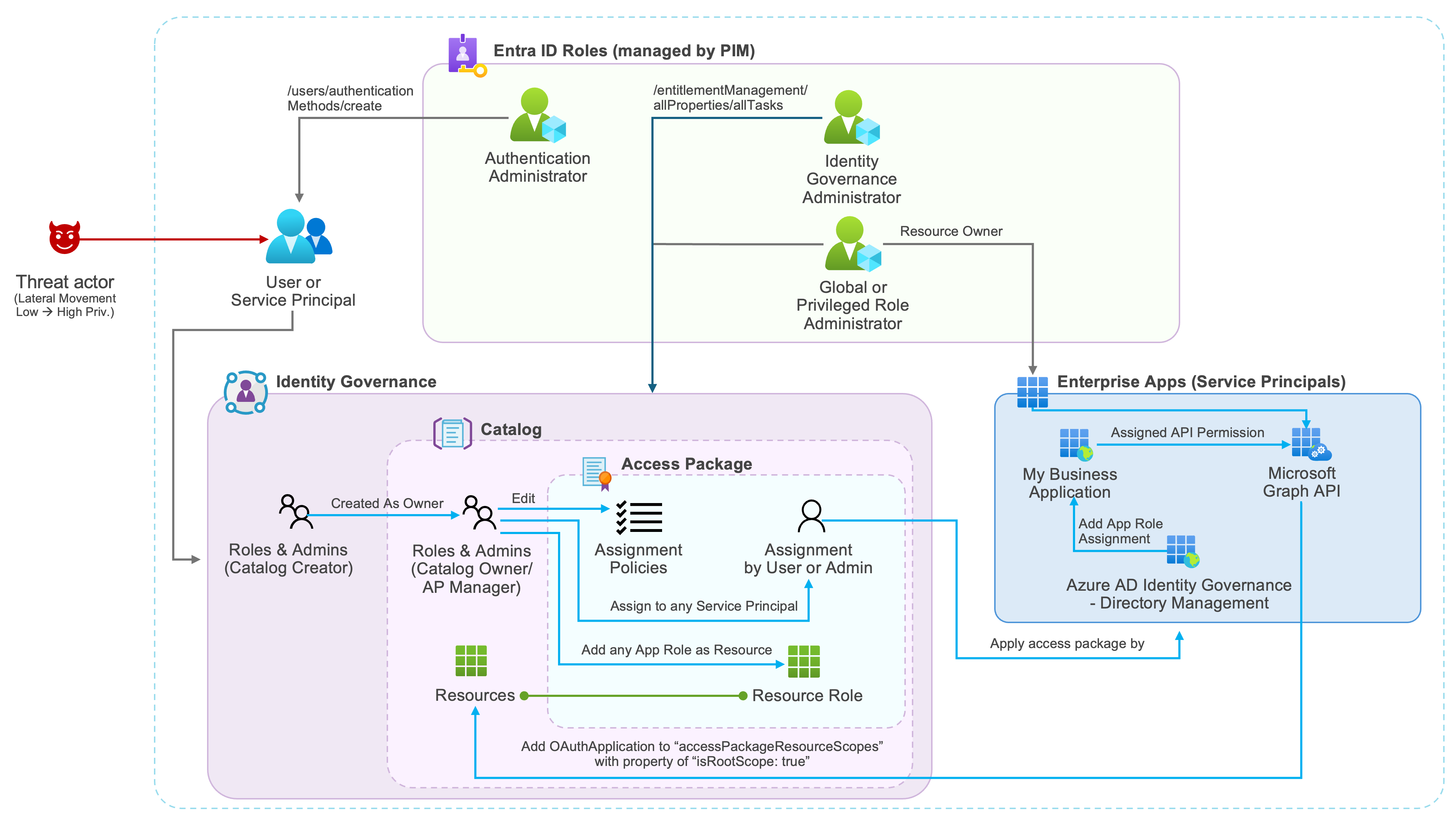
Diagram: how a catalog owner without a directory role can add a Microsoft Graph API permission as a catalog resource and use it in an access package. The “Azure AD Identity Governance - Directory Management” service principal (blue lines, right) then performs the app-role assignment on the caller’s behalf, while the top of the diagram shows the resource-owner path Microsoft intended to require.
In December 2025 and January 2026, I contacted MSRC about this behavior. A June 1, 2026 documentation change indicated that Microsoft had introduced resource-ownership validation both during onboarding and when adding permissions to an access package. I asked Microsoft to confirm whether the change reflected a deployed mitigation; MSRC confirmed deployment on June 18. MSRC assessed the behavior as Moderate severity and characterized it as improper configuration rather than a product vulnerability. According to MSRC, the additional validation is a defense-in-depth measure. Alongside this mitigation, I recommend reviewing resources assigned to catalogs for historical assignments and implementing controls to reduce the risk of abuse through delegated administration.
Current outcome: Microsoft has deployed the additional resource-ownership validation, and my subsequent testing confirms that a catalog owner without resource-owner authorization can no longer introduce or expand API permissions through this path. The specific behavior described in this report is fixed.
Introduction
Managing API permissions in access packages
In November 2025, Microsoft introduced support for assigning API permissions to a service principal or Agent ID in Identity Governance. Delegated and application permissions published by an Entra ID service principal can be included in an access package, subject to restrictions for the target identity type (for example, the limitation of highly privileged permissions for agent identities).
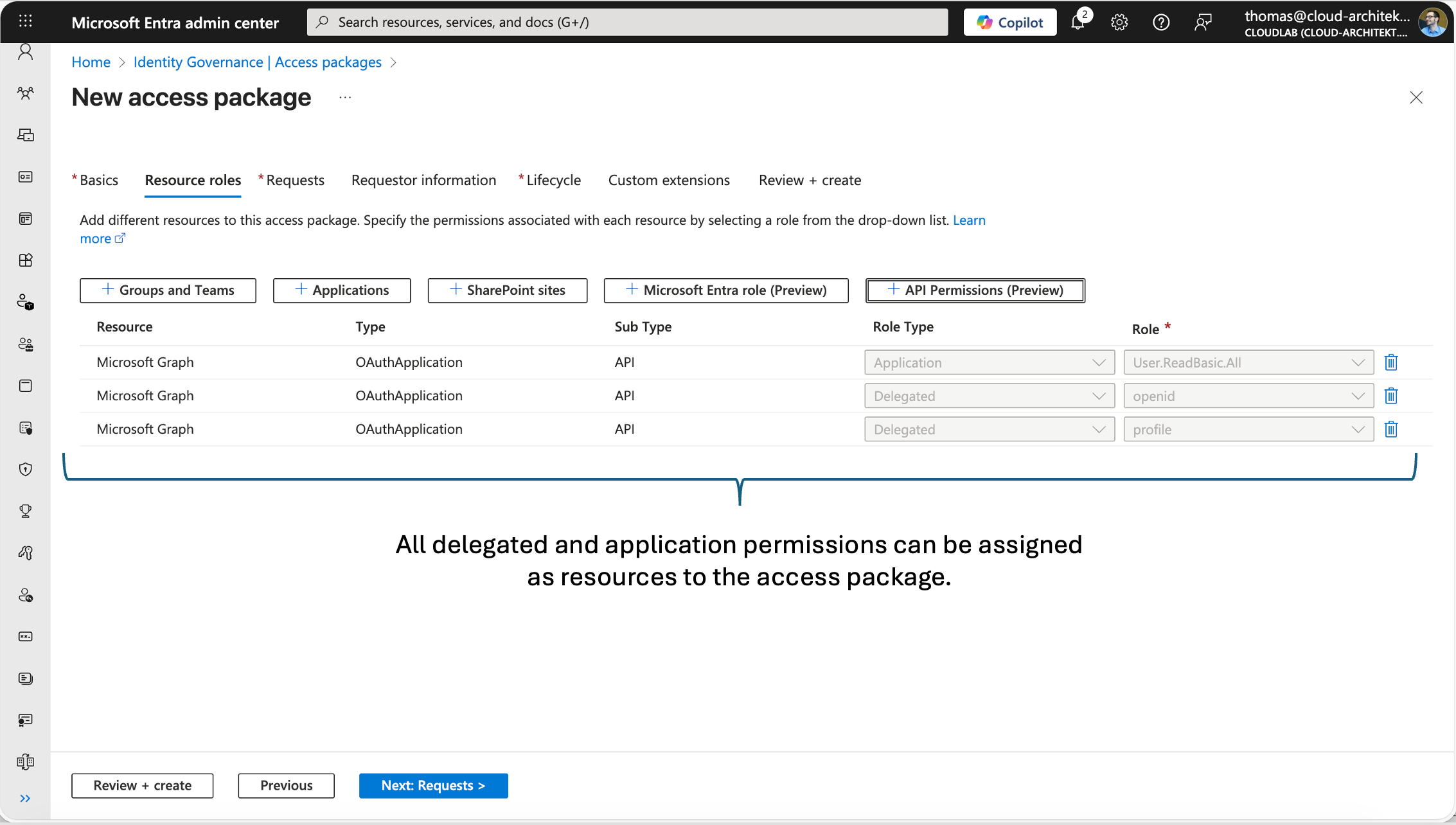
Screenshot: the access-package “Resource roles” tab, where delegated and application permissions can be added as resources.
Currently, the portal UI offers a limited catalog-level management for API permissions than for other resource types: API permissions added as resources can be managed only from an access package. At the catalog level, the resource view displays only the OAuthApplication resource that exposes the app roles and scopes; it does not show or let you assign individual API permissions. Other resources, such as Entra roles, can still be managed at both the catalog and access-package levels.
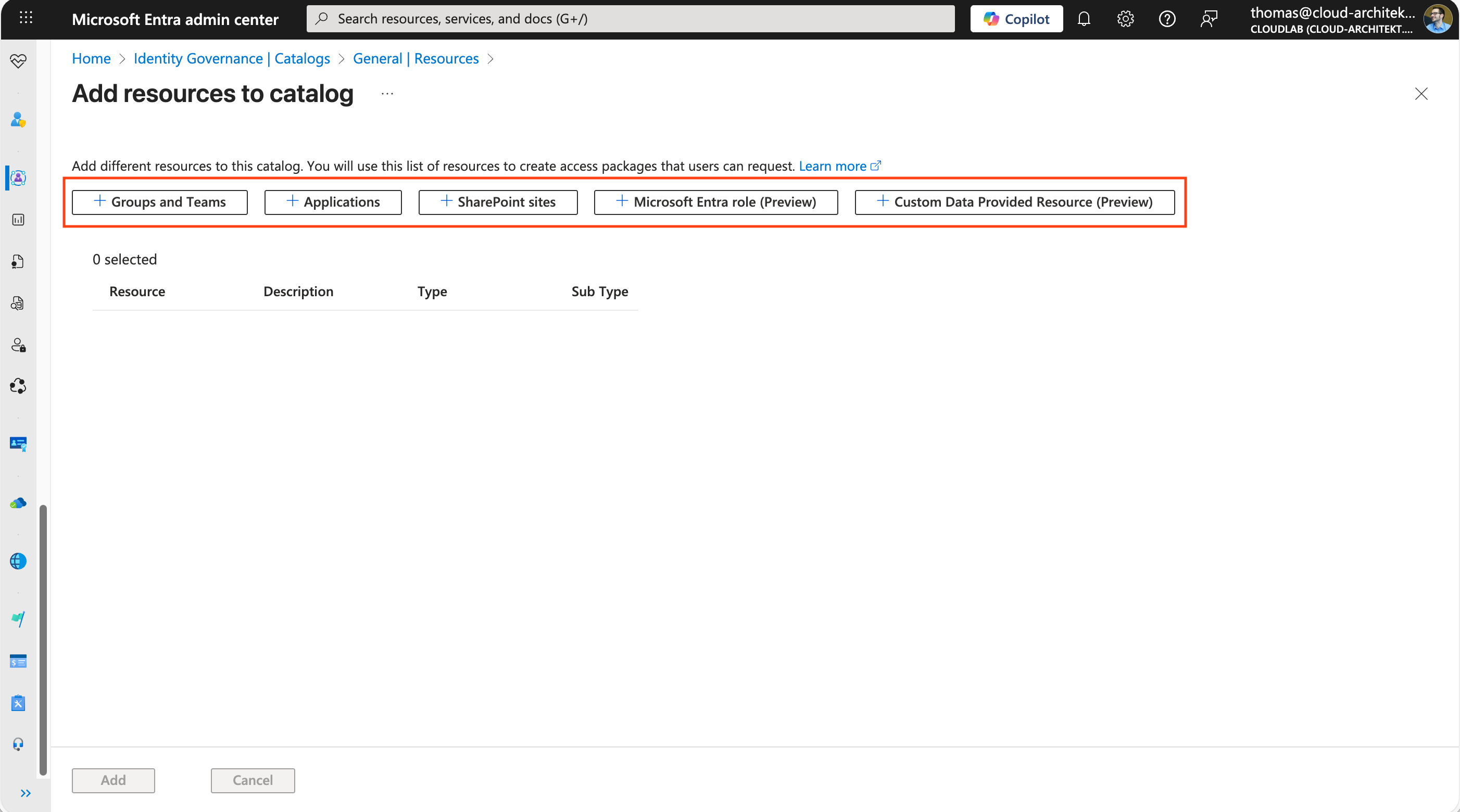
Screenshot: the catalog-level “Add resources to catalog” blade has no option to add or view individual API permissions; that resource type is only exposed at the access-package level.
Note: Microsoft recently changed the licensing requirements and now enforces a technical check. Assigning access packages to agents requires an Agent 365 or Microsoft 365 E7 license. This message also appears when you try to use this feature with service principals.
Risks of assigning sensitive resources through Identity Governance delegation
Identity Governance allows delegation of permissions using roles at the catalog level. A detailed description and comparison of these management roles is available on Microsoft Learn. The most powerful roles include:
| Entitlement management role | Description |
|---|---|
| Catalog owner | Edit and manage access packages and other resources in a catalog. |
| Access package manager | Edit and manage all existing access packages within a catalog. |
| Access package assignment manager | Edit and manage all existing access packages’ assignments. |
There are potential lateral-movement paths when someone becomes a catalog owner or access package manager. Sensitive resources already present in the catalog and access package can be assigned to a principal through an admin assignment, subject to the selected assignment policy. Catalog owners and access package managers can also create or modify policies. An access package assignment manager can administer assignments to existing access packages, but cannot modify access packages or policies; direct assignment still requires an eligible policy and honors required approvals. Consequently, already-onboarded resources, including role-assignable groups or Microsoft Entra directory roles, can be assigned indirectly within the delegated role’s scope.
Note: While Entra Identity Governance allows directory role assignments to be included as either active or eligible, the portal imposes strict limitations on which roles can be added as catalog resources, reducing the potential blast radius. Specifically, highly privileged roles—such as Global Administrator, Intune Administrator, and many others—are excluded from the portal’s resource picker. Based on my testing, it appears that roles with the
isPrivilegedflag are excluded.
These assignments by users without a privileged Entra ID role are possible because assignments in Entra ID are executed by the first-party service principal (“Azure AD Identity Governance - Directory Management”), which has the necessary permissions to add group, directory-role, or app-role assignments.
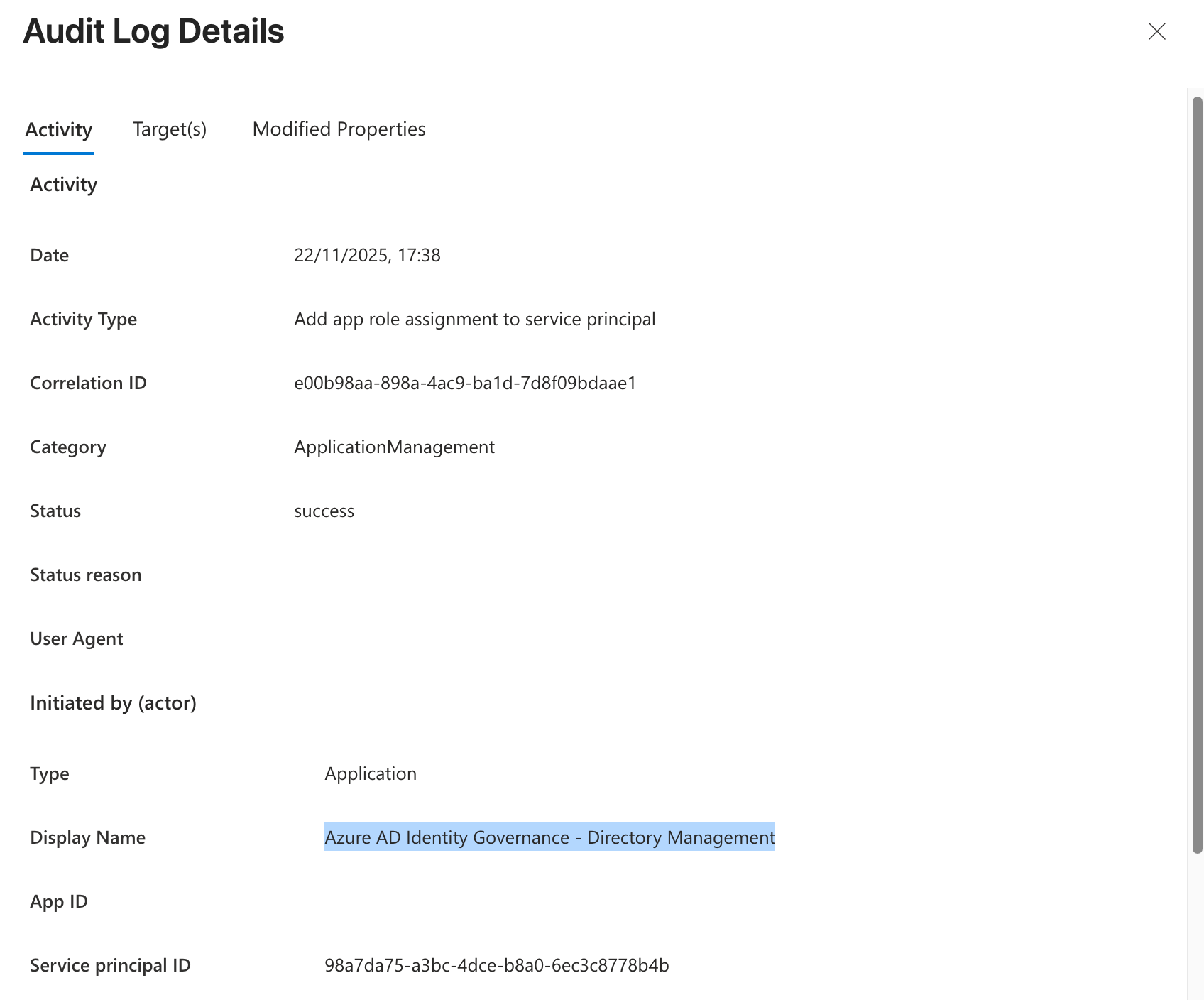
Screenshot: audit log entry showing the “Azure AD Identity Governance - Directory Management” service principal, rather than the requesting user, as the actor that performs the app-role assignment.
Any user, group, or service principal can be added as a delegated administrator. Once assigned as an administrator in Identity Governance, these accounts are not specifically protected (unlike Entra ID role members) because of their service-specific role assignment. Therefore, any entry point with privileges to manage service principals or reset regular user passwords could compromise the delegated administrator’s account. The dashed red line in the following visualization shows the indirect control path. The delegated administrator in Identity Governance has control of the catalog resources to assign membership to an Entra ID role or a role-assignable group with Entra ID role assignment via an access package.
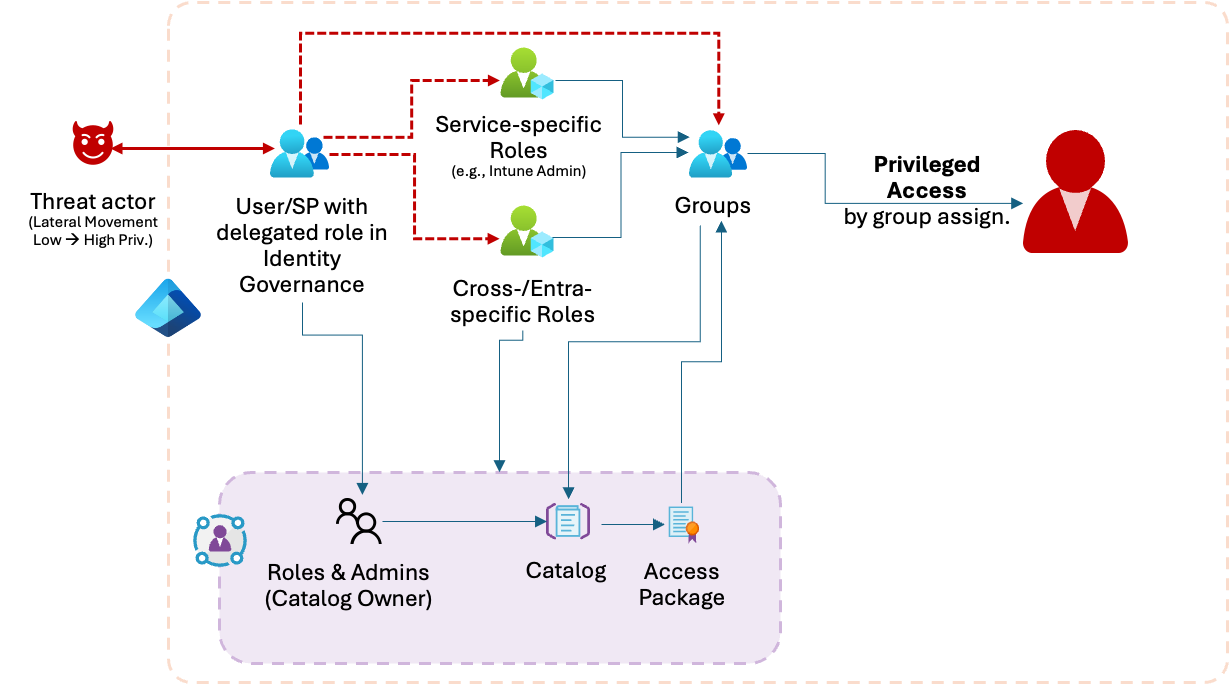
Diagram: solid blue lines show the delegated catalog owner’s normal path through Roles & Admins, Catalog, and Access Package. The dashed red lines show the indirect control path this role can also reach: assigning identities to a role-assignable group (via an access package) that itself carries a service-specific or Entra directory-role assignment, ending in privileged access through that group membership.
Validation of permissions required to add resources to a catalog
Microsoft has implemented logic in the Identity Governance resource interface and API to ensure that only actors with the appropriate roles can add sensitive resources. For example, only Privileged Role Administrators or Global Administrators can add directory roles as resources. Otherwise, the caller receives the following error message in the Microsoft Graph API response:
"code": "UnAuthorized",
"message": "User is not authorized to perform the operation. Reason: The caller is not authorized."
The previously mentioned roles are required to add a role-assignable group to the catalog or access package. If you lack the necessary permissions, the option is disabled.
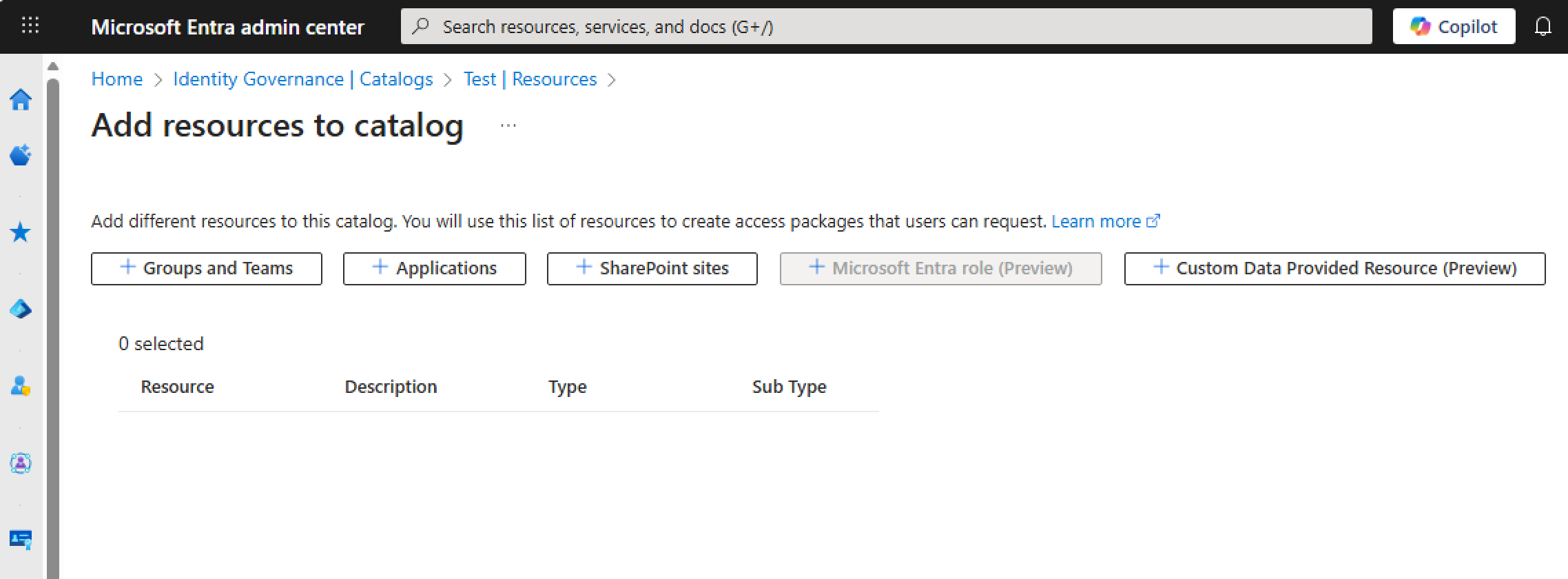
Screenshot: the “Microsoft Entra role (Preview)” button is disabled in the UI for a user who lacks resource-owner permissions.
For API permissions, the “Add API Permissions” button is always enabled. However, if you lack the required resource-owner permissions, the request fails. In my Microsoft Graph testing, adding these API permissions required Global Administrator or Privileged Role Administrator privileges; this statement reflects the roles and scenarios I tested rather than an exhaustive definition of every identity that Microsoft might recognize as an authorized resource owner.
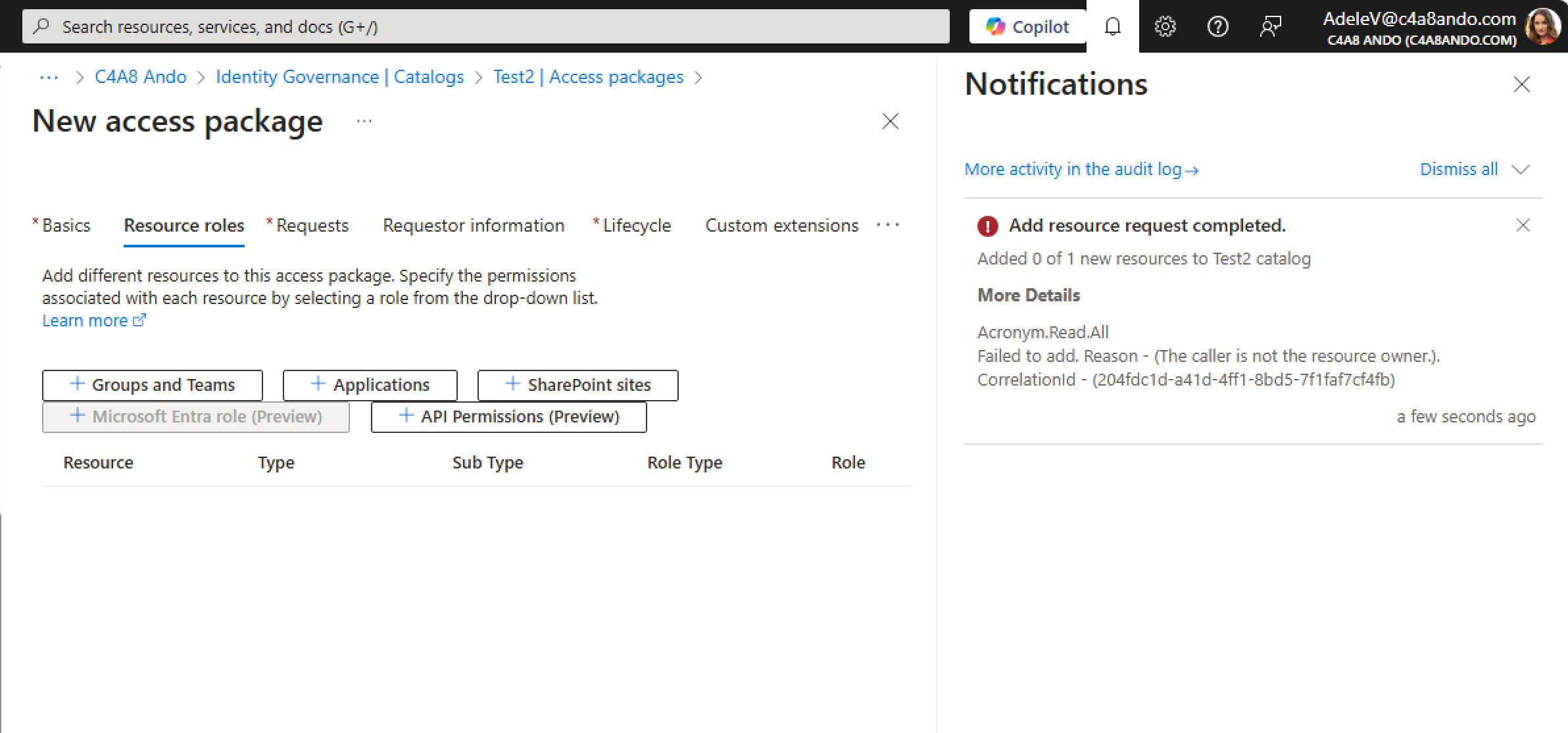
Screenshot: unlike the directory-role button, “Add API Permissions” stays enabled for any user, but the request still fails afterward with “The caller is not the resource owner.”
The same restriction applies to non-Graph API permissions: an Application Administrator, a role that can normally assign app roles and consent to permissions outside of Identity Governance, will also receive this error unless authorized as the resource owner.
Security concerns related to API permission support
Three issues stood out to me as security and governance risks. They differ significantly from how directory roles and other resource types are managed within access packages.
Scope of assigned resources in the catalog
In my Microsoft Graph testing, adding API permissions to a catalog required Global Administrator or Privileged Role Administrator privileges. This reflects the roles and scenarios I tested and should not be read as an exhaustive definition of all authorized resource owners. When an API permission from a service principal is added — even a low-privileged or default API scope — accessPackageResourceScopes includes the RootScope of Microsoft Graph API, which might be overlooked in the catalog’s “Resource roles” section in combination with this wide scope. You can view this by using the following Graph API call:
https://graph.microsoft.com/beta/identityGovernance/entitlementManagement/accessPackageCatalogs/<CatalogObjectId>/accessPackageResources?$expand=accessPackageResourceScopes,accessPackageResourceRoles
You should receive a response that includes the following scope:
"accessPackageResourceScopes": [
    {
        "id": "e73b4458-b74b-4541-b61d-e32adb70e77a",
        "displayName": "Root",
        "description": "Root Scope",
        "originId": "00000003-0000-0000-c000-000000000000",
        "originSystem": "OAuthApplication",
        "roleOriginId": null,
        "isRootScope": true,
        "url": null
    }
],
Additionally, every API permission added to Identity Governance is included in the catalog’s accessPackageResourceRoles. For example, a new catalog with an access package containing User.ReadBasic.All as a resource also includes other Microsoft Graph API permissions from other catalogs.
When the first API permission is added to an access package, Microsoft Graph appears to be added as a resource. This behavior can also be reproduced with the following Graph PowerShell cmdlet:
$accessPackageResource = @{
       "originSystem" = "OAuthApplication"
      "originId" = "00000003-0000-0000-c000-000000000000"
}

New-MgBetaEntitlementManagementAccessPackageResourceRequest `
-CatalogId $($CatalogId) `
-RequestType "AdminAdd" `
-AccessPackageResource $accessPackageResource
This behavior differs from Microsoft Entra roles, groups, or Azure subscriptions as catalog resources, where only the specific resource is included in the catalog. For example, the following resource defines the scope of “Attribute Log Reader” (role ID: 9c99539d-8186-4804-835f-fd51ef9e2dcd). It can be assigned at the root scope (directory-level assignment), but only that role can be used.
{
    "id": "8ff5971d-3ef9-4349-95f6-03a8d655b4ff",
    "displayName": "Attribute Log Reader",
    "description": "Read audit logs related to custom security attributes.",
    "url": "https://portal.azure.com/#blade/Microsoft_AAD_IAM/ActiveDirectoryMenuBlade/RolesAndAdministrators",
    "resourceType": "Built-in",
    "originId": "9c99539d-8186-4804-835f-fd51ef9e2dcd",
    "originSystem": "DirectoryRole",
    "isPendingOnboarding": false,
    "attributes": [],
    "accessPackageResourceScopes@odata.context": "https://graph.microsoft.com/beta/$metadata#identityGovernance/entitlementManagement/accessPackageCatalogs('746a869a-5416-4225-9f80-45e998f3ba1c')/accessPackageResources('8ff5971d-3ef9-4349-95f6-03a8d655b4ff')/accessPackageResourceScopes",
    "accessPackageResourceScopes": [
        {
            "id": "71c7df73-be01-4a83-b18c-f2c56cf025dc",
            "displayName": "Root",
            "description": "Root Scope",
            "originId": "9c99539d-8186-4804-835f-fd51ef9e2dcd",
            "originSystem": "DirectoryRole",
            "roleOriginId": null,
            "isRootScope": true,
            "url": null
        }
    ],
    "accessPackageResourceRoles@odata.context": "https://graph.microsoft.com/beta/$metadata#identityGovernance/entitlementManagement/accessPackageCatalogs('746a869a-5416-4225-9f80-45e998f3ba1c')/accessPackageResources('8ff5971d-3ef9-4349-95f6-03a8d655b4ff')/accessPackageResourceRoles",
    "accessPackageResourceRoles": []
}
Removal of catalog resources and limited visibility
Even if the API permission resource or the access package has been deleted, the AccessPackageCatalog resource assignment remains. This is also the case for other resource types. However, the portal UI does not display these catalog-level resources, which makes it difficult to identify stale resource assignments within the catalog.
Delegated administrators can add API permissions as resources
The previously described design allowed a catalog owner to add API permissions to the catalog and access package. When Microsoft Graph was onboarded as an OAuthApplication resource, its resource scope was represented in the catalog with isRootScope: true. This value described the scope of the onboarded resource provider; it did not itself grant every Microsoft Graph permission. In the historical behavior, the catalog owner could select additional Microsoft Graph resource roles because Identity Governance did not repeat resource-owner validation when those permissions were added to an access package. The combination of the broad resource scope and the missing validation enabled the permission expansion beyond the roles previously added by an authorized resource owner.
Potential privilege escalation and attack path
Included personas:
- User A is a catalog creator and is responsible, as a Helpdesk Administrator, for managing regular user-access privileges for human and non-human identities (for example, User Access, formerly known as Tier 2).
- User B is a Global Administrator and delegates administrative tasks to non-privileged users in the Helpdesk.
Example privilege-escalation scenario
The following steps illustrate the escalation path (as it existed before Microsoft’s fix):
- Catalog creation: User A created a new catalog as a catalog creator without any resources. By default, User A also became a catalog owner.
- Attempt to add an API permission: User A tried to add a lower-privileged API permission, such as
User.ReadBasic.All, as a resource to a new access package for LOB applications. The request was blocked because User A lacked resource ownership. - Global Administrator intervention: User B created an access package in the new catalog and added the lower-privileged API permission. In the background, Microsoft Graph was added as a catalog resource.
- Escalation opportunity: As the catalog creator, User A had management permissions for the access package and could add highly privileged API permissions as resources.
- Adding highly privileged permissions: User A created an access package in the catalog with another highly privileged API permission, such as
RoleManagement.ReadWrite.Directory. - Service principal exploitation: User A created a service principal and assigned it those highly privileged API permissions to gain directory role assignments in the tenant.
Responsible disclosure and Microsoft’s mitigation
I reported this potential vulnerability to the Microsoft Security Response Center (MSRC).
My first report covered the ability of a catalog owner to add additional Microsoft Graph API permissions without further resource-ownership validation. In my original reproduction, I used a Global Administrator as the authorized actor who added the first permission. MSRC initially assessed the report as Moderate severity because it understood this Global Administrator action to be a prerequisite. MSRC later clarified that the behavior could also be reproduced by an actor with lower privileges than Global Administrator, provided that the actor satisfied the applicable resource-owner requirement. The privilege escalation occurred when the catalog owner subsequently expanded the permissions without undergoing that validation again.
I sent a second report to MSRC with additional research findings, including the isRootScope in the catalog and stale catalog-resource assignments after access-package removal. MSRC again assessed the behavior as Moderate severity and later confirmed that a mitigation had been deployed.
A detailed disclosure timeline can be found in the appendix.
Mitigation by Microsoft
On June 1, 2026, Microsoft updated its documentation for access packages for Agent ID with the following statement:
For API permissions, resource ownership validation occurs both during onboarding the permissions to an access package and again when adding permissions to an access package. This additional validation helps ensure that only authorized resource owners can introduce or expand access to API Permissions through access packages.
Source: Microsoft Learn (documentation change on June 1, 2026)
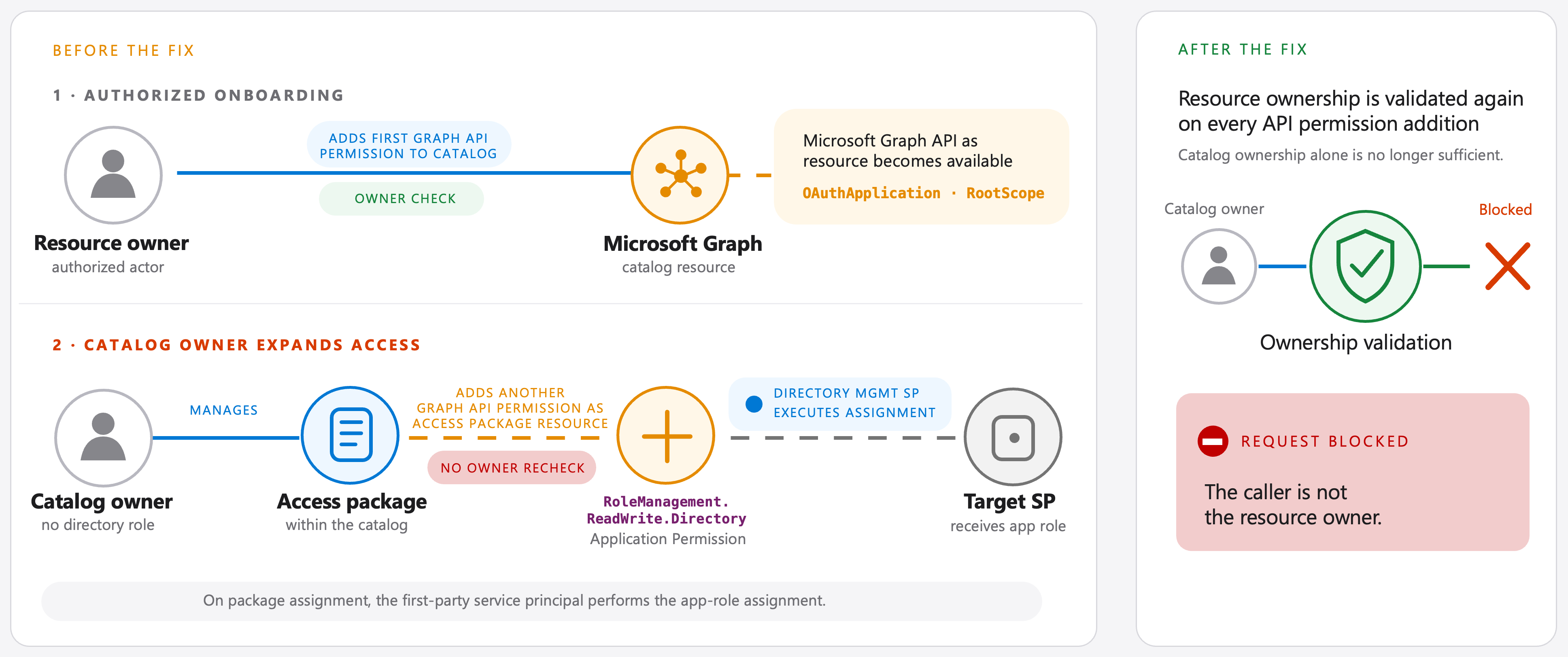
Diagram: before the fix (left), a catalog owner without a directory role could add a highly privileged permission to an access package without a repeated resource-owner check. After the fix (right), that action is blocked because ownership validation now repeats on every API-permission addition.
My testing confirms that a catalog owner without resource-owner permissions is now blocked from adding the API permission to a catalog or access package.
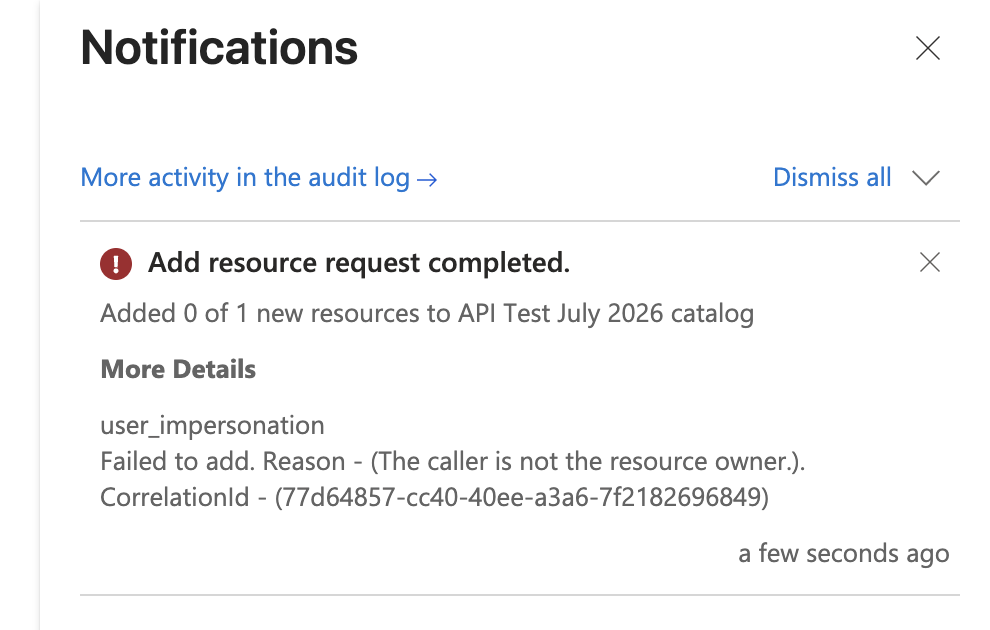
Screenshot: after Microsoft’s mitigation, adding an API permission as a catalog owner without resource ownership now fails with “The caller is not the resource owner.”
Monitoring and mitigation with EntraOps
Regardless of this report, organizations should monitor potential misconfigurations and overlooked lateral-movement paths in Microsoft Entra Identity Governance. Limited visibility in the portal can make it difficult to determine whether lower-privileged administrators can use catalog resources to gain elevated access.
A delegated Identity Governance role assignment does not make its holder a member of a Microsoft Entra directory role. Microsoft Entra therefore does not classify the holder as a privileged directory-role member on the basis of that assignment alone. Consequently, protections that rely on directory-role membership do not apply solely because of the Identity Governance assignment. For example, the role-based limitations that prevent an Authentication Administrator from managing the authentication methods of most directory administrators do not protect a delegated Identity Governance administrator who otherwise remains a nonadministrator in Microsoft Entra. Organizations should explicitly protect the underlying user, group, or service principal—for example, with appropriate Conditional Access policies for privileged users or workload identities and, for supported directory objects, by considering membership in a Restricted Management Administrative Unit (RMAU). An RMAU protects the underlying directory object from unauthorized modification; it does not protect the Identity Governance role assignment itself.
Given these security gaps and visibility challenges, I added monitoring and classification functionality in EntraOps to classify catalogs and delegated administrators based on the resources assigned to an OAuthApplication.
EntraOps evaluates the API permissions and applies the resulting classification to the catalog or access package and to all delegated administrators. For example, if a catalog contains a service principal with RoleManagement.ReadWrite.Directory and a catalog owner is a regular workforce user, that user will be classified as having Control Plane privilege due to their direct or indirect ability to manage Privileged IAM in Microsoft Entra. These insights are available in the EntraOps Privileged EAM Reporting Workbook, and you can also use KQL for deeper investigations.
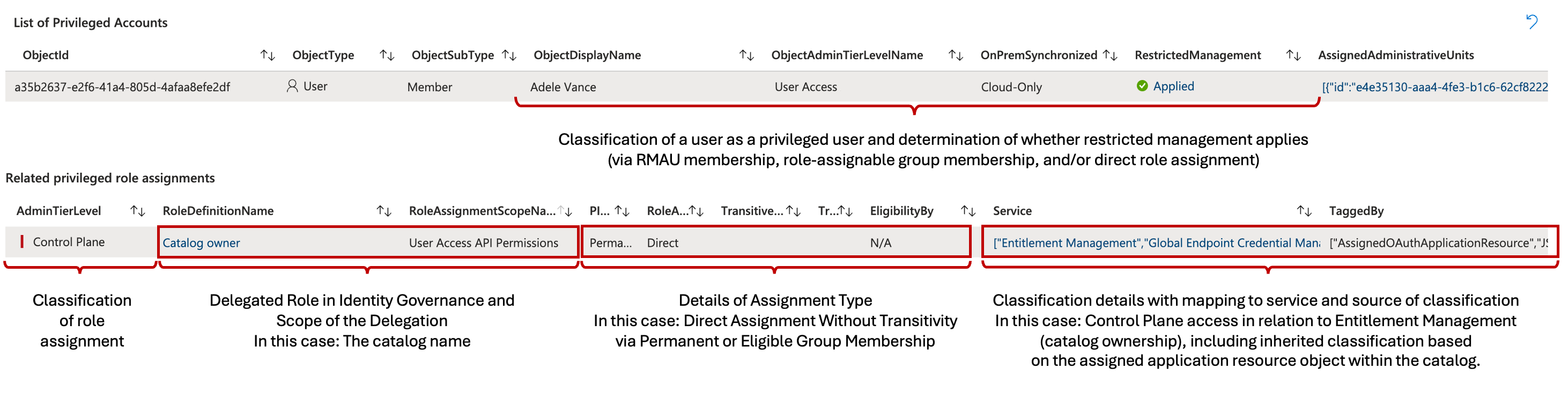
Screenshot: EntraOps classifies a catalog owner as a Control Plane user because the catalog contains an OAuthApplication resource with a Control Plane app role, tagging the finding as AssignedOAuthApplicationResource.
This delegated role assignment also shows up in the new EntraOps EAM Dashboard:
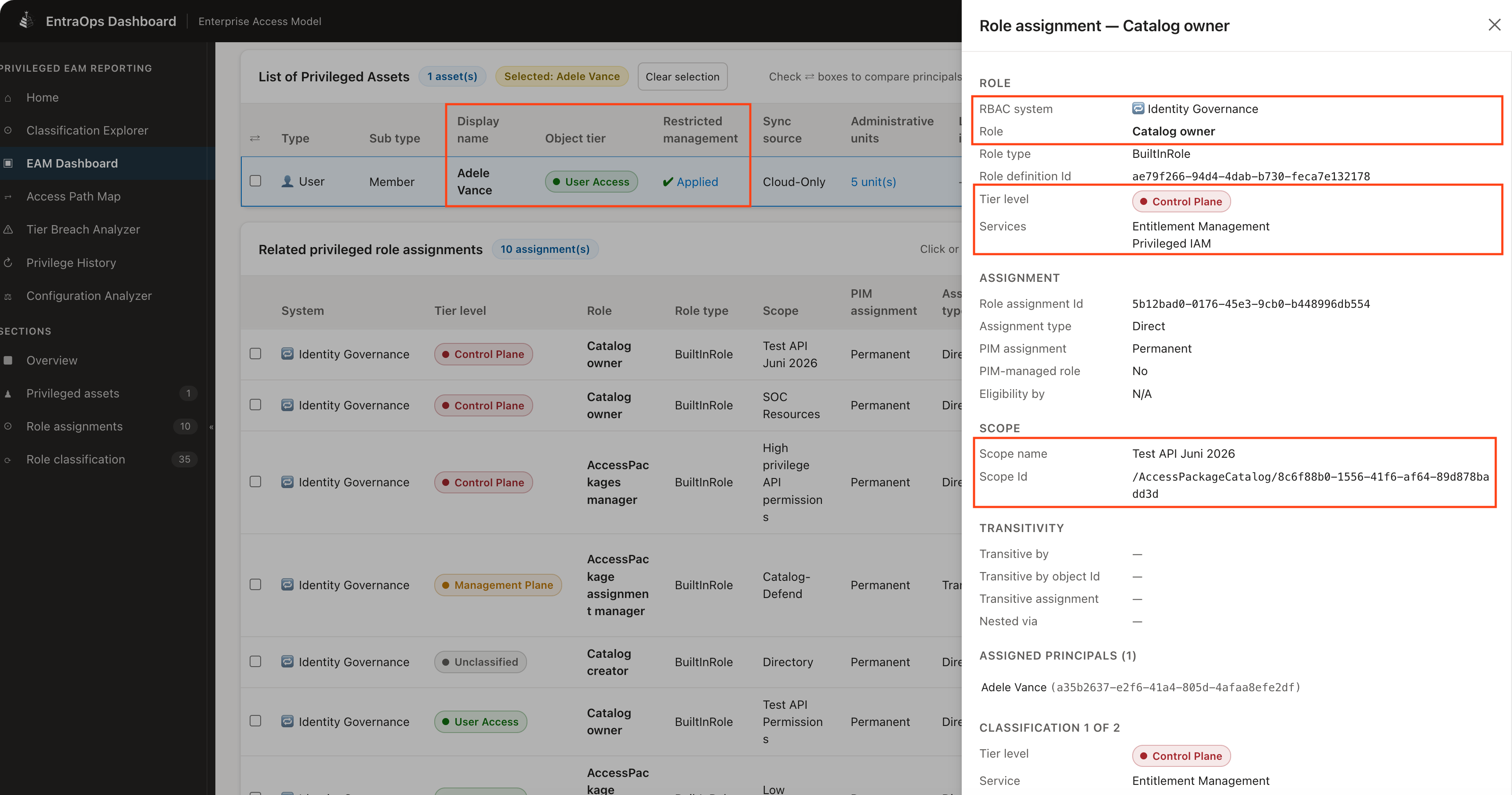
Screenshot: the EAM Dashboard shows a User Access identity with a Catalog owner role assignment classified as Control Plane.
In this example, Adele is classified as a User Access identity with a privileged delegated role assignment that maps to Control Plane. As a result, the same finding is surfaced in EntraOps’ Tier Breach Analyzer:
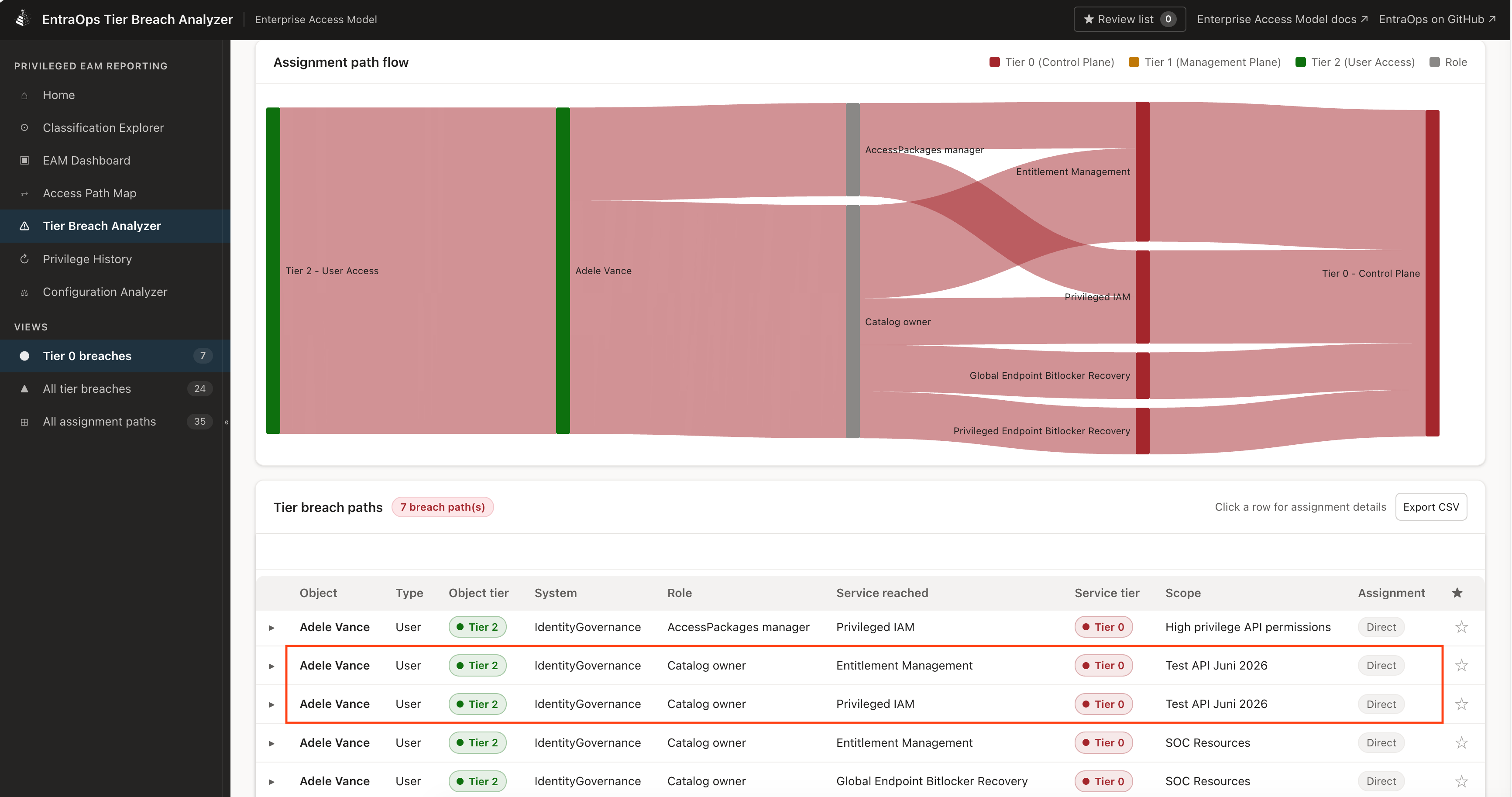
Screenshot: the Tier Breach Analyzer surfaces the Catalog owner assignment as a breach from User Access (Tier 2) to Control Plane (Tier 0). Furthermore, the Access Package Flow visualization lets you see how an access package request or assignment can be made through Identity Governance, including risks where an approver is less privileged than the target resource.
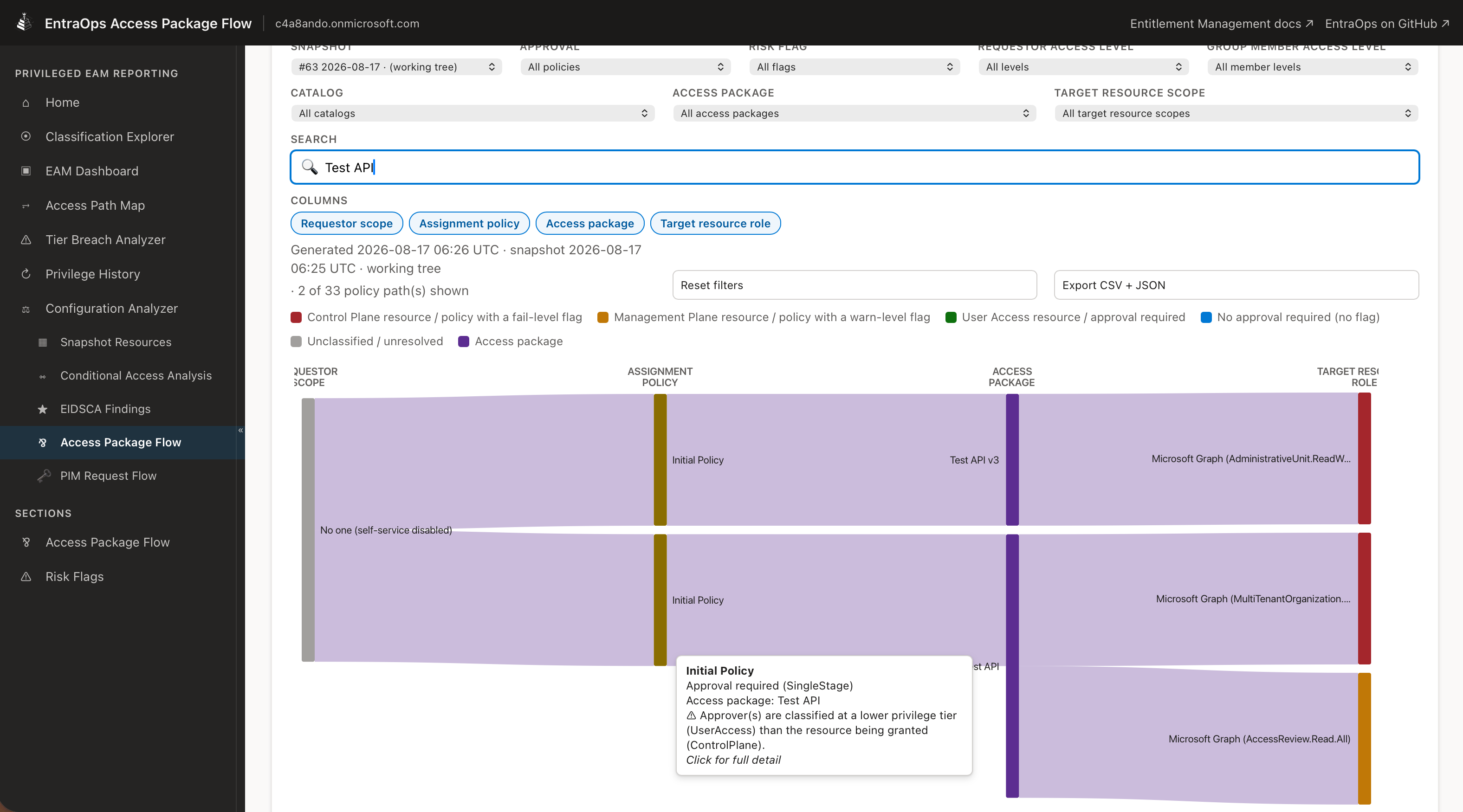 .
Screenshot: the Access Package Flow flags policies whose approvers are classified at a lower tier than the resources they approve.
.
Screenshot: the Access Package Flow flags policies whose approvers are classified at a lower tier than the resources they approve.
The visualization and data in the EntraOps report answer three critical questions:
- Who can request the access package? For example, is the request limited to a selected requester scope?
- Who can approve the request, if approval is required? For example, is the approver classified at a lower privilege level than the resource being granted? Can the request bypass approval because no approval is required?
- Which resources are assigned when the request is approved? For example, do they include API permissions classified as Control Plane?
Together, these details help identify potential lateral-movement paths caused by misconfigured access-package policies or catalog delegation.
Optionally, EntraOps can trigger automated responses based on the classification. This includes placing the user into a Restricted Management Administrative Unit (RMAU) if they are not already protected by such an RMAU or by Entra ID role assignments. The user object is also added to a security group used to target Conditional Access policies specifically designed for Control Plane Administrators.
EntraOps does not check whether a user is authorized to manage the resource as its owner and thereby satisfy resource-owner validation. In my opinion, you should always avoid granting lower-privileged users management authority over catalogs that expose higher-privilege resources.
“Root Scope” and observed enumeration behavior in Microsoft Graph
When you add a service principal (an OAuthApplication) as a resource to an access package catalog, Microsoft Graph does not let you scope which roles or scopes (API permissions) are exposed to that catalog. In the Azure portal and in the raw Graph response, this scope is simply labeled “Root”, which gives no indication of which API is actually behind it (Microsoft Graph, a custom API, and so on) unless you resolve the resourceAppId yourself.
In addition, querying a catalog’s resources through the $expand=accessPackageResourceRoles beta endpoint produced an unexpected result in several tenants I tested: for OAuthApplication resources, the returned app roles were not limited to the catalog queried. The response included app roles from service principals that had not been added to that catalog, including permissions associated with other catalogs. Relying on catalog-level enumeration for classification risks substantially over-reporting the API permissions available through a catalog.
Microsoft has since confirmed during the case that this beta-endpoint behavior is a bug and expects to fix it in near future.
A simplified example of what the catalog-level enumeration can return:
GET https://graph.microsoft.com/beta/identityGovernance/entitlementManagement/accessPackageCatalogs/{catalogId}/accessPackageResources?$expand=accessPackageResourceScopes,accessPackageResourceRoles
{
  "value": [
    {
      "id": "a1b2c3d4-...",
      "displayName": "Root",
      "originId": "00000003-0000-0000-c000-000000000000",
      "originSystem": "OAuthApplication",
      "accessPackageResourceScopes": [
        {
            "displayName": "Microsoft Graph",
            "description": "AppId: 00000003-0000-0000-c000-000000000000",
            "resourceType": "API",
            "originId": "00000003-0000-0000-c000-000000000000",
            "originSystem": "OAuthApplication"
        }
      ],
      "accessPackageResourceRoles": [
        { "displayName": "RoleManagement.ReadWrite.Directory", "originId": "9e3f62cf-..." },
        { "displayName": "User.ReadWrite.All", "originId": "741f8034-..." },
        { "displayName": "Application.ReadWrite.All", "originId": "1bfefb4e-..." }
      ]
    }
  ]
}
This response is a disadvantage for reporting, as already mentioned. Some of the roles listed (for example, Application.ReadWrite.All) may not actually be assigned to any access package in that catalog — they can belong to the same service principal onboarded in a different catalog but still show up here.
How EntraOps resolves the correct resources
Instead of trusting the catalog-level accessPackageResources enumeration for API resources, EntraOps derives the actually assigned API permissions from the catalog’s access packages and their accessPackageResourceRoleScopes — the same data the assignment itself is built from:
GET https://graph.microsoft.com/beta/identityGovernance/entitlementManagement/accessPackages/{accessPackageId}?$expand=accessPackageResourceRoleScopes($expand=accessPackageResourceRole,accessPackageResourceScope)
{
  "id": "f1e2d3c4-...",
  "displayName": "Control Plane Access Automation",
  "accessPackageResourceRoleScopes": [
    {
      "accessPackageResourceRole": {
        "displayName": "RoleManagement.ReadWrite.Directory",
        "originId": "9e3f62cf-..."
      },
      "accessPackageResourceScope": {
        "displayName": "Root",
        "originSystem": "OAuthApplication",
        "isRootScope": true
      }
    }
  ]
}
Because this data is fetched per access package, my testing returned only the API permissions granted to that access package. In the test cases evaluated, this avoided the cross-catalog result observed in the catalog-level enumeration.
EntraOps then:
- Matches each returned app role against the same classification template to derive its
AdminTierLevel(for example, Control Plane / Tier 0). - Applies the resulting classification both to the catalog itself and to every delegated administrator with a role assignment at that catalog’s scope, tagging the finding with
TaggedBy: AssignedOAuthApplicationResourceso the reasoning is traceable back to the exact service principal and app role responsible. - For the narrower access package assignment manager role — which can only assign users to existing access packages, not add new resources to the catalog — EntraOps computes an additional, tighter classification scoped only to the resource roles of the access packages that role can actually act on, rather than the catalog’s full (and potentially unused) resource inventory.
In the tenants and test cases evaluated, this approach made the EntraOps classification reflect the API permissions genuinely exposed through the access packages a user could manage or was assigned to, rather than flagging or missing a catalog and its delegated administrators based on the observed cross-catalog Graph enumeration under a "Root" label. Because these observations rely on beta API behavior, they should not be interpreted as a guarantee across all tenants or future API versions.
Research: Unreleased catalog privilege levels and EntraOps
In late March or early April 2026, I observed a privilegeLevel property in catalog responses from Microsoft Graph. I also found documentation that was subsequently removed with the commit message “Revert catalog privilege levels feature (never released).” Although the property appeared in my beta API research and accepted configuration attempts, Microsoft has not released or documented this feature for production use. The observations and examples in this section are therefore research only, not a supported mitigation or a deployment recommendation.
What are privilege levels in catalogs?
The removed documentation described two catalog privilege levels: Standard by default and Privileged when a catalog contains resources granting elevated permissions, such as Entra roles or API permissions. According to that unreleased content, privileged catalogs would have stricter controls: only Global Administrators or Privileged Role Administrators who also hold the Identity Governance Administrator role could modify them, auto-assignment policies could not be created, and the privilege level could be adjusted manually.
What would be the security benefit of this feature?
If released with the described behavior, automatic restrictions based on catalog resources could mitigate several risks described above.
The idea, as far as I can determine, is that each catalog would carry its own privilege level, separate from the roles and resources it holds. Catalogs would remain standard until they contained a resource that grants elevated permissions, such as an Entra directory role or an API permission, at which point the catalog would be reclassified as privileged and subject to tighter controls.
This reclassification would presumably be evaluated each time a resource is added, not just once at catalog creation. The same AdminAdd resource-request pipeline described earlier in this post would be the natural place for Microsoft to inspect what’s being onboarded and flip the privilege level accordingly, meaning a catalog could become privileged the instant someone adds the first sensitive resource, regardless of who added it or whether they were authorized to.
Once privileged, the documentation describes the catalog as considerably harder to modify: applications would need directory role management permissions to write to it, and only Global Administrators or Privileged Role Administrators who also hold the Identity Governance Administrator role could create, update, or delete it. Everyone else, including the original catalog owner, would have read-only access, and auto-assignment policies could not be created for it. The level could also be adjusted manually afterward, either from the catalog’s overview page or by updating the PrivilegeLevel property on the accessPackageCatalog object through Microsoft Graph, an override of the automatic behavior rather than a replacement for it.
Assuming that property name holds up once this is confirmed, identifying the current privilege level of a specific catalog would be a matter of reading it back on the catalog object itself:
GET https://graph.microsoft.com/beta/identityGovernance/entitlementManagement/accessPackageCatalogs/<CatalogObjectId>?$select=id,displayName,privilegeLevel
More usefully for monitoring purposes, the same property could presumably be queried across every catalog in the tenant at once, to find any catalog that’s already been reclassified as privileged:
GET https://graph.microsoft.com/beta/identityGovernance/entitlementManagement/accessPackageCatalogs?$select=id,displayName,privilegeLevel&$filter=privilegeLevel eq 'privileged'
If Microsoft releases this feature with the behavior described in the removed documentation, it could provide an additional control over the historical scenario discussed in this post. However, it must not be relied on: the feature is unreleased, unsupported, and its observed beta behavior may change or be removed without notice.
What could be a use case for automation in EntraOps?
The removed documentation described a limited set of sensitive resources that could affect a catalog’s privilege level, including sensitive API permissions and Entra ID roles. EntraOps analyzes additional RBAC systems, including Azure, Intune, Defender, and nested groups, to identify Control Plane (Tier 0) objects. An automatic catalog classification based on those broader findings could be useful if Microsoft releases a supported feature.
As part of this research, I implemented Update-EntraOpsPrivilegedUnprotectedElmCatalog, which can be invoked by Push-EntraOpsPrivilegedEAM when ApplyPrivilegedElmCatalogProtection is enabled in EntraOpsConfig.json. The setting is disabled by default. It remains in the codebase solely for research and future evaluation if Microsoft releases a supported catalog-privilege-level capability; it should not be enabled or used as a production control today.
Conclusion: What the fix does not cover
Microsoft’s fix closes the specific gap I reported: a catalog owner without resource ownership can no longer add or expand API permissions in a catalog. That’s confirmed, and it’s a real improvement.
It does not change who can assign an already-onboarded sensitive resource — an API permission, a role-assignable group, or a directory role — to a principal. Catalog owners and access package managers can manage access packages and policies, while access package assignment managers can manage assignments to existing packages. These powers remain subject to the applicable assignment policy and approval requirements. The unreleased catalog-privilege-level behavior discussed above should not be used as a control, even if related beta API behavior appears functional.
The general lesson is that, in Identity Governance, “who can add a sensitive resource to a catalog” and “who can assign it to someone” are different authorization boundaries. Microsoft tightened the former. Wherever delegation is granted without equivalent protections — such as Privileged Identity Management eligibility, Restricted Management Administrative Units, and Conditional Access scoped to these roles — a similar escalation path can reappear in a different form. Treating Identity Governance delegated roles with the same rigor as Entra ID directory roles, and monitoring what catalogs and access packages actually expose, helps address that risk beyond a single product change.
Appendix: MSRC disclosure timeline
- 22 Nov 2025 – Reported the issue to MSRC (VULN-166950) with reproduction steps and an attack scenario; provided a PoC video on request on 25 Nov.
- 03 Dec 2025 – MSRC assessed the report as Moderate severity, noting that a Global Administrator action appeared to be required, and closed the case. The product team was notified for possible defense-in-depth improvements.
- 10 Dec 2025 – Submitted a follow-up report (VULN-167957) covering the resource-provider-level scope (
isRootScope), the different authorization validation compared with other resource types, and the cross-catalog visibility of API permissions. Included an attack-path visualization, an updated video, and a blog post draft. - 13 Jan 2026 – MSRC again assessed the behavior as Moderate, clarified that a Global Administrator was not required, characterized it as improper configuration, and closed the case.
- Jan – Mar 2026 – Coordinated content review and disclosure timing with MSRC, who asked to postpone publication while gathering feedback. On 06 Mar, MSRC confirmed the behavior; on 18 Mar, it confirmed that a fix was in progress.
- 01 Jun 2026 – Microsoft updated its public documentation to describe repeated resource-ownership validation for API permissions.
- 18 Jun 2026 – MSRC confirmed that the fix had been deployed; severity remained Moderate.
- 20 Jul 2026 – Reported the cross-catalog
accessPackageResourceRolesenumeration behavior, including a video. - 29 Jul 2026 – Additional validation of the fix and shared the final blog post draft with MSRC.
- 15 Sep 2026 – MSRC provided feedback on the blog post draft.
- 29 Sep 2026 – Public disclosure.