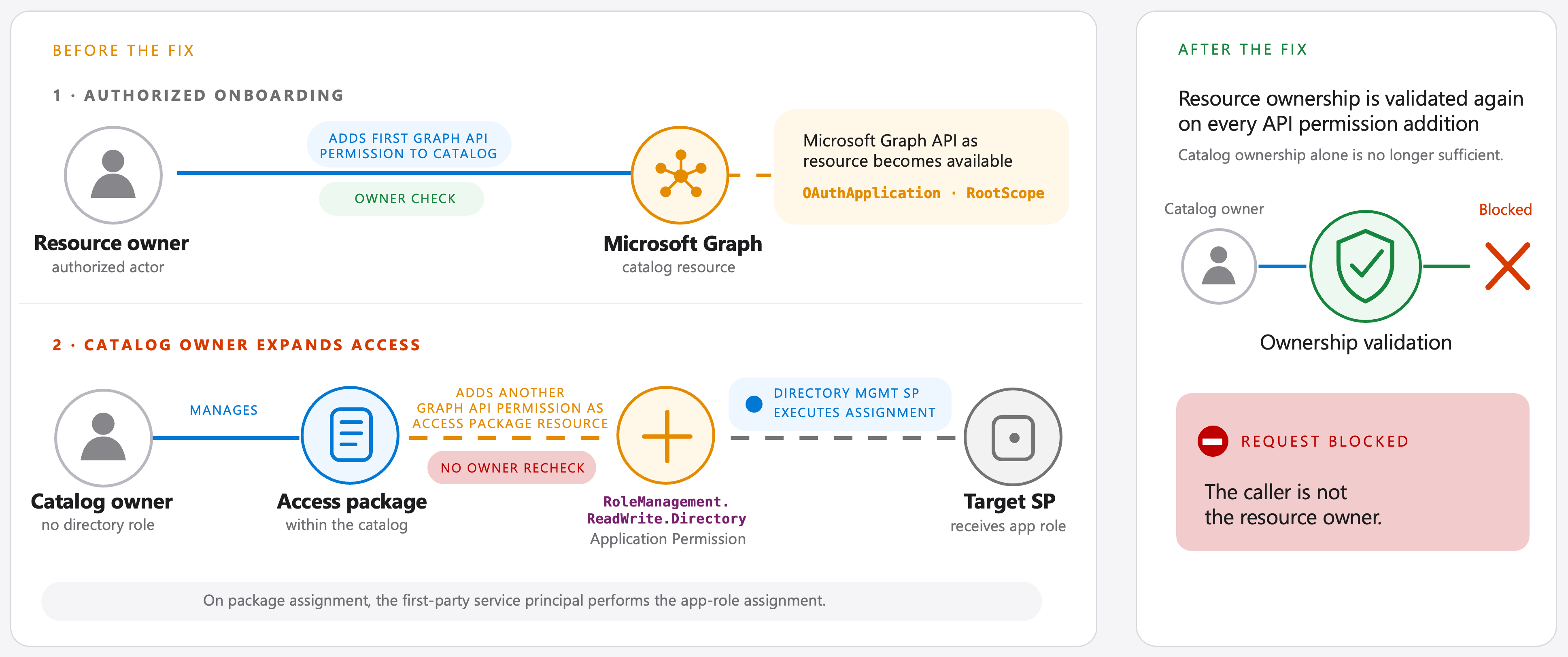
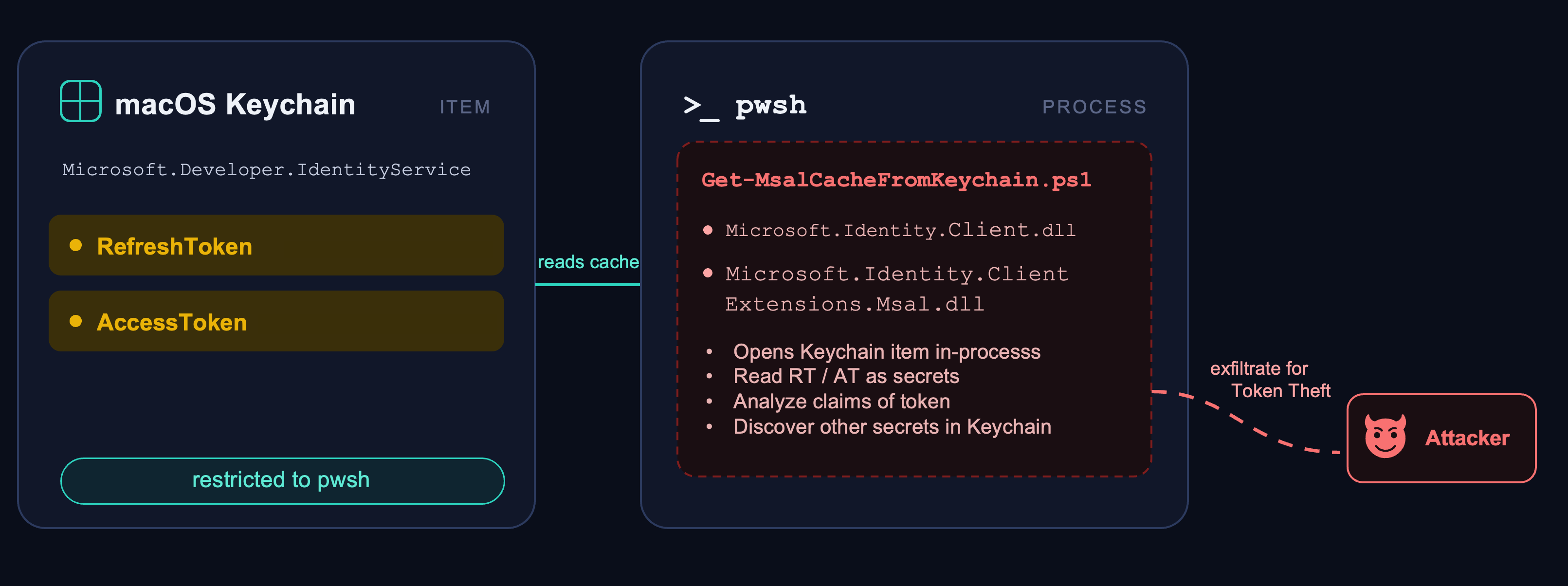
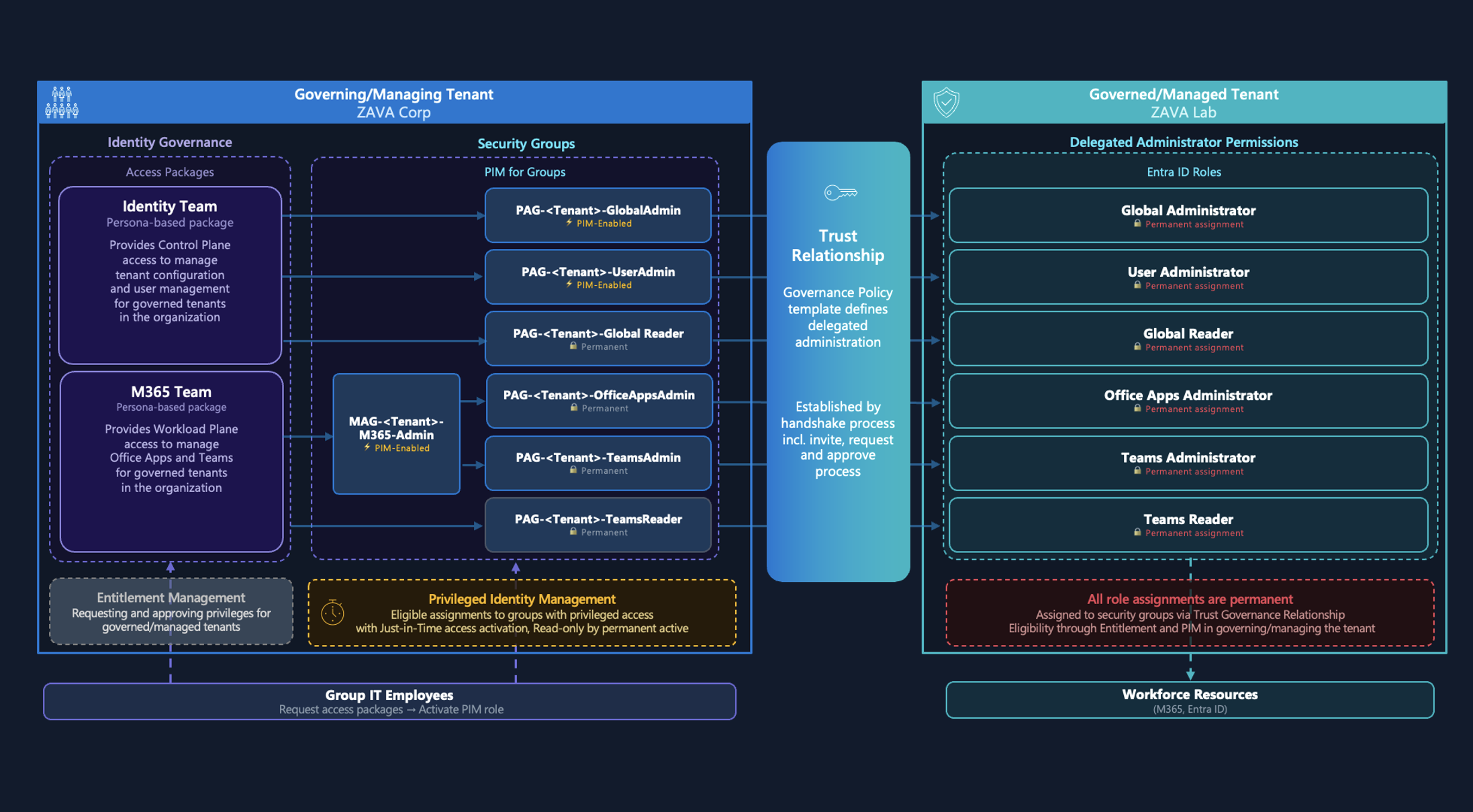
Microsoft Ignite 2026 brought a long list of announcements. This post is my identity-focused summary, based on the sessions I watched online and my own notes, plus Microsoft Tech Community posts, the official Book of News and Microsoft Learn. I originally collected these notes for myself, but thought they might be useful to others as well. So this is a slightly different kind of blog post: a curated collection rather than my usual deep dives based on my own research. I used AI tools to help draft and structure the summaries and reviewed the result myself. Each item has a short description, its release status and links to the Microsoft sources. I hope it helps you keep track of the identity and security news from Ignite. If I missed an announcement or a description isn’t quite accurate, please let me know so I can update the article.
🔐 Microsoft Entra ID - Conditional Access and identity verification
- Conditional Access policy plans - Preview. Group related access rules under a shared security objective, with reusable assignments and exclusions, rule-level enforcement, built-in templates (including agent templates), per-rule sign-in log entries and a migration path from existing policies. Plans add to the existing model rather than replace it: standalone policies and plan rules are evaluated side by side, and every applicable one must be satisfied. Known preview limitation: plans that target users with a Location condition receive one-hour access tokens without the instant IP enforcement check. The preview started shortly before Ignite and was featured at the event. Documentation · Announcement
-
Conditional Access for agents acting on a user’s behalf - Preview. Admins can set access policies for assistive agents that are separate from the policies of the user they work for. Conditional Access for agents · Entra Ignite announcement
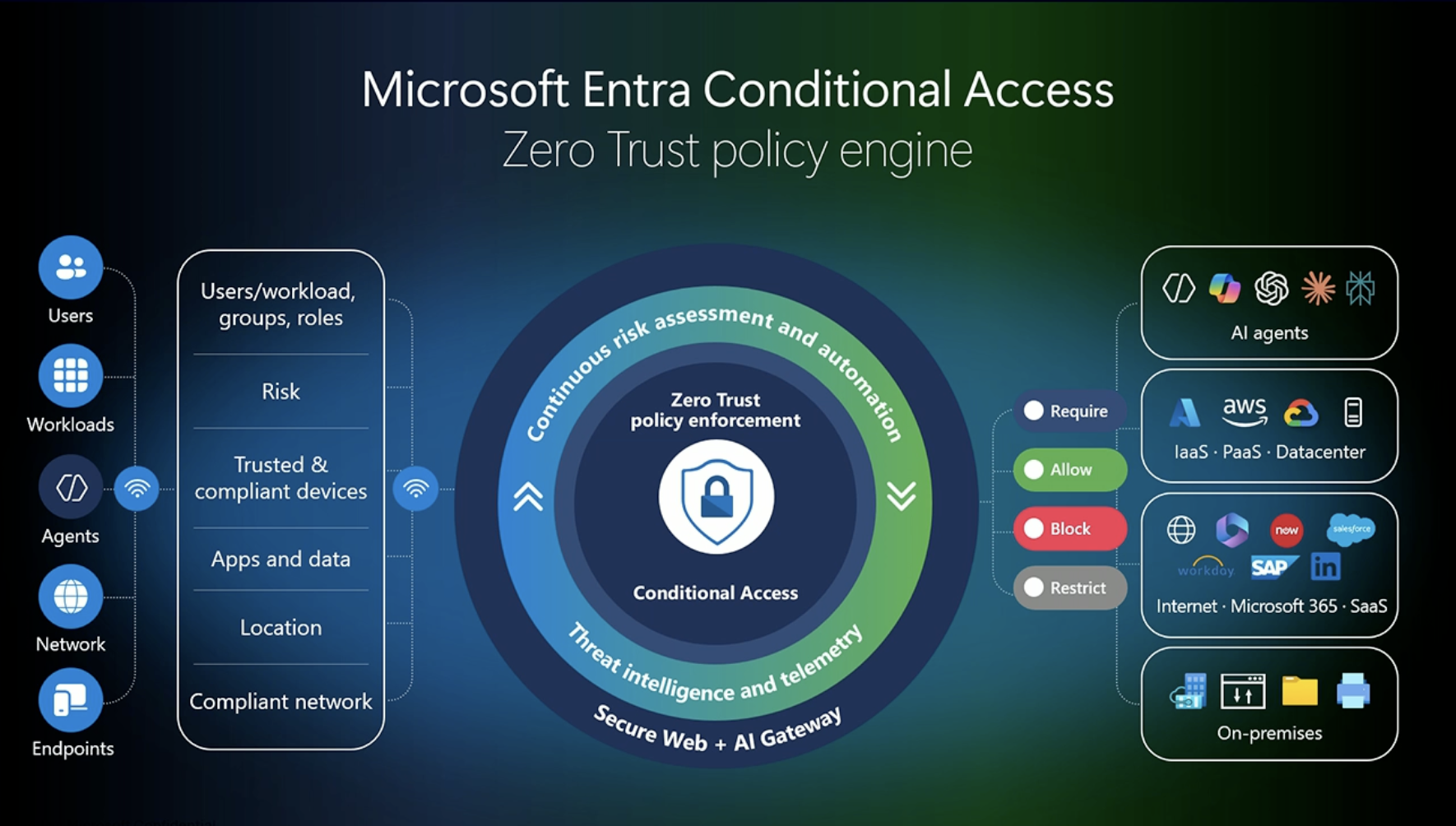
Another Ignite, another updated “big picture” slide of Conditional Access, now with agents as a signal source. Source: BRK331 - A Single Policy for Humans and AI Agents? Here’s How to Make It Work. Slide © Microsoft.
-
Conditional Access dynamic controls - Limited preview. Policy is evaluated at the point of action, not only at sign-in. As an agent’s risk and context change, organizations can restrict sensitive operations or require human approval while lower-risk work continues, without blocking the human the agent works for. Entra Ignite announcement · Agent 365 Ignite details
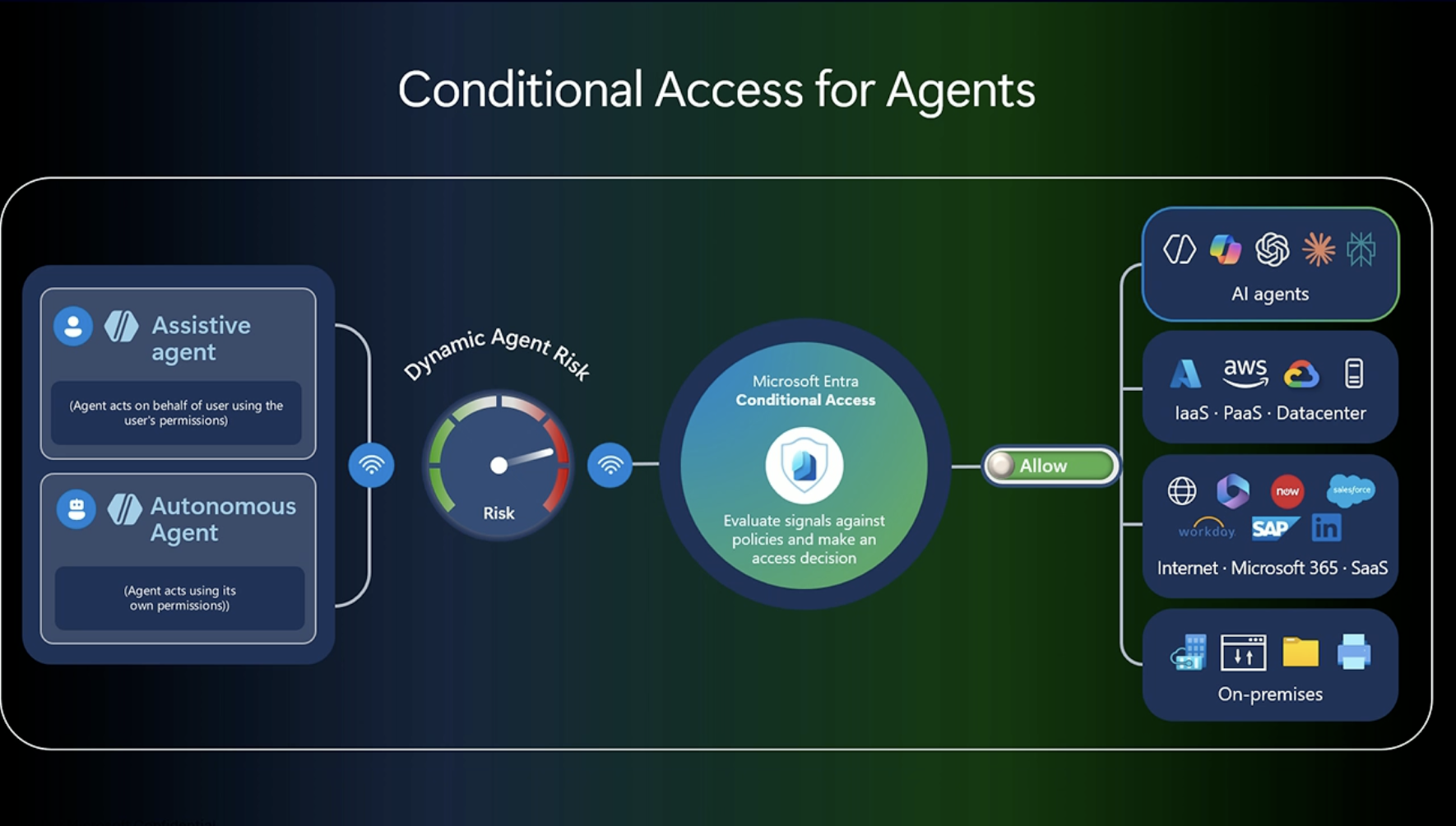
Conditional Access for assistive and autonomous agents. Source: BRK331 - A Single Policy for Humans and AI Agents? Here’s How to Make It Work. Slide © Microsoft.
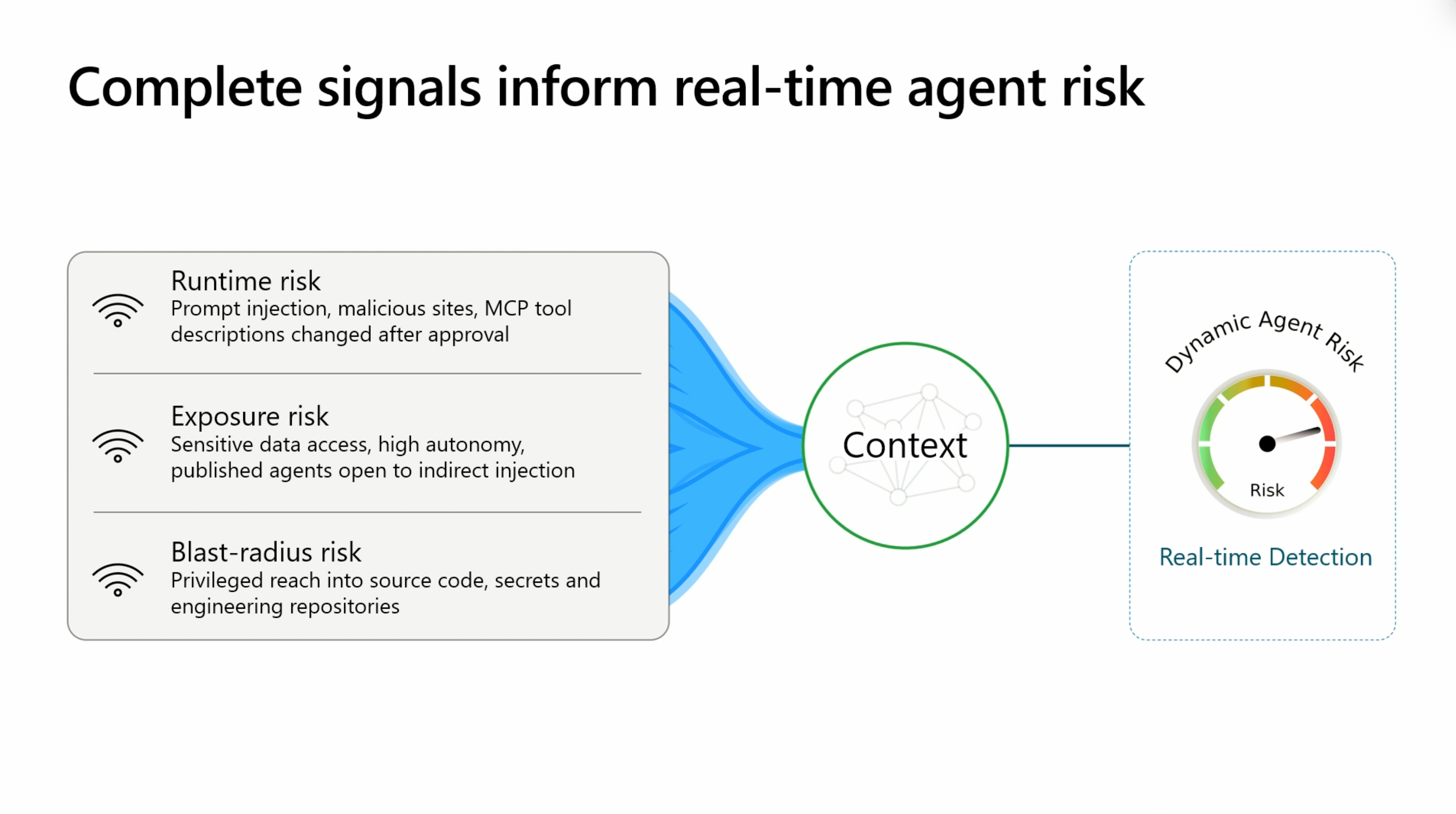
Signals that feed Dynamic Agent Risk. Source: THR877 - AI agents: access granted. Trust not included. Slide © Microsoft.
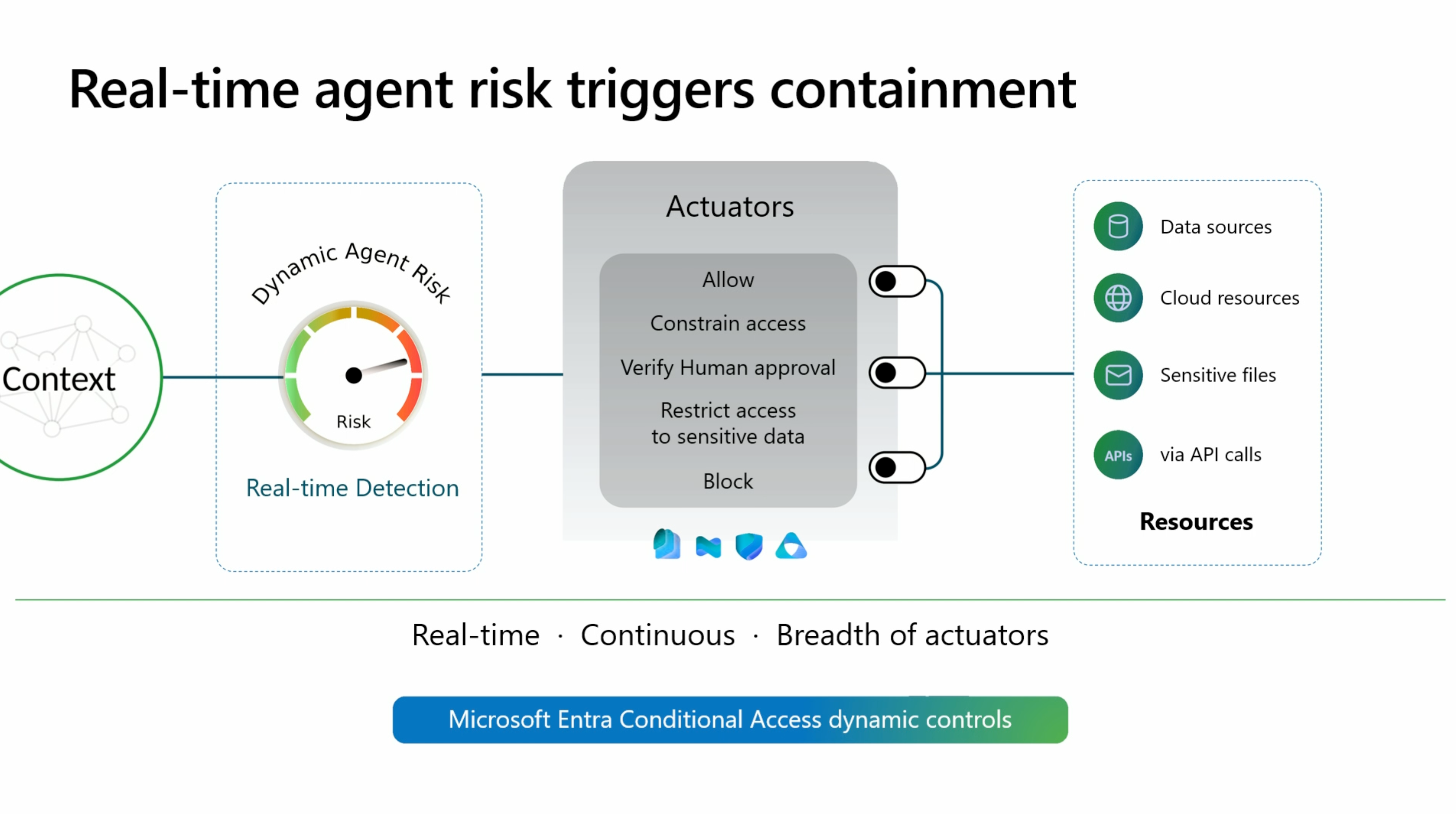
Real-time agent risk triggers containment through Conditional Access dynamic controls. Source: THR877 - AI agents: access granted. Trust not included. Slide © Microsoft.
- Conditional Access for Windows 365 for Agents - GA. Conditional Access covers the Cloud PCs used as secured agent execution environments. The Agent execution environments condition used to scope these policies to endpoint-based sessions is still labelled preview on Microsoft Learn. Conditional Access for agents · Entra Ignite announcement · Windows 365 for Agents
- Require identity verification grant control - Preview. Conditional Access can require Microsoft Entra Verified ID identity verification for supported high-assurance access and risk remediation scenarios, instead of treating ordinary MFA as proof of real-world identity. Conditional Access grant controls · ID Protection risk policies
- High-assurance credential lifecycle - Preview. Combine passkeys with partner-backed identity verification at onboarding, for sensitive resource or meeting access, and during account recovery. Supported verification partners are listed in Microsoft’s announcement. Entra Ignite announcement · Account recovery overview
- SharePoint site step-up with Verified ID - Preview (example scenario). Tag a sensitive SharePoint site with an authentication context and require identity verification in the matching Conditional Access policy. This is a configuration pattern built from the preview grant control, not a separate SharePoint feature. Grant-control guidance · Community walkthrough
- Conditional Access app protection for the Windows App - Preview. Windows App on Windows supports Intune MAM from version 2.0.1601.0 (released November 17), extending app protection from the Edge browser scenario to the native remote desktop client. Conditional Access can require an app protection policy for remote access from unmanaged Windows devices, a BYOD alternative to full device enrollment. Combine grant controls so that app-protected unmanaged devices and MDM-compliant devices are both handled, and test in report-only mode first. Windows App release notes · Require an app protection policy on Windows · Intune Windows MAM
🛡️ Microsoft Entra ID Governance - Privileged access, groups, guests and entitlements
- PIM for application roles - Preview. Make supported enterprise application role assignments eligible and require just-in-time activation, extending PIM beyond directory and Azure roles. Requires Microsoft Entra ID Governance licenses; Entra ID P2 alone isn’t sufficient. PIM documentation · Entra Ignite announcement
- PIM for Azure and Azure Arc VM access with session oversight - Preview. Activate eligible access and connect to supported VMs from My Access; admins can inspect privileged sessions and review recordings. Entra Ignite announcement · PIM documentation
- PIM-only mode, AI-assisted least-privilege suggestions and bulk operations - Preview. Enforce eligible-only role assignment, get lower-privilege role recommendations and convert assignments at scale. Entra Ignite announcement · PIM documentation
- Dynamic group rules: MemberOf Next and Transitive Reports To - Preview. Derive membership from selected groups or from a full manager reporting chain, replacing scripts and manual updates. MemberOf Next is not the retired legacy
memberOfpreview. Requires Microsoft Entra ID Governance. Advanced dynamic group rules · Entra Ignite announcement - Guest lifecycle policies - GA. Automate guest sponsorship, inactivity and invitation-status checks with remediation rules, reporting and sponsor actions to reduce stale external accounts. Guest lifecycle policies · Entra Ignite announcement
- Dynamic permissions remediation for agents - Preview. Find over-privileged agent identities in connected business applications, investigate the excess and apply recommended remediation. The preview supports agent identities in Snowflake and starts with two checks: Critical privilege levels and separation-of-duties conflicts. During preview, requires Microsoft 365 E7. Entra Ignite announcement · Dynamic permissions overview
- Access packages for AI teammates - Preview. Entitlement management extends access packages to AI teammates (called “digital teammates” in the Entra announcement), with governed requests, approvals and time-bound access to the resources an AI teammate uses. Review which identity is authorized for each resource; this is separate from the agent identity’s own permissions. Entra Ignite announcement · Agent ID governance overview
🏢 Microsoft Entra Tenant Governance - Multitenant identity configuration
- Cross-tenant desired-state configuration and drift monitoring - Preview. Deploy and monitor common baselines across governed tenants and compare actual settings with the desired state, covering identity and selected Microsoft 365 workloads. Configuration management · Entra Ignite announcement
- Entra resource policy - Preview. Evaluate supported Microsoft Graph write requests and block non-compliant changes before they happen, complementing drift detection after the fact. Resource policy overview
- Multitenant agent management in Agent 365 - Preview. Partners and multitenant enterprises get one view of Microsoft and third-party agents across the tenants they manage, in the Microsoft 365 admin center. Admins can deploy agents to selected tenants, compare configuration and who can use an agent per tenant, review security, compliance and risk details, and approve or block agents at scale. Available operations depend on permissions, tenant relationships and licensing. Manage agents across tenants · Agent 365 Ignite details
♻️ Microsoft Entra Backup and Recovery - Identity resilience
- Backup and Recovery Premium - Preview. Adds 30-day retention and Microsoft 365 Backup integration for restoring critical identity configuration and objects after mistakes or attacks. Backup and recovery plans · Entra Ignite announcement
- Hard-deletion protection - Preview. Extra safeguards against permanently deleting critical tenant objects, including agent identities. Configure hard-deletion protection · Entra Ignite announcement
🤖 Microsoft Entra Agent ID and Microsoft Agent 365 - Non-human identity
Platform status: Microsoft Entra Agent ID itself is generally available; most of the Ignite items below are previews built on top of it. What’s new in Agent ID
Discovery and identity assignment
-
Local agent discovery - GA in Microsoft Defender; Preview in Global Secure Access. Defender and Global Secure Access together discover more than 60 local AI agent types, such as Claude Code and GitHub Copilot CLI, and their configured MCP servers. Defender covers managed Windows and macOS devices and ties each agent to its device and user; Global Secure Access adds network-level visibility of agent destinations and MCP servers. Shadow AI discovery in the Agent registry is also in preview. Local agent discovery · Shadow AI discovery
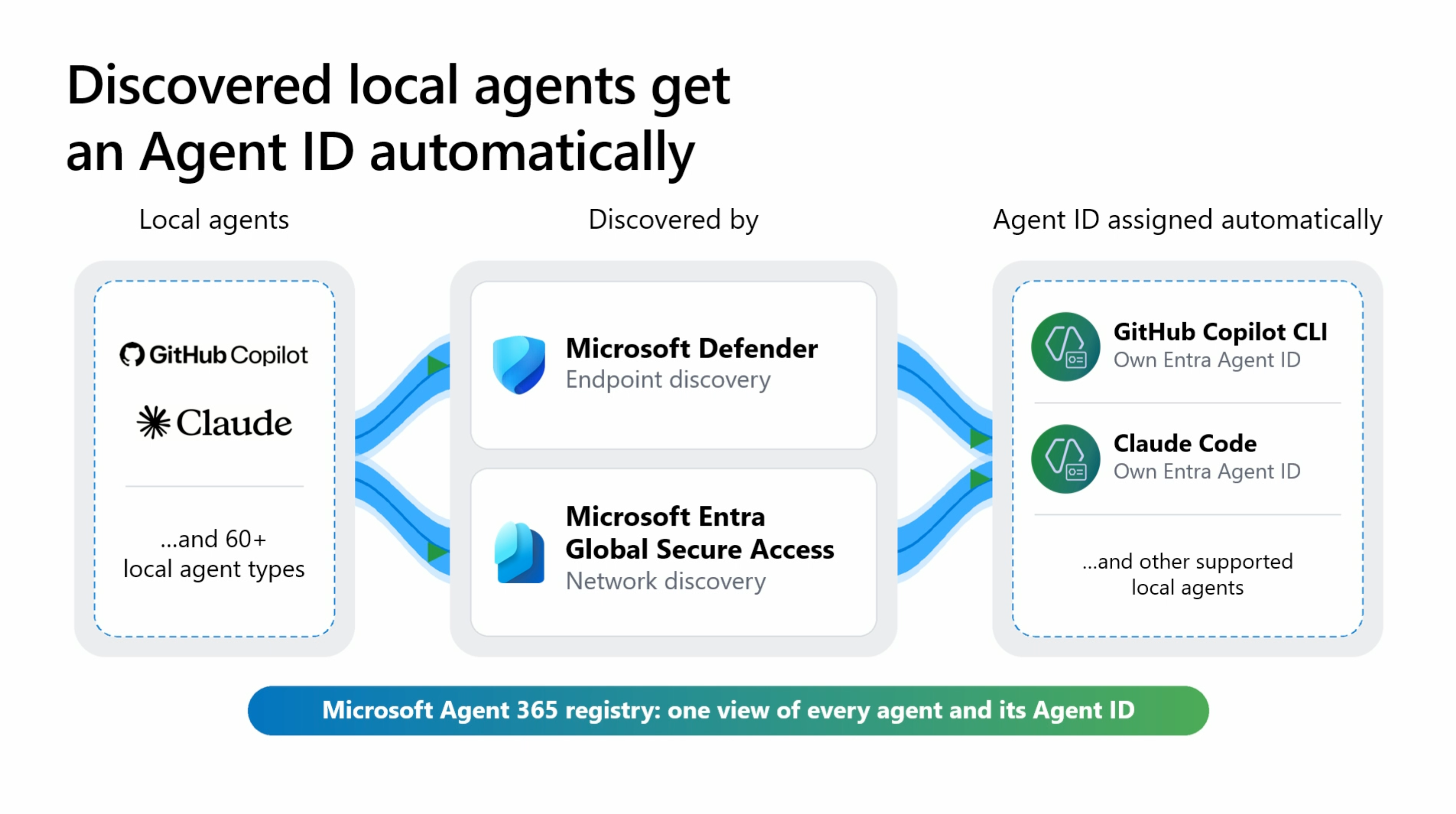
Discovered local agents get an Agent ID automatically. Source: THR877 - AI agents: access granted. Trust not included. Slide © Microsoft.
- Automatic Agent ID for discovered local agents - Preview. Supported local agents discovered by Defender or Global Secure Access automatically get their own Entra Agent ID, starting with GitHub Copilot CLI and Claude Code. A distinct identity separates agent activity from human activity and enables agent-specific inventory, risk and access controls. Discovery covers more agent types than automatic identity assignment. Agent 365 Ignite details · Entra Ignite announcement
- Agent ID for connected third-party platforms - Preview (capabilities vary by platform). Agents from connected platforms automatically receive an Entra Agent ID, bringing them under identity lifecycle, Conditional Access, identity risk and revocation. Support is rolling out across Salesforce Agentforce, Amazon AgentCore, Google Vertex AI, Databricks, Snowflake, Anthropic Claude Managed Agents, OpenAI, Oracle, SAP, ServiceNow and UiPath, and Microsoft says it completes in December. A guided connection wizard simplifies setup, and Microsoft announced secretless authentication that uses workload identity federation instead of stored long-lived secrets. Connected platforms · Integrate third-party agents · Agent 365 Ignite details
- Agent ID for Microsoft cloud agents (Autopilot) - Preview. Agent ID extends to Microsoft Autopilot, the long-running personal agent now rolling out through Frontier, building on existing support for Copilot Studio and Microsoft Foundry agents. Autopilot actions, even on a user’s behalf, are tied to its own Agent ID. Agent 365 Ignite details · Book of News
- Azure SRE Agent with Entra Agent ID - Preview. An SRE agent can get a governed Entra Agent ID with Agent 365 integration. The user-assigned managed identity remains the default resource-access identity: creating an Agent ID doesn’t switch it or copy role assignments. If you select the Agent ID for resource access, assign Azure RBAC roles to that identity, not to its agent user. Book of News · Manage SRE Agent permissions
Developer and protocol capabilities
- Local agent authentication (OAuth public client) - Preview. A local agent can sign in a user and request delegated access with authorization code flow and PKCE, without storing any client credential on the device. Relevant to desktop agents, CLI tools and MCP clients. This is a documented integration path; Microsoft has not said that automatic Agent ID assignment uses it. Sign in users from a local agent
- Blueprint instance modes: single-instance and multi-instance - Preview. A single-instance blueprint has exactly one Agent ID per tenant that shares the blueprint’s client ID, has no blueprint principal and cannot use inherited permissions. A multi-instance blueprint creates a fleet of Agent IDs with their own client IDs and can pass permissions down through its blueprint principal. Public-client agents on endpoint devices must use single-instance mode. The mode is chosen at creation and cannot be changed. Instance modes
- Client ID Metadata Documents (CIMD) - Preview. An OAuth client can use a public HTTPS metadata URL as its client ID, so MCP clients can connect to Entra-protected MCP servers without being registered in every tenant in advance. CIMD identifies the client; it does not grant permissions or bypass consent. Client ID Metadata Documents
AI teammates
Microsoft’s Entra announcement calls these “digital teammates”; the Agent 365 and Learn documentation says “AI teammates”. This post uses the Learn term.
-
Entra Agent ID for AI teammates - Frontier preview. Extends identity security and governance to agents that take part in Microsoft 365 collaboration with their own user identity. An AI teammate is an Agent 365 integration pattern, not a separate directory object type. It needs an agent identity blueprint, an agent identity and the agent user linked to it. Entra Ignite announcement · Agent 365 developer guide
Identity model. Every agent identity is created from an agent identity blueprint, which holds the authentication configuration and any credentials. A multi-instance blueprint has a tenant-local blueprint principal, can create many agent identities and can pass permissions down after admin consent; a single-instance blueprint has none of that (see above). Each agent identity has its own permissions and needs a sponsor. Agent 365 identity · Agent ID governance overview
Provisioning. Use the Agent 365 developer onboarding flow or CLI (
make-ai-teammateguided setup) to register the blueprint, configure authentication and consent, publish the agent and create an approved instance through Teams or the Microsoft 365 admin center. Existing agents can adopt the pattern without hand-writing the integration. Creating the agent user object through Graph alone does not provision Microsoft 365 collaboration services. Connect an existing agent · Agent 365 setup skillsAccess implications. A standard agent uses application permissions as its agent identity, or delegated permissions on behalf of a signed-in human. An AI teammate can also act as its own agent user with explicitly granted access, independent of the requesting human’s privileges. Entra logs distinguish blueprint, agent identity and agent user activity. Agent 365 identity and permissions
-
Agent ID token swapping with ID-JAG - Demonstrated at Ignite (release status not announced). The demonstrated flow separates the human who starts a task from the agent user who executes it. Briana signs in; an identity exchange returns an ID-JAG whose subject is her linked agent user, “Briana Helper”; Snowflake’s authorization server redeems it and attributes the action to the agent user. Briana’s authorization still sets the access ceiling. ID-JAG (Identity Assertion JWT Authorization Grant) is an IETF draft for cross-application authorization; switching the subject to an agent user is part of Microsoft’s demonstrated flow, not a requirement of the draft. BRK344 demo (20:15–23:08) · Agent ID overview · IETF ID-JAG draft
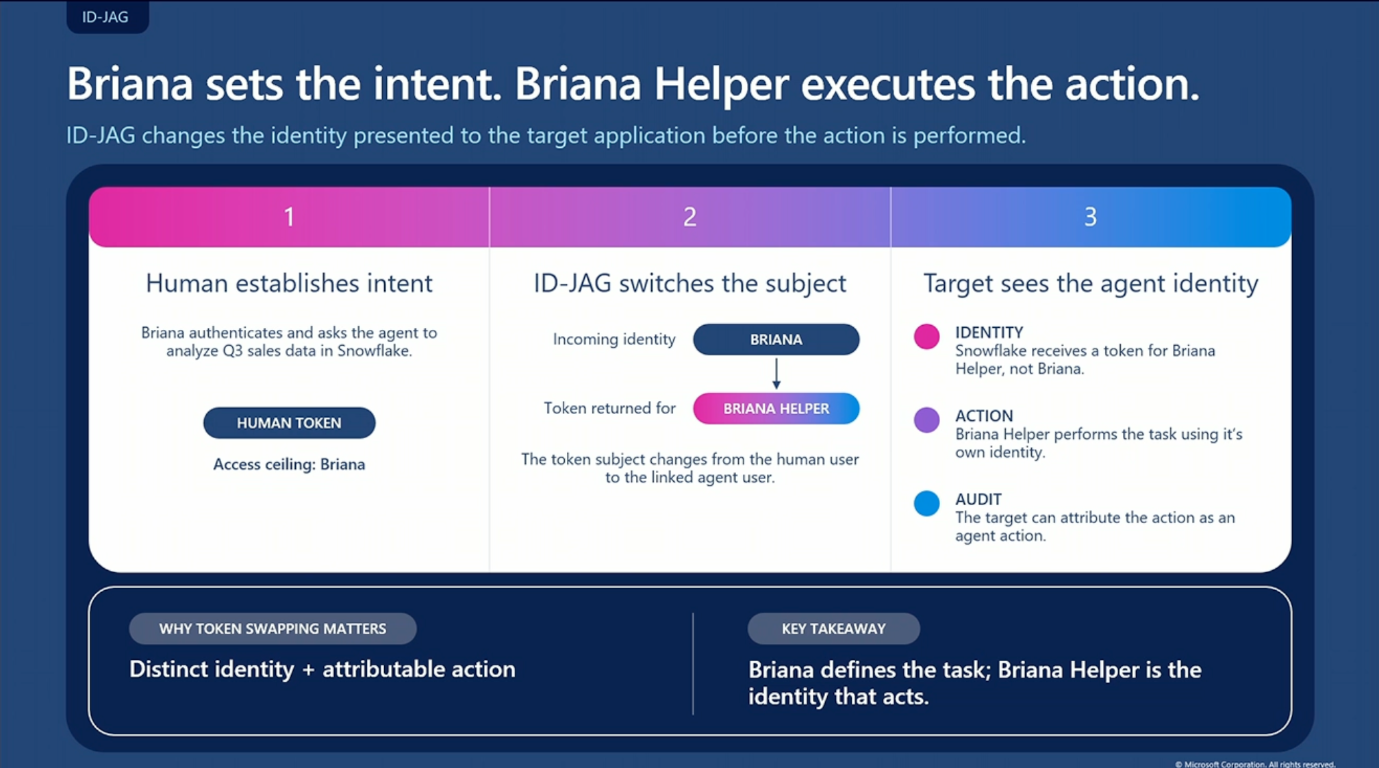
ID-JAG token swapping: Briana sets the intent, Briana Helper is the identity that acts. Source: BRK344: Build, secure and govern agents across platforms with A365 and Entra (20:15–23:08). Slide © Microsoft.
Lifecycle, risk and observability
- Agent identity lifecycle policies - GA ** Policies check whether an agent has a sponsor, is still needed and has been active. The **default inactivity policy is available to every tenant with no license required, but an admin has to enable it. Once enabled, it notifies sponsors and owners after 60 days without token issuance, disables the identity at 90 days and deletes it at 455 days, and these timeframes cannot be changed. (The “60 days” in the Ignite announcement is the notification threshold.) Admins can exclude selected agents (for example seasonal ones) and set fallback recipients for agents without sponsors. Sponsors cannot re-enable a disabled agent; only owners or admins can. Custom lifecycle policies with their own rules need additional licensing. Default inactivity policy · Custom lifecycle policies · Entra Ignite announcement
- Dynamic Agent Risk - Preview. One continuously updated risk level per agent, combining runtime signals (identity, access, data, endpoint, cloud, network) with exposure and blast radius. It updates as the agent acts, is targeted, or receives code or model updates, and appears in the Agent 365 registry (Microsoft 365 admin center) and in Defender, Entra, Intune and Purview. Partner signals from Check Point, Cyera, Darktrace and Zenity are being added through Microsoft Sentinel. An expanded limited preview runs inside Microsoft Perception. The risk level feeds Conditional Access dynamic controls. Agent 365 Ignite details · Book of News
- Demo recommendation: the theater session THR877: AI agents: Access granted. Trust not included includes a Dynamic Agent Risk demo.
- Export agent activity - Ignite update. Continuously sync agent traces from Agent 365 into Azure Monitor and Application Insights, filtered by agent or platform, with control over which prompts and responses are included. Agent 365 Ignite details
🌐 Microsoft Entra Global Secure Access and Edge for Business - Identity-centric network access
- Secure enterprise browser: Global Secure Access in Microsoft Edge - Preview. Edge for Business forwards internet, Microsoft 365 and FQDN-based private web app traffic to Global Secure Access from the signed-in work profile, without installing the GSA client. Conditional Access steers users into the work profile, Edge Management Service delivers the browser policy, and GSA applies each user’s existing forwarding profiles. Preview scope: Edge on Windows and macOS, version 157.0.4341.46 or later, configured through Edge Management Service (Intune app policies are not supported). Internet Access policies include TLS inspection; Microsoft 365 traffic is enabled together with Internet Access, without TLS inspection or web filtering; Private Access covers FQDN-defined web apps only. Not supported: the Microsoft Entra traffic profile (so no compliant-network checks or universal tenant restrictions for Entra ID), Private DNS, and B2B guest sign-in to Edge. The GSA client can run alongside on Windows but not on macOS. Suited to browser-only access, kiosks and VDI. Requires a Microsoft 365 E7 license. Secure enterprise browser overview · Edge for Business at Ignite
- Managed agent browsing in Edge for Business - Preview. IT can require Microsoft and third-party agents to use Edge for Business whenever a task needs a browser. Each agent works in a dedicated, visually marked window with its own Entra agent identity, within the user’s permissions and organizational policies. Requires a Microsoft 365 E5 license. Book of News · Edge for Business at Ignite
- Global Secure Access Device Access - Preview. Device Access forwarding profiles let Windows devices reach selected Private Access resources before a user signs in, authenticated with the device identity. Typical uses: first sign-in without cached credentials, changing an expired password and Group Policy processing against on-premises domain controllers, plus NTP, Configuration Manager and WSUS at startup. User-context tunnels take over after sign-in; Internet Access and Microsoft 365 traffic are never tunneled in device context. Requirements: Microsoft Entra joined or hybrid joined devices (plain domain join is not supported), a GSA Windows client with Device Access support (introduced in version 2.35.136), Private Access traffic only. For AD DS, enable Private DNS with the domain suffix and publish the domain controllers as their own private application. This gives you an alternative to an always-on device VPN for pre-logon connectivity. Create a Device Access profile · GSA Windows client release notes
- Agentic traffic acquisition - GA; agent-type network policy for local agents - Preview. Acquire and classify traffic from supported local and cloud agents for identity-aware network visibility and agent-specific destination controls. The Book of News lists traffic acquisition as GA, the Entra announcement as preview. Entra Ignite announcement · Book of News
- MCP firewall - Preview. Gateway policies for agent-to-MCP traffic: permitted MCP servers, tools, resources, prompt templates, methods, protocol versions, transports and connection requirements. Requires TLS inspection and the Global Secure Access client on a Microsoft Entra joined or hybrid joined device. Configure the MCP firewall · Entra Ignite announcement
- Purview DLP enforced over Global Secure Access - GA. Network-layer data protection for human traffic and agent traffic on a user’s behalf, including traffic to unsanctioned AI apps. Entra Ignite announcement
- Edge extension safety - GA; Edge Sentinel connector - Preview. Organization-wide extension inventory with risk scores, and browser security events and audit logs in Microsoft Sentinel. Edge for Business at Ignite
- See also: Private Access as the network path for Windows 365 agents reaching on-premises Kerberos resources: On-premises application access for Windows 365 for Agents.
👥 Microsoft Entra External ID - Customer identity and developer authentication
- HTML/JavaScript sign-in customization - Preview. Branded sign-up and sign-in pages with dynamic content; Microsoft says rollout completes by December 7, 2026. Entra Ignite announcement
- Bring your own UX (self-hosted authentication pages) - Preview. Keep identity enforcement and SSO in External ID while fully controlling the user-facing experience. Entra Ignite announcement
- Multiple first-factor sign-in methods - Preview. Users choose among supported first factors such as passkeys, one-time passcodes and passwords. Entra Ignite announcement
- Native Authentication API v2 and SDKs - Preview. Updated APIs and SDKs for embedding authentication in mobile and single-page apps. Entra Ignite announcement
- External ID AI agent toolkit - Preview. Agent skills that inspect applications and help onboard them to External ID or migrate from Native Authentication API v1 to v2. Entra Ignite announcement
- Self-service credential management APIs - Preview. Lower-privilege delegated APIs for customer passkey enrollment and password management. Email and phone APIs are Planned. Entra Ignite announcement
- TOTP for external customer users - Preview. Standards-based authenticator-app one-time codes as an additional factor in external tenants. Entra Ignite announcement
💻 Azure Arc, Windows 365, Intune and Defender - Workload, device and runtime identity
- Azure Arc TPM-backed managed identity - Preview. Protect Arc machine identity credentials with a physical TPM or vTPM instead of disk-only storage. Azure Arc at Ignite
- User-assigned managed identities for Arc-enabled servers - Preview. Assign one or more separately managed Azure identities (up to 10 per server) to Arc machines and reuse them across machines. Onboarding with user-assigned identities requires TPM-backed key storage. Azure Arc at Ignite
-
On-premises application access for Windows 365 for Agents - Preview. Agents on Windows 365 for Agents Cloud PCs can reach supported Kerberos-based on-premises apps and file shares as their own cloud-only agent user, with no matching AD DS account. Two separate parts make it work: Microsoft Entra Private Access provides the network path from the Cloud PC (GSA client) through a private network connector, and Microsoft Entra Kerberos lets the agent user exchange its Cloud TGT for a service ticket, which the resource validates with its synced key. The resource then authorizes with its existing permissions, using the group SIDs in the ticket. Setup still requires the Microsoft Entra Kerberos trust, resource-side Kerberos configuration, resource key synchronization, and group-based authorization with the group’s source of authority transferred to Microsoft Entra ID. The Kerberos flow itself doesn’t require Private Access; any network path that provides name resolution and TCP connectivity to the resource works. On-premises access for agent users · Configure cloud-only identities with Entra Kerberos · Windows 365 at Ignite
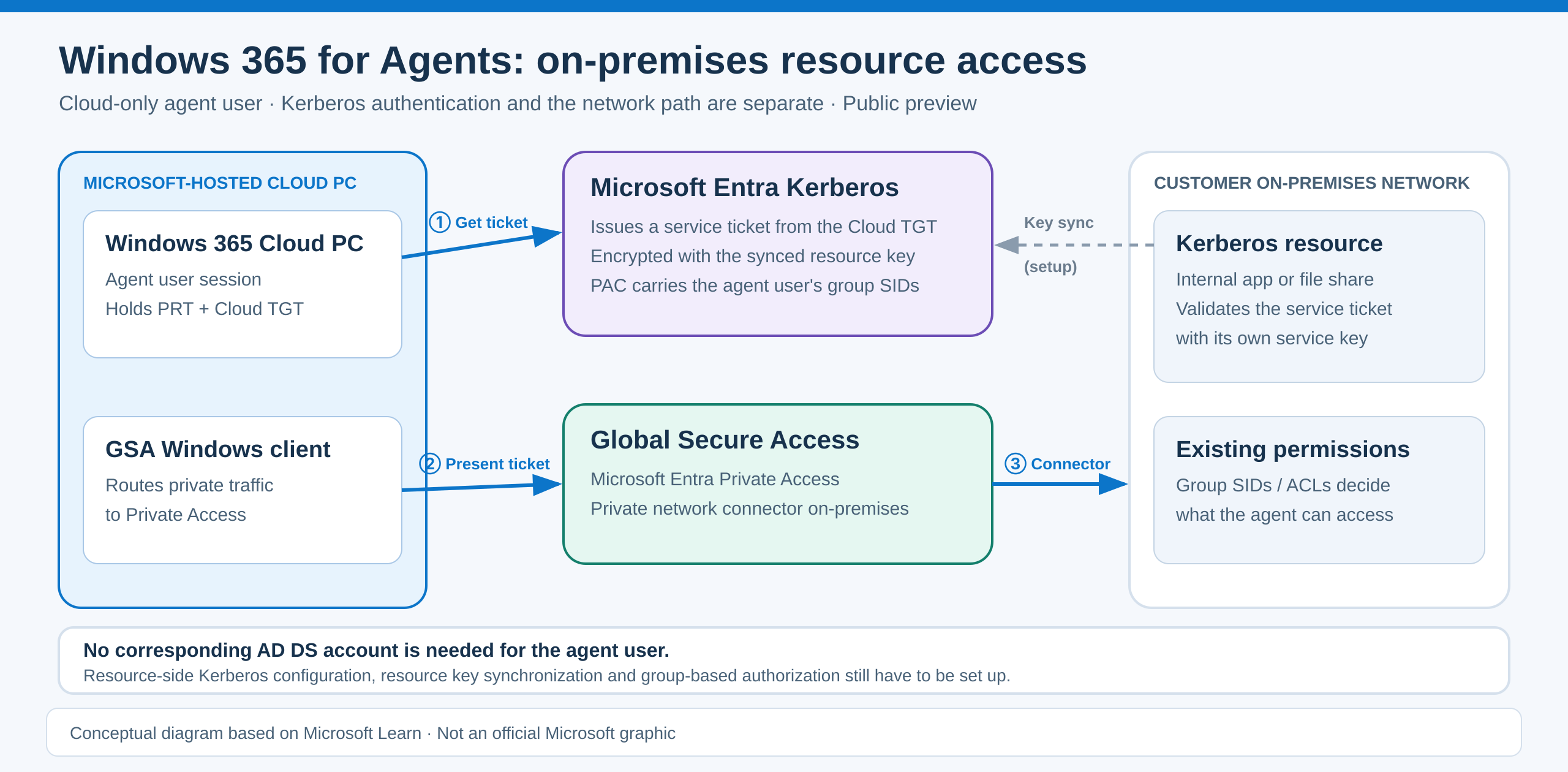
On-premises Kerberos access for Windows 365 for Agents: Private Access provides the network path, Microsoft Entra Kerberos handles authentication. Conceptual diagram based on Microsoft Learn and BRK403.
- Intune policies for Microsoft Execution Containers (MXC) - Preview. Intune policies define the file and network boundaries that MXC on Windows enforces for supported tool execution, outside the agent’s control, so an agent cannot grant itself more access. Windows 365 for Agents (managed agent Cloud PCs) and MXC were already generally available before Ignite; the Intune controls for local agents are the new preview. Windows at Ignite · Windows 365 at Ignite · Agent 365 Ignite details
- Intune compliance for unsanctioned agents - Preview. A new software compliance policy marks Windows devices running specified unapproved agents as non-compliant so Conditional Access blocks them from company resources until remediated. Intune at Ignite
- Defender runtime protection for local agents - GA (Windows). Defender inspects critical points in the agent loop and can block malicious instructions before a local agent acts, in Audit or Block mode. Agent-native protection covers Claude Code, Claude Desktop (Code), GitHub Copilot CLI, the GitHub Copilot app and the VS Code extensions for GitHub Copilot and Claude Code; network-based protection covers OpenClaw, Ollama Desktop, ChatGPT Classic and ChatGPT Desktop (Chat). Available to Defender for Endpoint P2 customers. Some Learn pages still label the Windows support matrix as preview. Book of News · Defender and Sentinel at Ignite
- Purview DLP for Microsoft and local agents - Preview. Detect and block sensitive information before Microsoft agents and key local agents (Claude Code, Claude Desktop, GitHub Copilot CLI and others) process or send it, with policies scoped to individual agents, groups or the whole organization. Agent 365 Ignite details
- See also: Conditional Access app protection for the Windows App.
🔎 Cross-product administration and detection
- Microsoft MCP Server for IT Admins (formerly Microsoft MCP Server for Enterprise) - GA. AI assistants and agents can read and manage Microsoft Entra data and read Microsoft Intune data through delegated, permissions-based access; Microsoft’s Entra announcement also names Purview. Operations are limited by the signed-in admin’s permissions. Existing users must migrate from the deprecated
/enterpriseendpoint to/admin. Entra Ignite announcement · Product page - Defender security posture for third-party agents - Preview. Agents built on Amazon Bedrock, Google Gemini, Google Vertex AI and Anthropic Claude appear in Defender’s AI agent inventory with risk assessments and recommendations, alongside Copilot Studio and Foundry agents. Bring them into scope by connecting their platforms to Agent 365. Agent 365 Ignite details · Agent security posture
- Plugin, skill and MCP server governance - GA (plugins and skills); Preview (Azure AI Gateway and LiteLLM gateways). Admins control which plugins and skills are available and to whom, and see which agents and plugins depend on an MCP server before blocking it. Agent 365 Ignite details · Tools governance
- SharePoint agent content governance - Ignite update. A new Agent governance node in the SharePoint admin center shows which agents are accessing your SharePoint, OneDrive and Teams content, with one-click guardrails such as restricted access control, restricted content discovery and site access reviews. Related items from the same announcement: the Agent Access Heatmap for SharePoint and OneDrive is GA in December 2026, and a control that restricts whom agentic users can collaborate with is in public preview in December 2026. SharePoint at Ignite
🏰 Active Directory and on-premises identity - Windows Server, hybrid security, PKI
Windows Server 2028 and authentication hardening
- Windows Server 2028 - Preview. Announced at Ignite as the next LTSC release after Windows Server 2025, with a hardened Server Core configuration by default, a new security baseline, Trusted Launch for VMs, post-quantum cryptography and automated certificate management. Security, performance and management features are available through the Windows Server Insider Program; there is no new AD DS functional level announced. Windows Server 2028 announcement · Book of News
- Hardened Server Core by default - Insider preview (build 29706). Hundreds of security settings are on from first boot, aligned with CIS and DISA STIG, covering Kerberos over NTLM, protected LSASS, SMB signing and encryption, remote access and auditing. That reduces credential theft and lateral movement risk on domain controllers and other Tier 0 hosts. Test domain-controller and legacy-protocol compatibility; NTLM blocking and print/RPC hardening are still to come in later previews. Hardened Server Core · Build 29706
- Hardened-policy scoring, restore and re-application - Insider preview. New cmdlets (
Get-MSHardenedPolicyScore,Set-MSHardenedPolicy,Restore-MSHardenedPolicy) assess and adjust the security defaults on identity-critical servers. GPO/OSConfig ownership and preview KDC scoring limitations apply. Microsoft notes that the tool and cmdlets may be renamed in a later preview flight. Hardened Server Core - Windows Server roadmap session. The full Windows Server roadmap is in BRK418: What’s new and what’s next for Windows Server.
PKI, cryptography and hybrid operations
- Post-quantum TLS in Windows - Context (October 2026 security update), highlighted at Ignite. Pure post-quantum options for TLS key exchange and certificate-based authentication in the Windows TLS stack. AD CS ML-DSA certificate issuance was already GA before Ignite. Post-quantum TLS in Windows · Earlier AD CS ML-DSA announcement
- Intune management for Windows Server - Preview. Configuration, compliance and update management for eligible Windows Server Insider builds and some domain-joined hybrid servers. Microsoft recommends non-production evaluation. Manage Windows servers with Intune · Intune at Ignite
- On-premises security initiative - Announced; rolling out over time. Starts with supported Exchange Server, SharePoint Server and Skype for Business Server workloads: faster security updates, an On-Premises Baseline Security Mode with more secure settings built in, and temporary protections against emerging threats until a fix ships. It does not target AD DS directly. On-premises security initiative · Book of News
- Kerberos RC4/AES hardening - Context (2026, before Ignite). KDC updates earlier in 2026 phased in changes to RC4 and AES service-ticket encryption, affecting legacy service accounts. KDC RC4 guidance · Background
- See also: pre-sign-in domain controller connectivity with Global Secure Access Device Access; Windows 365 agents reaching on-premises Kerberos resources without an AD DS account in On-premises application access for Windows 365 for Agents; Azure Arc TPM-backed managed identity and user-assigned managed identities for Arc-enabled servers.
🕵️ Identity security and ITDR - Microsoft Defender, Perception and Sentinel
- Microsoft Perception - GA (platform); some capabilities inside it are preview. Specialized security agents and playbooks for investigation and triage, correlating Active Directory, cloud identity, endpoint and other evidence, including activity without a dedicated alert. Not everything in Perception is GA: Dynamic Agent Risk runs there as an expanded limited preview, and AI Readiness Initiatives enter preview in January. Perception at Ignite · Security for the agentic era
- Integrated Security Operations Center (ISOC) - GA (core); Preview (full SIEM breadth and 90 days of included Defender retention). Brings SIEM and XDR together so cloud, hybrid identity and endpoint evidence are correlated in one investigation experience. Defender and Sentinel at Ignite · Sentinel at Ignite
- Detection and disruption of GitHub device-code phishing - Ignite update. Defender detects GitHub device-code phishing and can disable accounts and revoke sessions where supported. Defender and Sentinel at Ignite
- Third-party identity signals and response - Ignite update. Expanded Okta, AWS and partner identity and session signals and response actions in Defender and Sentinel; available actions depend on the integration. Sentinel at Ignite
- Vulnerability shielding - Preview. During an active attack, Defender can deploy targeted, temporary controls to known vulnerable systems until they are patched. Relevant for protecting Tier 0 servers. Book of News
- See also: Dynamic Agent Risk extends ITDR to non-human identities.
Microsoft Sentinel - identity-specific partner connectors (announced November 11)
- BloodHound Enterprise - New connector. Adds identity attack-path and privilege-exposure context, linking AD DS and Entra alerts to Tier 0 attack paths. Sentinel connectors announcement
- SailPoint for Microsoft Sentinel - New connector. Streams audit and search events from SailPoint Identity Security Cloud into Sentinel, so analysts can correlate identity governance activity with other security signals; playbooks can revoke access or disable compromised accounts. Sentinel connectors announcement
- SpyCloud Enterprise Protection - New connector. Adds stolen-credential and compromised-session exposure signals for account-takeover investigations. Sentinel connectors announcement
Microsoft Sentinel - identity connector updates released before Ignite
- Semperis Lightning - Context (September 14, 2026). Featured early adopter of multi-account support for Sentinel codeless connectors; surfaces AD and Entra exposure and identity-risk findings for privileged and hybrid Tier 0 assets. Multi-account support for codeless connectors (preview)
- Auth0 multi-account ingestion - Context (August 31, 2026). The Auth0 connector, together with CrowdStrike Falcon and Salesforce Service Cloud, supports ingesting from multiple accounts for broader visibility across external identity tenants. Multi-account support for Sentinel connectors
Microsoft Defender for Identity - relevant capabilities released before Ignite
- Identity Security dashboard and Coverage & Maturity - Context (released September 2026). Posture and coverage summary across on-premises AD, Entra, SaaS and non-human identities. Identity Security dashboard · What’s new in MDI
- Domain Investigation page - Context (GA, July 2026). AD domain configuration, trusts, GPOs and sensitive identities for hybrid and Tier 0 risk analysis. What’s new in MDI
- Expanded identity inventory and recommendations - Context (released before Ignite; non-human identity tab in preview). Shows privileged users, AD service accounts and non-human identity risks. Identity inventory
📺 Sessions
My top 5
- BRK343: AI is changing access. See how Microsoft Entra helps you stay ahead.
- BRK344: Build, secure and govern agents across platforms with A365 and Entra
- BRK331: A Single Policy for Humans and AI Agents? Here’s How to Make It Work
- BRK332: Identity Knows What Your SOC Doesn’t: Stop Threats Faster Together
- BRK339: Local agents are here. Can you find and secure them?
Also worth watching
- BRK214: Manage and secure your AI agents at enterprise scale with Agent 365
- BRK336: When AI acts, security has to answer: Microsoft Security for AI
- BRK337: Prioritize and remediate your riskiest agents with Project Perception
- BRK345: Master agent governance with Agent 365
- BRK418: What’s new and what’s next for Windows Server
- THR877: AI agents: Access granted. Trust not included
Breakout sessions are available on demand at ignite.microsoft.com.
My session at Ignite
- ODSP2220: Your global admin deserves better than your everyday laptop (pre-recorded, available on demand). Together with Jan Geisbauer, I share insights into the Managed Red Tenant service we provide at glueckkanja AG and how it protects privileged access by separating it from everyday work.